How to Rank in AI Overviews and Get Cited by Google
How to rank in Google AI Overviews: what Google requires, why citations come from beyond the top 10, which queries trigger them, and how to measure it.


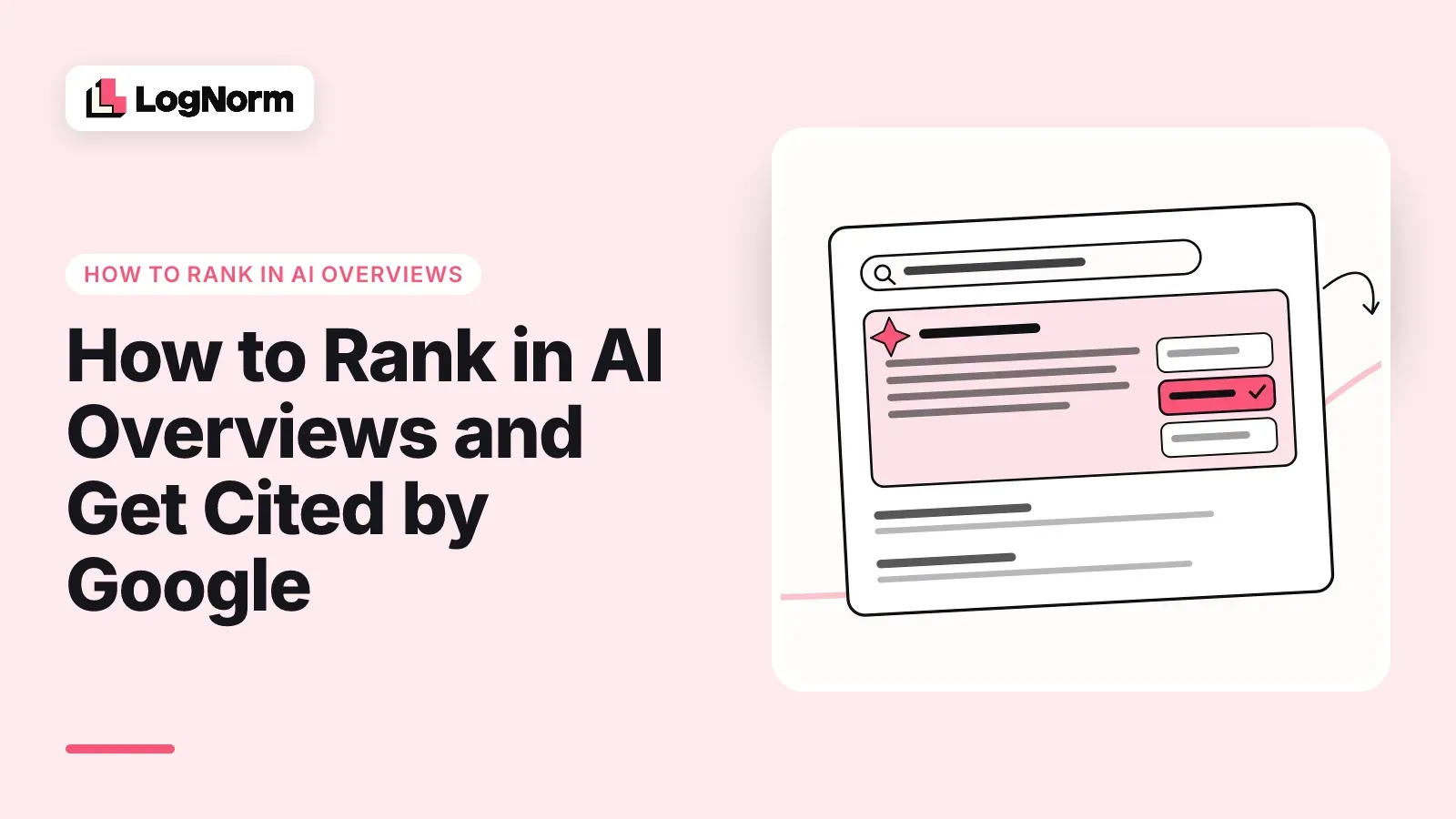
To rank in Google AI Overviews, a page must be indexed and eligible to appear in Google Search with a snippet. Google says there are no extra requirements: no special markup, no AI text files, no new schema. Beyond that, you earn citations the way you earn rankings, by answering the questions that trigger an overview with unique, easy-to-extract content on a page that works well.
"Ranking" is the word people search for, but the outcome you want is a citation. An AI Overview has no positions one to ten. Your page is either one of the supporting links inside the summary or it is not, and being cited is a different outcome from being the third blue link under it. This guide covers what Google documents about inclusion, how citations relate to organic rank, what the summaries do to clicks, a seven-step plan a small team can run, and how to measure the result.
AI Overviews are one surface of a broader shift. For the full picture across ChatGPT, Perplexity and Google, start with our guide to generative engine optimization. This post stays on Google.
What "ranking" in AI Overviews actually means
Ranking in AI Overviews means being one of the pages Google cites as a supporting link inside the AI-generated summary at the top of the results. AI Mode is a separate, conversational search experience that cites pages the same way.
Google's AI features documentation says AI Overviews "help people get to the gist of a complicated topic or question more quickly, and provide a jumping off point to explore links to learn more." Three details from that page shape your plan:
- Both features use query fan-out. They "may use a 'query fan-out' technique, issuing multiple related searches across subtopics and data sources, to develop a response." A page can be cited for one subtopic of a question, not only the question itself.
- They can cite different pages. "AI Mode and AI Overviews may use different models and techniques, so the set of responses and links they show will vary."
- AI Overviews often do not appear. Google shows them "only when our systems determine that it is additive to classic Search, and as such, often don't trigger."
So there is no single rank to chase. For each question you care about, the useful facts are whether an overview shows, which pages it cites, and whether yours is one of them.
What Google says it takes to be included
There is no separate AI Overviews algorithm to opt into. Google's AI features guide says: "There are no additional requirements to appear in AI Overviews or AI Mode, nor other special optimizations necessary."
The one hard requirement is eligibility: "To be eligible to be shown as a supporting link in AI Overviews or AI Mode, a page must be indexed and eligible to be shown in Google Search with a snippet, fulfilling the Search technical requirements. There are no additional technical requirements." Meeting them is not a guarantee: Google notes that indexing and serving "isn't guaranteed."
On the "AI SEO" tactics sold today, the page is direct: "You don't need to create new machine readable files, AI text files, or markup to appear in these features. There's also no special schema.org structured data that you need to add."
What helps is the SEO you should already be doing. Google calls these fundamentals "worthwhile" for AI features: crawling allowed in robots.txt and by your CDN or host, internal links, a great page experience, important content in text form, supporting images and video, structured data that matches the visible text, and up-to-date Merchant Center and Business Profile information.
The honest answer to "how to rank in AI Overviews" is: be eligible, then be the best available answer to a question Google decides deserves a summary. The rest of this guide is about the second part.
Do you need to rank in the top 10 to be cited?
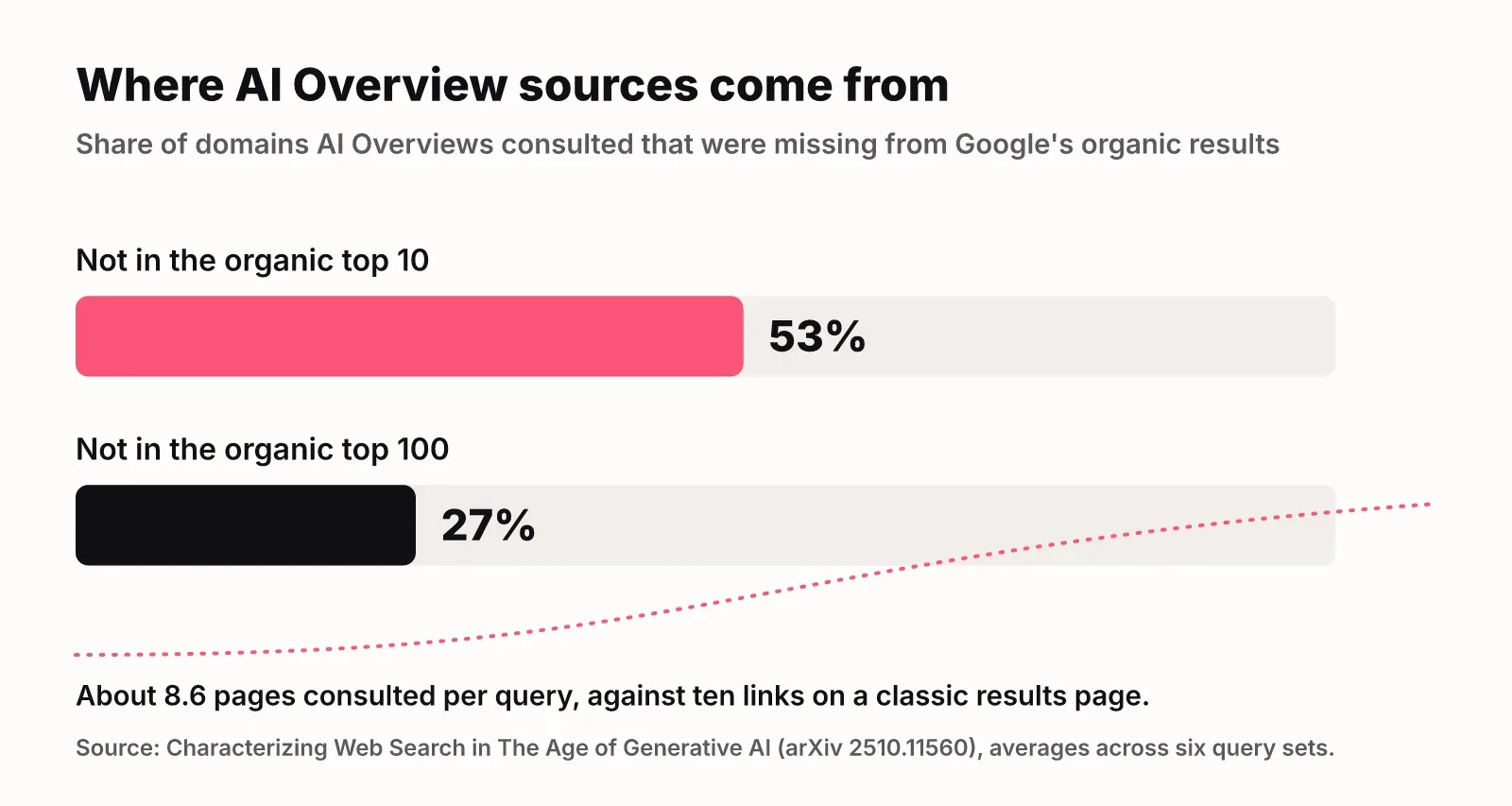
No. A top 10 organic ranking helps, but AI Overviews regularly cite pages that sit well outside it.
The clearest evidence is a 2025 study, Characterizing Web Search in The Age of Generative AI, which compared Google's organic results with AI Overviews and other generative engines across six query sets. On average, 53% of the domains AI Overviews consulted were not in the top 10 organic results, and 27% were not in the top 100. AI Overviews consulted about 8.6 web pages per query, against the ten links a classic results page shows.
Query fan-out explains the gap. Google runs several related searches for subtopics, so a page that ranks for a narrow sub-question can be cited in the summary of a broader one where it does not rank at all.
| Classic organic result | AI Overview citation | |
|---|---|---|
| What you compete for | One of ten positions | One of several supporting links |
| Who gets picked | Pages ranked for the exact query | Pages that answer the query or one of its subtopics |
| How many pages are used | Ten links on page one | About 8.6 pages consulted per query in the arXiv study |
| Where cited pages come from | The top 10 by definition | 53% of domains outside the organic top 10 |
| What wins | Relevance and authority for the whole query | A clear, extractable answer to a specific part of it |
For a startup this is the useful part: you do not have to outrank a large domain on the head query to be cited. You have to be the clearest source for one piece of the answer.
What AI Overviews do to clicks
AI Overviews reduce clicks on regular results, and very few people click the links inside the summary. That is why being cited matters more than position.
The clearest independent data is a Pew Research Center study from July 2025, based on the browsing of 900 US adults across 68,879 Google searches in March 2025:
- With an AI summary on the page, users clicked a traditional result on 8% of visits. Without one, they did so on 15% of visits.
- Users clicked a link inside the AI summary on just 1% of visits.
- Sessions ended on 26% of pages with an AI summary, against 16% without.
Google frames it differently. Its May 2025 post, Top ways to ensure your content performs well in Google's AI experiences on Search, says clicks from results pages with AI Overviews "are higher quality, where users are more likely to spend more time on the site." Google did not publish numbers behind that, so test it on your own site.
Both can be true: fewer clicks, better qualified. Either way, the brands named in the summary keep some visibility when the click does not come. We made the wider case in distribution is the new moat.
Which searches trigger AI Overviews
Long, question-shaped searches trigger AI Overviews far more often than short ones. Pew's data shows how large the gap is:
| Type of search | Share that produced an AI summary |
|---|---|
| All searches (March 2025) | 18% |
| One or two words | 8% |
| Ten words or more | 53% |
| Phrased as a question | 60% |
| Full sentences | 36% |
Source: Pew Research Center, July 2025.
Google says the same in its own words: in its AI experiences, "users are asking longer and more specific questions." Pew also found 88% of summaries cited three or more sources, so each overview has several slots to compete for.
This favours startups. Short head terms are where big domains win. Long, specific questions are where a focused company with real expertise can be the best answer.
How to rank in AI Overviews: a seven-step plan
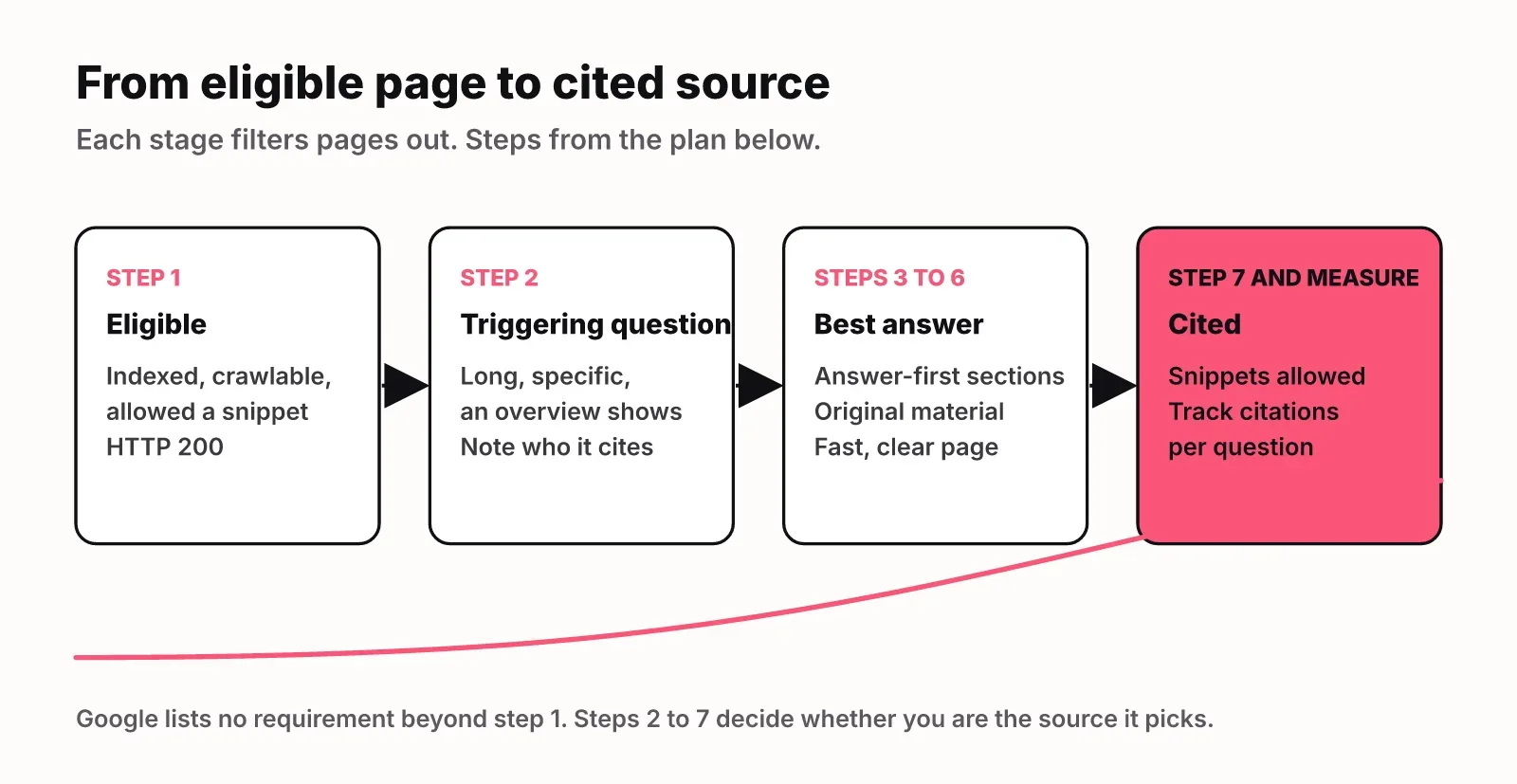
Here is the plan we would run, in order. None of it needs special tooling.
1. Confirm you are eligible
Start with the hard gate. Google's May 2025 guidance lists the checks: Googlebot isn't blocked, "the page works (Google receives an HTTP 200 (success) status code), and the page has indexable content." Check that your CDN does not block crawlers and that no forgotten snippet restriction is set. Use URL Inspection in Search Console on the pages that matter, and run your domain through a robots.txt checker to confirm Googlebot is allowed.
2. Target the questions that trigger overviews
Build a list of long, specific questions, since those are most likely to show a summary. Pull question-style queries from your Search Console Performance report, the questions sales and support hear weekly, and the comparisons buyers make before choosing.
Then search each one and write down three things: whether an overview appears, which pages it cites, and which subtopics the summary covers. Prioritise questions where the cited pages are thin or outdated, and subtopics the summary covers but no cited page answers well. That is the opening for your page.
3. Write answer-first sections
Put a direct two or three sentence answer at the top of the page and of each section, then expand. Phrase headings the way people ask. Because of query fan-out, Google may want an answer to one subtopic, so each section should stand on its own. We cover this structure in our guide to answer engine optimization.
4. Add something that is not available elsewhere
Google's advice is to "focus on making unique, non-commodity content." If your page restates what ten others say, there is little reason to cite it. Startups usually have more original material than they think:
- Aggregated, anonymised data from your product or customers
- A test you ran, with the setup and the numbers
- First-hand experience: what broke, what it cost, what you would change
- Comparisons you actually did, with the criteria shown
5. Fix page experience
Google warns that "even the best content can be disappointing to people if they arrive at a page that's cluttered, difficult to navigate or makes it hard to find the main information they're seeking." It names three checks: whether the page "displays well across devices," its latency, and "whether visitors can easily distinguish main content from other content."
6. Keep text primary, and support it
Make sure important content exists as text, not only inside images or video. Add high-quality images or video where they help, since Google notes people now search with photos. Keep structured data matching what is visible, and keep Merchant Center and Business Profile current if they apply to you.
7. Set snippet controls on purpose
Snippet settings decide how much of your content Google can use in AI features. Choose them deliberately, as the next section explains.
Snippet controls and the trade-off
Google gives four controls over what appears in Search, including AI features: nosnippet, data-nosnippet, max-snippet and noindex. Its guidance: "More restrictive permissions will limit how your content is featured in our AI experiences."
The robots meta tag specification spells out each effect:
| Control | What it does | Effect on AI Overviews and AI Mode |
|---|---|---|
nosnippet |
No text snippet or video preview in any Google result | "Will also prevent the content from being used as a direct input" |
max-snippet:[number] |
Caps the snippet length in characters (0 equals nosnippet) | "Will also limit how much of the content may be used as a direct input" |
data-nosnippet |
Excludes specific span, div or section elements from snippets |
Holds back those parts only |
noindex |
Removes the page from Search | The page is no longer eligible |
The trade-off is direct. Restricting snippets protects content you do not want summarised, but it also removes or shrinks your page as a source for AI features, and changes your snippet in regular results too. For most startup content, the sensible default is no page-level restriction, with data-nosnippet on the few blocks you want to hold back.
One common confusion: Google-Extended is not the switch for AI Overviews. Google's AI features page says robots.txt directives for Googlebot are the control for Search, while Google-Extended limits "AI training and grounding in some of Google's other systems."
How to measure AI Overview citations
Search Console shows AI Overviews traffic but cannot tell you whether you were cited. Google's AI features guide says it is "included in the overall search traffic in Search Console," reported "in the Performance report, within the 'Web' search type."
The Search Console Help page What are impressions, position, and clicks? explains the counting:
- AI Overviews: a click on a link to an external page counts as a click, and standard impression rules apply. "An AI Overview occupies a single position in search results, and all links in the AI Overview are assigned that same position."
- AI Mode: clicks count the same way. A follow-up question is treated as a new query.
- Search Labs: data from Search Labs experiments is not included.
That page does not document a separate AI Overviews filter. So Search Console tells you about clicks and impressions, not about citations. To see citations, track the questions directly:
- Keep the list of target questions from step 2.
- Run each one as a Google search from your market's country, on a fixed schedule, because whether an overview appears can change between runs.
- Record whether an overview showed, which pages it cited, and whether it named your brand. A mention and a citation are different outcomes, so log them separately.
- Leave searches with no overview out of your citation rate, so the rate describes only the overviews Google actually showed.
- Pair it with conversions and time on site in a tool such as Google Analytics, as Google suggests, because clicks alone undercount the value.
You can do this by hand in a spreadsheet for a dozen questions. LogNorm's AI Overview tracker does the same thing on a schedule: it runs your prompts as Google searches from your market, reads the overview's text and cited pages, records mentions and citations as separate rates, and marks searches where Google showed no overview instead of counting them as misses. It sits inside AI visibility, which tracks ChatGPT and Gemini answers the same way.
Where this fits in AI search
Google is one answer engine among several, and a page can do well in one and not another. ChatGPT is a separate product, so the playbook overlaps but is not identical; we cover it in how to rank in ChatGPT. For how AI fits into the rest of a startup's search work, see AI SEO for startups, and for how every surface fits together, our generative engine optimization guide.
FAQ
How do I rank in Google AI Overviews?
Make sure the page is indexed and eligible to show in Google Search with a snippet, the only technical requirement Google lists. Then target long, specific questions that trigger overviews and answer them directly with original content, one self-contained section per subtopic. Inclusion is never guaranteed.
Do I need to rank in the top 10 to be cited in an AI Overview?
No. In a 2025 arXiv study, 53% of the domains AI Overviews consulted were outside the organic top 10, and 27% were outside the top 100. Strong organic rankings help, but a clear answer to one subtopic can be cited without them.
Do I need schema markup or an llms.txt file for AI Overviews?
No. Google says you don't need "new machine readable files, AI text files, or markup" and there is "no special schema.org structured data" to add. If you use structured data, keep it accurate and matching the visible text.
Can I stop my content from appearing in AI Overviews?
Yes. nosnippet prevents content from being used as a direct input for AI Overviews and AI Mode, and max-snippet limits how much can be used. Both also affect your snippet in regular results.
Do AI Overviews reduce clicks to websites?
Independent data says yes. Pew Research found users clicked a traditional result on 8% of visits with an AI summary, against 15% without, and clicked a link inside the summary on 1% of visits. Google says the clicks that do come are higher quality.
Is AI Overviews SEO different from regular SEO?
Mostly not. Google says "the best practices for SEO remain relevant" and no special optimizations are needed. What changes is emphasis: question-led topics, answer-first sections and original material matter more when the goal is to be cited.
Sources
- Google Search Central: AI features and your website (December 2025)
- Google Search Central Blog: Top ways to ensure your content performs well in Google's AI experiences on Search (May 2025)
- Google Search Central: Robots meta tag specifications (March 2026)
- Search Console Help: What are impressions, position, and clicks? (October 2026)
- Pew Research Center: Google users are less likely to click on links when an AI summary appears in the results (July 2025)
- Characterizing Web Search in The Age of Generative AI (arXiv, October 2025)