Keyword Research: A Practical Guide for Startups
Keyword research, step by step: find what buyers search, judge intent and difficulty, and pick keywords a young site can win, with a real worked example.



Keyword research is the work of finding the searches your buyers make and deciding which page on your site should answer each one. Done well, it gives you a short, ranked list of pages to write or fix, not a spreadsheet of every phrase a tool could find. This guide walks through a method a startup can run in an afternoon, with a worked example built on real numbers.
What keyword research is and what it decides
Keyword research decides which searches your site goes after, and with which page. Every keyword you keep should end up attached to one URL, existing or planned.
You judge each keyword on four things:
- Search volume: roughly how many times a month people search the phrase. It is an estimate, often rounded into buckets.
- Keyword difficulty (KD): a 0-100 score from your tool that estimates how hard the first page is to reach, mostly from the links behind the pages that rank.
- Intent: what the searcher wants to do. Learn something, compare options, buy, or reach a specific site.
- The results page itself: the pages Google ranks today, which tell you the format that wins and who you are up against.
Volume and difficulty come from tools. Intent and the results page need your judgement, and they matter more. A small phrase searched by people ready to buy beats a huge one searched by students writing an essay.
What a young domain can realistically win
A new or low-authority site will not rank for a broad head term like "keyword research" in its first year. In LogNorm's keyword data that phrase has 90,500 searches a month and a difficulty of 88 out of 100. Most of the pages ranking for it belong to established SEO tool and marketing companies.
What a young site can win is narrower phrases with clear intent and lower difficulty. Think "keyword research for [your industry]", "[competitor] alternative", or the exact question a prospect asked on your last sales call. These have less volume, but they convert, and the competition is often thin.
Set this expectation before you start. Most keyword research goes wrong at the end, when a team picks the biggest numbers on the list and then waits a year for traffic that never comes. Our playbook on SEO for startups covers the wider plan around this.
How to do keyword research in seven steps
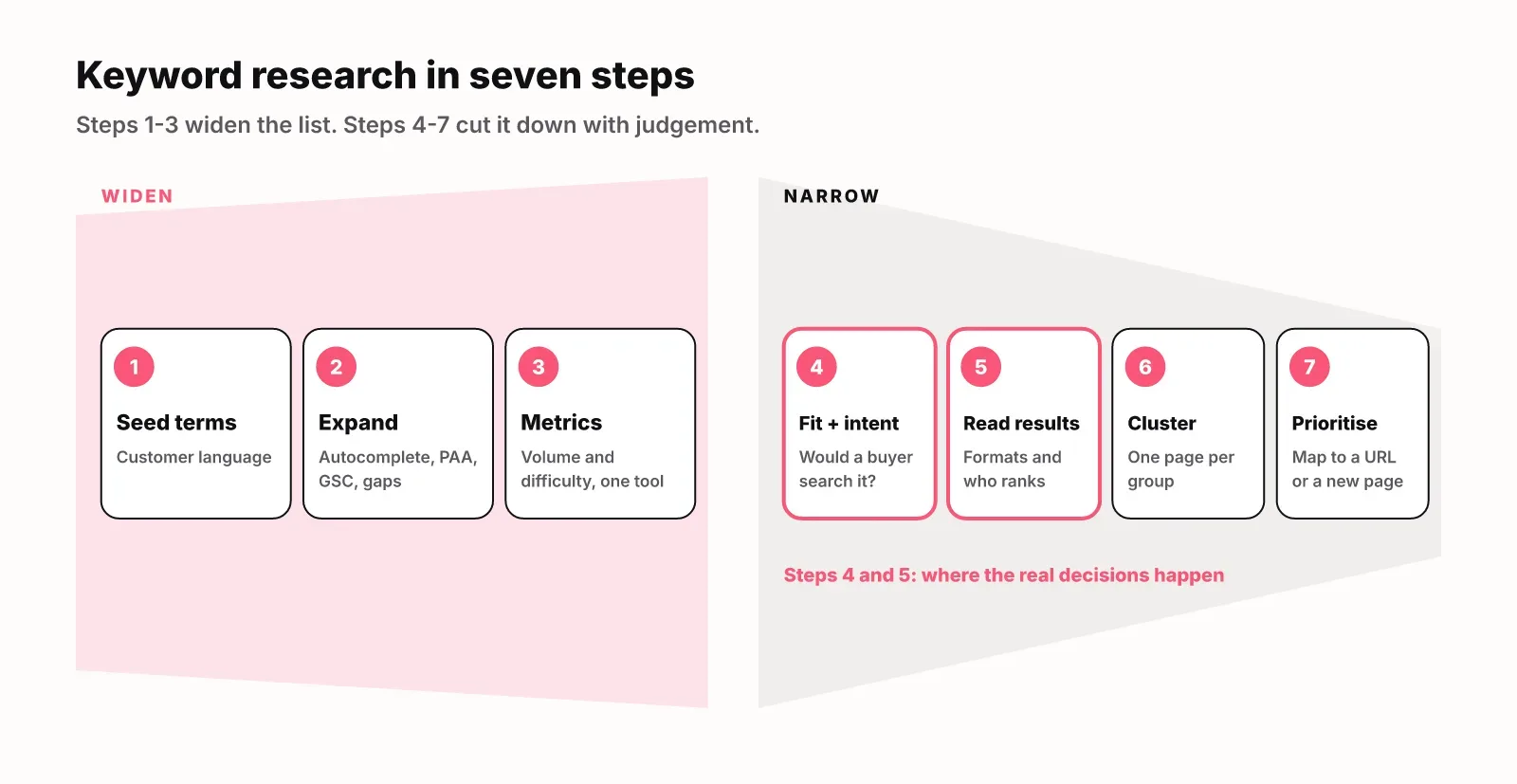
Start from your customers' language, widen the list with free sources, then cut it down with judgement. Here are the steps in order.
- Write down seed terms in your customers' words. Pull them from sales call notes, support tickets, onboarding answers and the way people describe you in reviews. A short list of seeds is plenty to start.
- Expand the list. Type each seed into Google and note the autocomplete suggestions, the People Also Ask questions and the related searches at the bottom. Add the queries you already get impressions for in Google Search Console. Add the keywords competitors rank for and you don't, which LogNorm lists as competitor keyword gaps.
- Pull volume and difficulty for every phrase from one tool, so the numbers are comparable.
- Judge fit and intent. For each keyword, ask whether someone who matches your ideal customer would search it while looking for a product like yours. Mark the intent. Drop anything off-topic and any search for a competitor's own brand.
- Read the live results page for every keyword you plan to keep. Note the page types (guides, tool pages, product pages, forums) and how strong the sites are. If the top ten are templates, a long guide will not win. If they are forum threads and thin posts, you have a chance.
- Group the keepers into pages. Keywords that share intent and show many of the same results belong on one page. Our guide to keyword clustering covers this step in detail.
- Prioritise and map. Rank the page groups by fit, intent and how winnable they are. Map each one to an existing URL if you have one. Only groups with no page become new content.
Steps 4 and 5 are where the real decisions happen. A tool can do steps 2 and 3 for you in minutes. No tool knows your buyers as well as you do.
A worked example: the research behind this guide
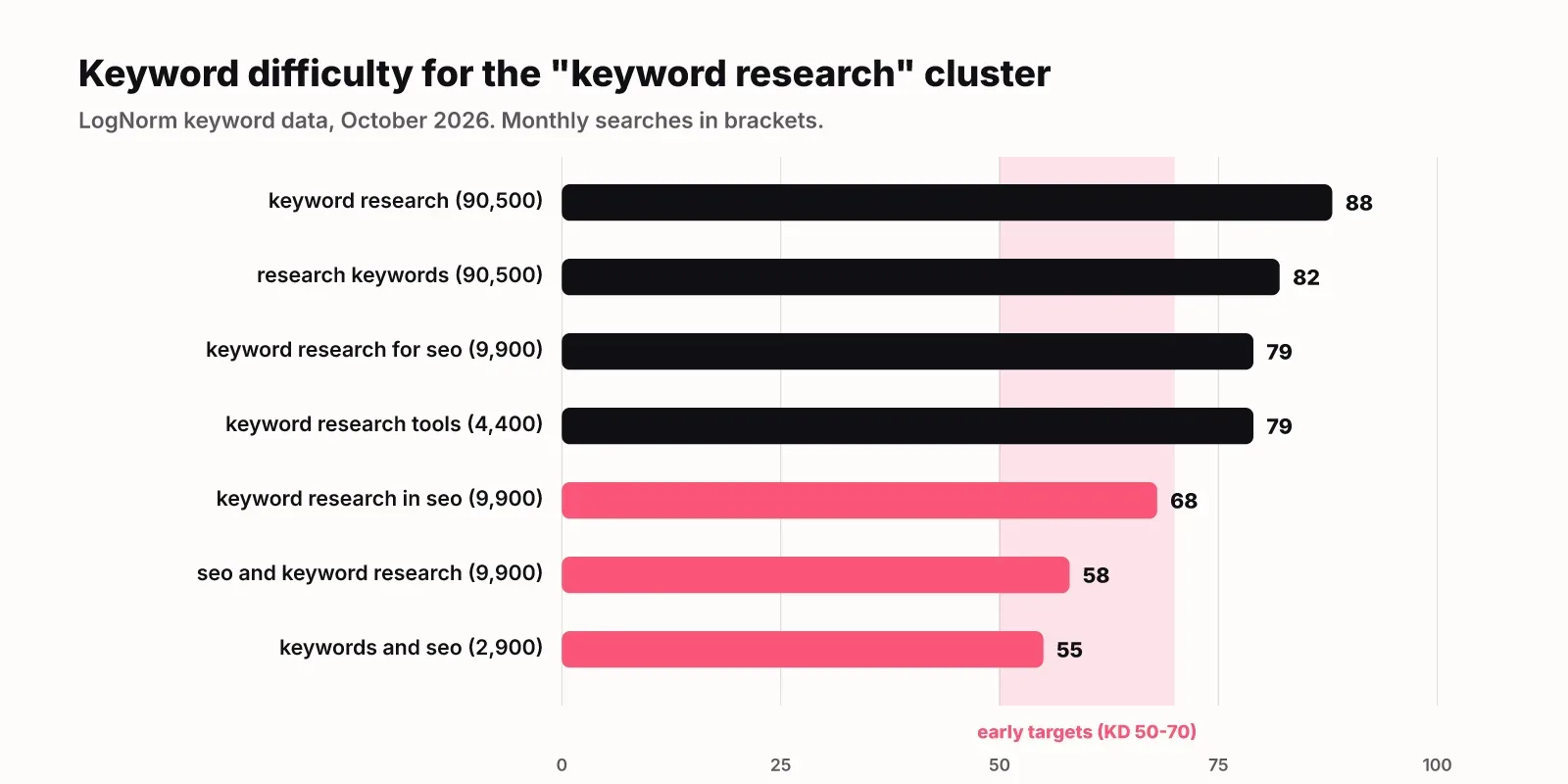
We ran the method above on the topic of this article, using LogNorm's keyword data and the live results for "keyword research". The numbers below are the ones we planned this page with.
| Keyword | Searches/month | Difficulty | Decision |
|---|---|---|---|
| keyword research | 90,500 | 88 | Primary, long-term |
| research keywords | 90,500 | 82 | Same intent, same page |
| keyword research for seo | 9,900 | 79 | Same intent, same page |
| keyword research in seo | 9,900 | 68 | Same page, more winnable |
| seo and keyword research | 9,900 | 58 | Same page, early target |
| keywords and seo | 2,900 | 55 | Same page, early target |
One keyword from the same list went elsewhere. "Keyword research tools" (4,400 searches, difficulty 79) is a search for tools rather than a method, so it gets one section here and its own guide.
Three things stood out once we looked past the numbers.
First, several close variants show the same 9,900 figure. Treat that as a sign the data source groups near-identical phrases, not as six separate audiences. One page serves all of them.
Second, the results page for "keyword research" is split. Roughly half the top ten are free tool pages and half are how-to guides, with an AI Overview and a People Also Ask box on top. The ranking guides vary a lot in length, from mid-length walkthroughs to very long beginner manuals. That told us a guide can rank here, and that length alone is not the edge. A clear method and real examples are.
Third, the honest target is not the head term. With a difficulty of 88, "keyword research" is a multi-year goal for a site our age. The variants at 55 to 68 are where this page can realistically show up first, and they all share its intent.
We also made two scoping calls. Tool comparisons belong in our guide to search engine optimization tools, so this page covers tools in one section. Grouping keywords got its own article, so step 6 above links out instead of repeating it.
Keyword research for a brand-new site
A site with no traffic yet has no Search Console data, so start from the market instead of your own numbers. The method stays the same. Only the sources for the first two steps change.
- Mine the language around you. Founder interviews, customer calls, community threads and the questions people ask in demos show how buyers describe the problem before they know your category name.
- Read competitors' sites for structure, not copy. Their navigation, product pages and blog categories show which searches they think matter. Competitor keyword gaps then show which of those searches they actually rank for.
- Start with the pages buyers need to choose you. Comparison pages, alternatives pages and use-case pages match clear commercial intent and face less competition than broad guides.
- Publish, then let Search Console tell you what Google thinks you are about. After a few weeks, the queries you get impressions for become your best new seeds.
Hold off on broad educational guides until you have a few pages that rank. A guide like this one is a long-term bet. A comparison page for a tool your buyers already use can bring qualified visitors much sooner.
How to choose which keywords to target
Choose with fit first and volume last. Run every keyword through these filters in order, and stop at the first one it fails.
- Fit: would your ideal customer search this while evaluating a product like yours?
- Intent: does the searcher want something your page can give them, in the format Google already ranks?
- Live results: are the ranking pages beatable by a site of your size?
- Difficulty: is the score within reach, given the links your domain has today?
- Volume: among the keywords that pass, prefer the larger ones.
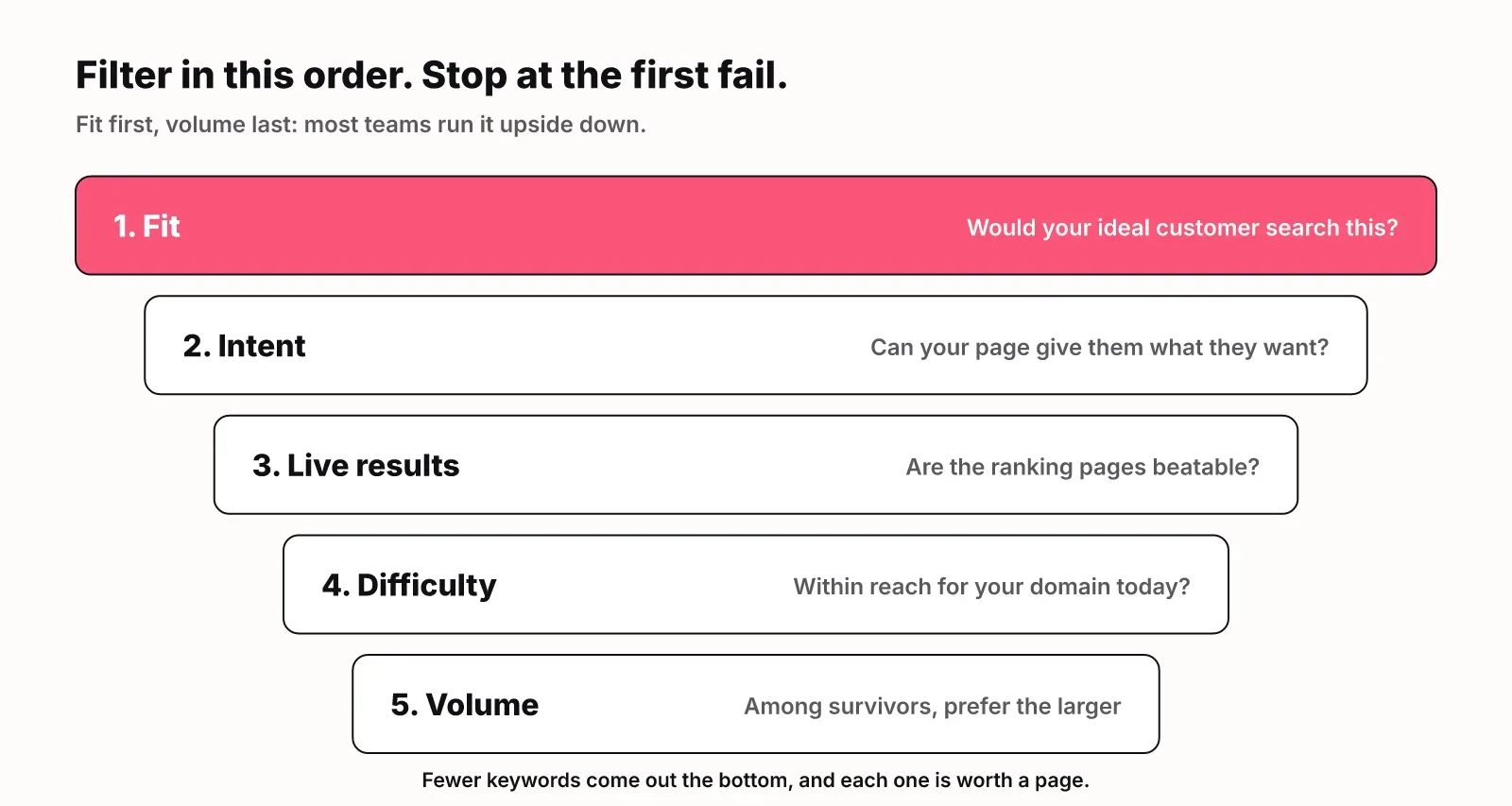
Most teams run this list upside down. They sort by volume, then try to argue each big keyword into fitting. Filtering in this order leaves you with fewer keywords, but every one of them is worth a page.
If you want a number to sort by, LogNorm's opportunity score is one worked model. It gives up to 40 points for volume on a log scale and up to 30 for ease. It adds points for commercial intent, for Search Console impressions and for competitors ranking on the phrase. It then moves the score up or down based on how relevant the keyword is to your business. The Keywords docs explain each part.
Keyword research tools: free and paid
You can do good keyword research with free tools alone. Paid tools save time and add difficulty scores and competitor data at scale.
Free tools
| Tool | What it gives you | Best for |
|---|---|---|
| Google autocomplete and People Also Ask | Real phrasing and questions | Expanding seeds |
| Google Search Console | Queries you already appear for | Pages close to page one |
| Google Keyword Planner (needs a Google Ads account) | Volume ranges, related ideas | Rough demand checks |
Paid tools
| Tool | What it gives you | Best for |
|---|---|---|
| SEO suites such as Semrush and Ahrefs | Difficulty scores, competitor gaps | Large lists |
| LogNorm | A call on fit, intent and format, plus clusters | A ranked plan |
Pick one paid source and stick with it. Different tools estimate volume and difficulty differently, so mixing them makes comparisons meaningless.
Search Console deserves more attention than it gets. Queries where you already sit just below the top results are often the fastest wins on the whole list, because Google already sees your page as relevant.
Keyword research for AI answers
Keyword research now has to account for AI answers, because they take clicks from the results below them. In a Pew Research Center study of 68,879 Google searches, users clicked a traditional result in 8% of visits with an AI summary, against 15% without one.
The same study found AI summaries appeared in 53% of searches of ten or more words, compared with 8% of one- or two-word searches. Long, question-style keywords are exactly where AI answers show up most. That changes what you plan for those keywords.
- Write answer-first sections. Put a direct, quotable answer in the first sentence under each heading so an AI summary can lift it.
- Track the questions buyers ask assistants as prompts, alongside your keywords. Our guide to AI visibility explains how to measure whether ChatGPT, Gemini and AI Overviews mention you.
- Weight commercial and comparison keywords higher. Clicks were already scarce before AI summaries: SparkToro's 2024 zero-click study found only 360 of every 1,000 US Google searches send a click to the open web.
None of this makes keyword research obsolete. The phrases people type into Google are still the best evidence of what they want to know. You are now writing pages that need to be cited as well as clicked.
Mistakes that waste a startup's first months
Most wasted SEO effort traces back to a handful of keyword mistakes. Check your list against these.
- Chasing volume. The biggest keywords on your list are usually the least winnable and the least likely to convert.
- Writing two pages for one cluster. They split your links and Google has to guess which to rank. Merge them, or link one to the other.
- Skipping the results page. Difficulty scores miss format. If Google ranks tools and you write an essay, you lose regardless of the score.
- Ignoring Search Console. The queries you already appear for are the cheapest wins you have.
- Researching once. Demand, competitors and your own rankings move. Revisit your list every quarter, and refresh pages that slip.
Keyword research only pays off when it feeds a plan. Our guide to SEO content strategy picks up where this one stops: turning the keyword list into a ranked backlog of pages.
Where LogNorm fits
LogNorm runs the expansion and filtering steps for you and leaves the final decision with you. It gathers candidate keywords from your Search Console, your competitors and keyword research. It then gives its own call on each one: how relevant it is to your business, the intent, and the kind of page that would win it.
You target or skip each keyword. Targeted keywords are tracked and grouped into topic clusters, and the clusters become moves in your weekly plan. Skipped ones never come back. See LogNorm Keywords for how it works in the product, or keyword research judged for your business for the short version of why it exists. This guide is the method. Those pages are the tool.
FAQ
What are keyword clusters?
A keyword cluster is a group of searches that one page can rank for together, because they share intent and show many of the same results. Each cluster becomes one page with one primary keyword.
Are there free keyword research tools?
Yes. Google autocomplete, People Also Ask, related searches, Google Search Console and Google Keyword Planner are all free. They cover idea generation and demand checks. Paid tools add difficulty scores and competitor rankings.
What is the difference between a keyword search and a subject search?
A keyword search matches the exact words you type, while a subject search matches a topic regardless of wording. The distinction comes from library catalogues. For SEO, it is a reminder that Google matches meaning, so one page can rank for many phrasings of the same need.
How often should you redo keyword research?
Do a full pass when you launch a site or a product line, then review the list every quarter. Check Search Console monthly for new queries and pages slipping in position.
How long does it take to rank for a new keyword?
For a narrow, low-difficulty keyword, expect weeks to a few months on a site Google already crawls regularly. Broad head terms with very high difficulty can take years, and usually need links from other sites.