B2B Keyword Research: How to Find Keywords for a Niche Product
B2B keyword research for niche products: start from buyer language, judge keywords on fit over volume, and prove demand with Search Console and a test.



B2B keyword research for a niche product starts from how your buyers describe their problem, not from what a keyword tool says is popular. In a small market, the terms that bring in demos often show almost no search volume in keyword tools. That is normal. Your job is to find those terms, check that real buyers use them, and write the page that answers them better than anyone else.
This guide is for founders and small teams selling to a narrow group: vertical SaaS, developer tools, compliance or industrial software. If you want the general method (seed lists, difficulty, search intent), start with a broad keyword research guide. This one covers the case where the tools say nobody searches, but your sales calls say otherwise.
Why B2B keyword research works differently for niche products
Niche B2B keyword research works differently because your buyers are few, specific and use many different phrasings, so tools undercount the demand you actually have. A keyword that a handful of your buyers search can be worth more than a popular one that none of them do.
Three things make niche B2B different from consumer search:
- Many people search for one purchase. Forrester's Buyers' Journey Survey, 2025 found that 73% of purchases involve three or more departments, with an average of 13 people inside the buyer's organization and nine from outside involved in making a purchase decision. The engineer, the manager and the procurement lead each search in their own words.
- Demand spreads across variants. "SOC 2 evidence collection tool", "automate SOC 2 evidence" and "SOC 2 screenshots for auditors" may each show near-zero volume. Together they are one page with real demand.
- Broad informational terms pay less every year. A 2024 SparkToro clickstream study showed that for every 1,000 EU Google searches, only 374 clicks go to the open web, while in the US it is 360. A small site competing for a broad definition term gets a thin slice of a shrinking pie.
The practical consequence: sort by buyer fit first and volume last.
Step 1: Collect buyer language before you open a keyword tool
Start with the words your customers already use, because those are the words they type into Google and AI assistants. A keyword tool can only expand the seeds you give it. Feed it your marketing copy and you get your marketing copy back.
Pull phrases from these sources:
- Sales call recordings and notes, especially the opening minutes where the prospect explains why they took the call
- Support tickets and onboarding questions
- Lost-deal reasons and the tool the prospect chose instead
- RFPs and security questionnaires, which use procurement's vocabulary
- Community threads, Slack groups, subreddits and forums where your buyers ask each other for help
For each phrase, write down the exact wording, who said it (job title), and what they use today. Keep the typos and the jargon. "Our auditors want screenshots" is a better seed than "compliance automation platform".
Put this list somewhere your whole team and your writing tools can read. In LogNorm that place is the Company Brain, where positioning, product docs and customer language live once and every brief and draft cites them.
Step 2: Turn phrases into keyword candidates by page type
Each buyer phrase maps to a page type, and the page type tells you what to write and how close the searcher is to buying. In niche B2B, the page types that convert best are the ones generic guides skip.
Decision-stage pages bring the searchers closest to buying:
| Page type | Example | Why it converts |
|---|---|---|
| Comparison | "Tool A vs Tool B" | The searcher has a shortlist |
| Alternatives | "Tool A alternatives" | The searcher wants to switch |
| Integration | "Tool A Jira integration" | A concrete stack requirement |
Earlier-stage pages catch buyers before they have a shortlist:
| Page type | Example | Why it converts |
|---|---|---|
| Problem | "how to collect SOC 2 evidence" | The buyer's words before they know the category |
| Use case | "SOC 2 evidence for startups on AWS" | Few rivals have a dedicated page |
| Glossary | "what is a bridge letter" | Regulated terms buyers must learn |
Comparison and alternatives searches are winnable. They are not the competitor's brand search: the person typing "Tool A alternatives" is shopping. LogNorm's keyword research labels them that way for the same reason.
Write each candidate in your buyer's words, then add the page type next to it. Expect a large share of the list to be comparison, integration or use case terms with tiny reported volume. Those are the terms closest to a purchase.
Step 3: Read low search volume correctly
A low or zero volume figure means the tool has too little data to model the term, not that nobody searches it. Treat the number as a weak signal and look for stronger ones.
Keyword tools estimate monthly volume from samples and round it into buckets. The smallest buckets are the least reliable, and a term below the threshold often shows as 0 or "no data". Variants make it worse: ten phrasings that each show near zero look like ten dead keywords, when together they are one page worth writing.
Before you drop a low-volume term, run three checks:
- Search it yourself. If vendors, review sites or forum threads rank with pages built for that exact phrase, someone found the demand worth serving.
- Look in Google Search Console under Performance, filtered to queries containing the core term. Impressions for close variants are first-party proof that people search it and Google already connects you to it.
- Ask sales. If prospects say the phrase on calls, it goes on the list regardless of what the tool reports.
A term that passes any one of these checks stays. A term that fails all three and also scores low on buyer fit goes.
Step 4: Score each keyword on buyer fit, not volume
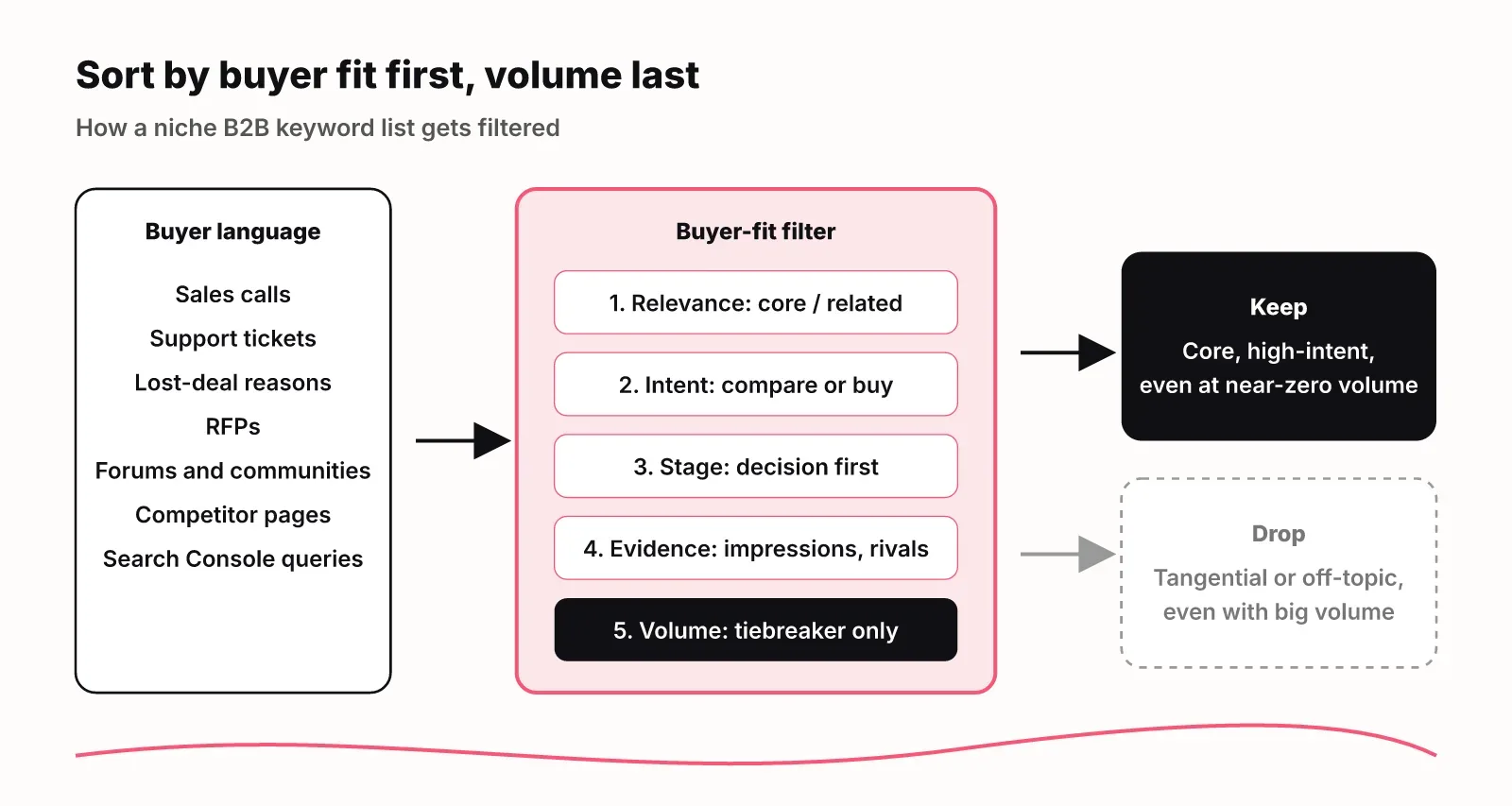
Score every candidate on whether your buyers would search it and how close it puts them to buying, then use volume only to break ties. A simple rubric keeps the call consistent across a list of a few hundred terms.
Ask these questions for each keyword:
- Relevance: would a buyer search this when looking for or comparing a product like yours (core), is it part of their world (related), does it only share your vocabulary (tangential), or is it unrelated (off-topic)?
- Intent: does the searcher want to learn, compare or buy?
- Stage: awareness, consideration or decision?
- Evidence: do you have Search Console impressions, or does a competitor rank for it?
- Ease: how strong are the pages ranking today?
Drop tangential terms even when they show volume. A data engineering tool will see big numbers on "what is ETL", but most of those searchers are learning a concept, not shopping for a tool. A core term with a fraction of the volume beats it.
This is the call LogNorm's keyword research makes on every keyword. It rates relevance on the same core, related, tangential and off-topic scale, labels intent, page type and funnel stage, and estimates how likely someone matching your ideal customer searches it while evaluating a product like yours.
Its opportunity score gives volume up to 40 points on a log scale and adds points for Search Console impressions and competitors ranking, so a niche core term can outrank a popular tangential one. When the call is close to a coin flip, the keyword goes to a Needs your call list instead of being decided silently. The Keywords docs show the full scoring.
Step 5: Mine competitor rankings for proven niche terms
Keywords your competitors rank for and you don't are the strongest demand signal a niche market gives you, because a rival invested in a page for them. Look at their commercial pages first, not their blog.
Open each competitor's comparison, integration, use case and industry pages. List the phrases in their titles and H1s. Then check which of those phrases you have no page for. A competitor with a dozen integration pages is telling you which integrations buyers ask about.
Most SEO suites can export the keywords a domain ranks for. Filter to positions 1 to 30 and remove the competitor's brand terms. What remains is a list of terms with proven demand, sorted by how much effort a rival thought they deserved. Our guide to SEO competitor analysis walks through the full process, and content gap analysis covers turning the gaps into pages.
LogNorm adds a keyword to your suggestions when a tracked competitor ranks for it in the top 30 and you don't, and shows which competitor page ranks so you can read it before deciding.
Step 6: Group into pages and validate with a small content test
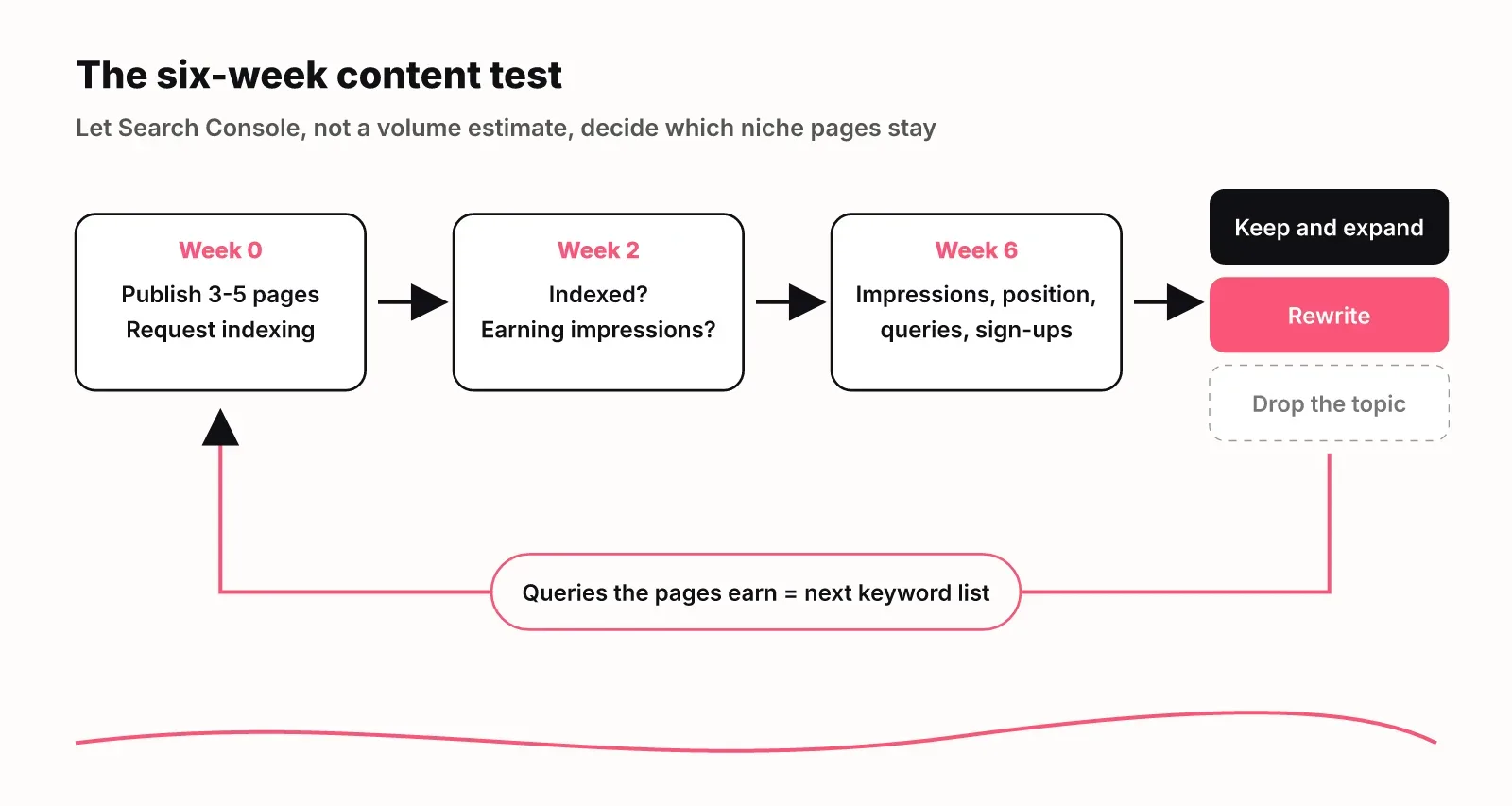
Group the surviving keywords into one page per intent, then ship a handful of pages and let Search Console tell you which were worth it. In a niche, your own impressions and conversions are better data than any tool's volume estimate.
Group variants first. "SOC 2 evidence collection", "automate SOC 2 evidence" and "SOC 2 audit screenshots" share one intent and belong on one page. Splitting them creates thin pages that compete with each other. See how to group keyword variants into pages.
Then run a six-week test:
- Pick three to five pages, at least two of them comparison, integration or use case pages.
- Publish them and request indexing in Search Console.
- After two weeks, check that each page is indexed and earning impressions.
- At six weeks, read impressions, average position and the queries each page shows for. Track positions for the terms you targeted.
- Keep and expand pages that earn impressions from on-topic queries or bring a sign-up. Rewrite pages that rank for the wrong queries. Drop the topic if a page earns nothing after you fixed indexing.
The queries a page actually shows for are your next keyword list. Niche pages often rank for phrasings no tool suggested, and those become the next round of pages.
Check how AI assistants answer your buyers
Your buyers also ask ChatGPT, Gemini and Google AI Overviews, so your research should include the prompts they ask, not only the keywords they type. Forrester's Buyers' Journey Survey, 2024 found that 89% of buyers reported they were using genAI in at least one area of their purchasing process.
Prompts are longer and more specific than search queries: "what's the best way to collect SOC 2 evidence for a small startup on AWS". Take your top buyer phrases from Step 1, write them as the questions a buyer would ask an assistant, and check which products the answers mention and which pages they cite. A page that answers the question directly, in your buyer's words, is the page assistants can quote.
LogNorm's AI visibility tracking runs those prompts in the real assistants from your country and shows who gets mentioned and cited. For a niche product, it tells you whether the assistants mention you at all, and which pages they cite instead.
FAQ
What is B2B keyword research?
B2B keyword research is finding the searches that the people who buy business software or services make while they look for, compare and choose a product. It weighs buyer fit and intent over volume, because a B2B purchase involves several people and a small market.
Should I target keywords with zero search volume?
Yes, when the keyword passes a demand check: competitors rank with a dedicated page, Search Console shows impressions for close variants, or prospects use the phrase on sales calls. Group zero-volume variants that share an intent into one page.
Does SEO work for B2B?
SEO works for B2B when you target the comparison, alternatives, integration and use case searches buyers make late in their decision. Those terms have small volume and high intent, and few competitors in a niche have pages for all of them.
What should I do after I have my keywords?
Group them into one page per intent, prioritise decision-stage pages, publish three to five, and judge them on Search Console impressions and conversions after six weeks. The queries those pages earn become your next keyword list.