Google AI Mode: What It Changes for SEO and How to Show Up
Google AI Mode answers complex searches in a conversation with links. Here's how it differs from AI Overviews, what it does to clicks and how to get cited.



Google AI Mode is a conversational way to search Google. You ask a long or complex question, Gemini writes an answer, and the answer links to the web pages it drew on. For anyone who runs a website, the more useful question is what AI Mode does to the pages it reads from. This guide covers both: what AI Mode is and how to use it, then what it changes for your traffic and how to show up as one of its sources.
What is Google AI Mode?
Google AI Mode is an AI search experience inside Google Search. It answers questions in a conversation instead of a list of ten blue links. It runs on Google's Gemini models and keeps the thread going, so you can ask follow-up questions without starting over.
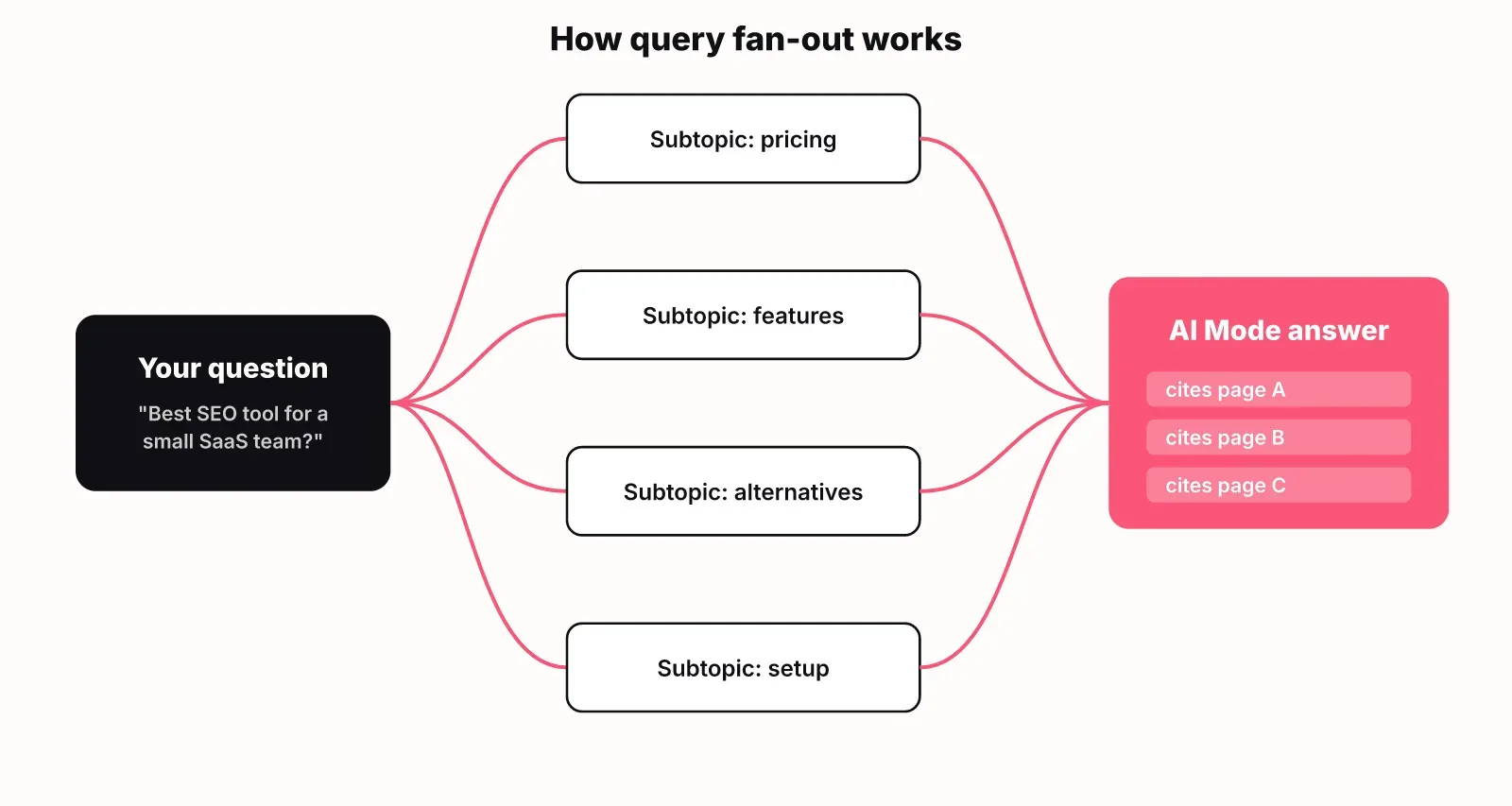
The key mechanism is query fan-out. AI Mode splits your question into subtopics and runs related searches for each of them at the same time. Then it combines what it finds into one response with links. Google's documentation on AI features describes the same fan-out for both AI Overviews and AI Mode.
You can ask in several ways:
- Type a question, as long and specific as you like
- Ask by voice
- Use a photo or an image
- Upload a PDF or other file and ask about it
- Ask about a specific webpage or URL
How to turn on Google Search AI Mode
You don't need to switch anything on. Google Search AI Mode is a separate mode you open when you want it:
- Go to google.com/ai in any browser.
- Or run a normal Google search and tap AI Mode below the search bar.
- Or open the Google app and pick AI Mode on the home screen.
AI Mode costs nothing to use in Google Search. Paid Google AI subscribers can choose more advanced Gemini models inside it for harder tasks such as coding or research.
If you can't see AI Mode, the usual reasons are:
- It isn't available yet in your country or language
- You're on a work or school account where Google's AI features may be limited
- You're using an old version of the Google app
AI Mode vs AI Overviews vs classic results
AI Mode and AI Overviews both use AI. They show up in different places and behave differently. Here's how the three Google experiences compare for a site owner:
| Classic results | AI Overviews | AI Mode | |
|---|---|---|---|
| Where it appears | The normal results page | A summary above the normal results, on some searches | Its own tab or page, opened by the searcher |
| What the searcher gets | Ranked links | A short AI answer with source links, then the usual links | A full conversational answer with links, and follow-ups |
| How sources are picked | Ranking | Core ranking systems plus fan-out | Core ranking systems plus fan-out across many subtopics |
| What winning looks like | A high position and a click | Being one of the cited sources | Being cited across several turns of the conversation |
AI Overviews add an answer on top of the results page. AI Mode replaces the results page with a conversation. If you've already worked on getting cited in AI Overviews, most of that work carries over to AI Mode, because both draw on the same index and ranking systems.
What AI Mode does to your clicks
Expect fewer clicks per search wherever an AI answer appears. In a Pew Research Center study of web browsing data from 900 US adults, users who encountered a Google AI summary clicked on a traditional search result link in 8% of visits compared to 15% without one. Clicking a link within the AI summary occurred in just 1% of visits.
That study measured AI summaries on the normal results page, not AI Mode. AI Mode gives searchers a fuller answer and a way to keep asking, so there are fewer reasons to leave. No public study yet measures AI Mode click-through on its own, so treat any number you see quoted for it with care.
What this means in practice:
- Citations become the visibility metric. Being named and linked inside the answer is the new page one.
- The clicks that do come arrive later in the journey. Someone who reads an AI answer and then clicks through usually wants detail, a price or a product.
- Commercial pages matter more, because comparison, pricing and use-case pages are where those late-stage clicks land.
How to show up in Google AI Mode
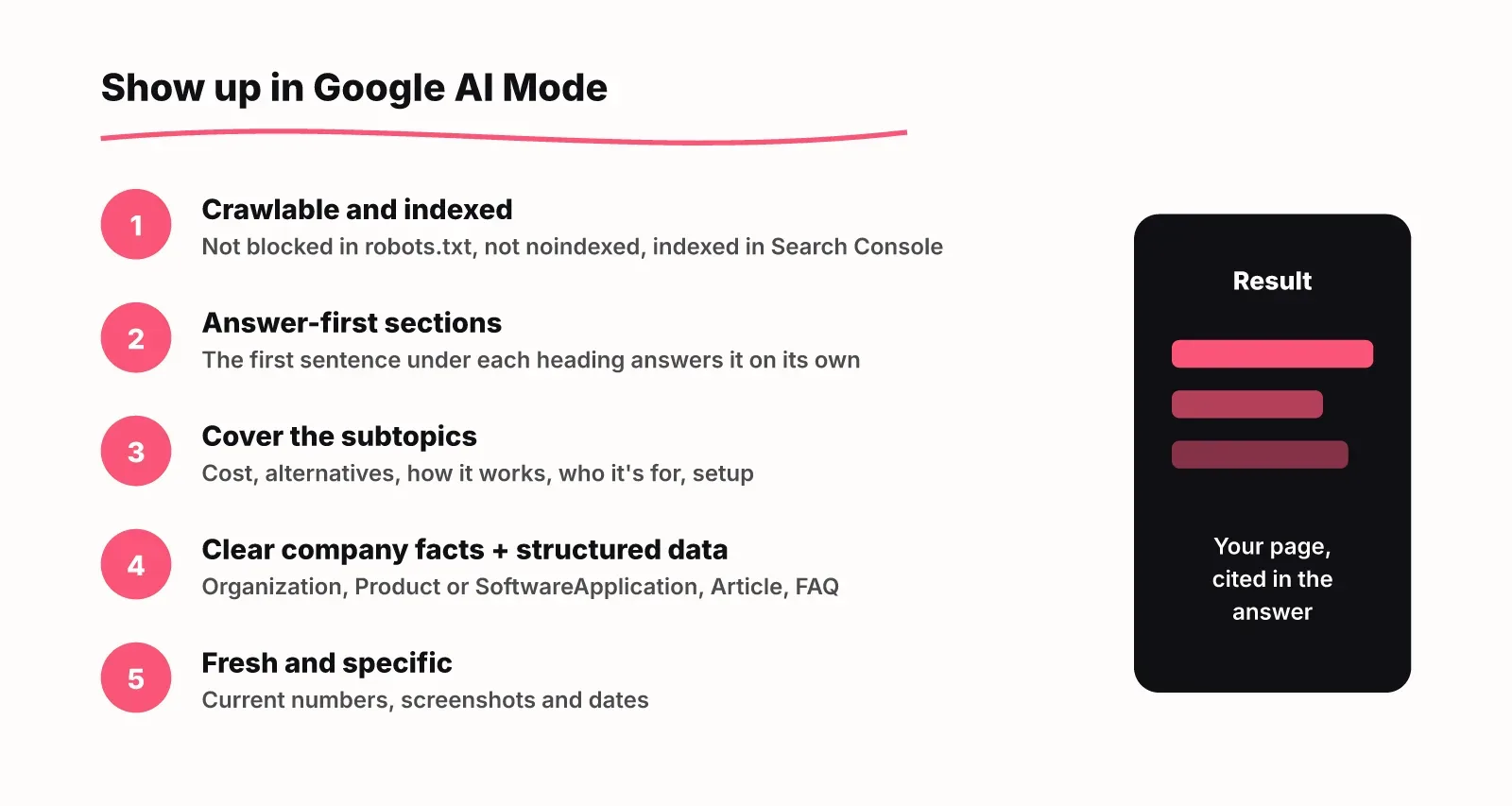
There is no special AI Mode optimization. Google's documentation says plainly that there are no additional requirements to appear in AI Overviews or AI Mode, and that both rely on the core Search ranking and quality systems. Good SEO is still the entry ticket.
Fan-out changes which pages get picked, though. AI Mode searches the subtopics of a question, so a page that clearly answers one subtopic can be cited even if it doesn't rank for the head term. That points to five practical steps.
1. Make sure Google can crawl and index the page
A page that is blocked, noindexed or canonicalised elsewhere can't be a source. Check robots.txt rules for Googlebot and for AI crawlers with a free robots.txt checker, and confirm the page is indexed in Search Console.
2. Write answer-first sections
Put the answer in the first sentence under each heading, in words that make sense on their own. Fan-out searches pull in passages, and a passage that opens with "It depends" gives the model nothing to quote. One question per heading also makes it easy to match a subtopic to your section.
3. Cover the subtopics, not just the head term
List the follow-up questions a buyer asks about your category: cost, alternatives, how it works, who it's for, how to set it up. Then make sure a page on your site answers each one. A topic cluster with a hub and spokes is a natural way to organise this.
4. State facts about your company clearly
AI answers name brands when the facts are easy to find and consistent. Say what your product is, who it's for and what it costs in plain sentences on your homepage, product and pricing pages. Add structured data (Organization, Product or SoftwareApplication, Article, FAQ) so the facts are machine-readable.
5. Keep pages fresh and specific
Update numbers, screenshots and dates when they change. Specific, current pages give AI answers something worth citing over a generic article.
For a wider plan that covers ChatGPT and Gemini too, see our guide to AI SEO for startups.
How to track your visibility in AI Mode
Search Console won't show AI Mode on its own line. Per Google's AI features documentation, traffic from its AI features is counted inside the normal Web search totals in the Performance report. You can see the clicks but not which experience sent them.
To see whether AI answers name you, track the prompts your buyers ask:
- Write 10 to 20 buyer prompts, using the real questions people ask before they buy, such as "best tool for X for a small team".
- Record mentions and citations separately. A mention is the answer naming your brand; a citation is one of your pages among its sources. You can have one without the other.
- Note which competitors and sources get named instead. Those sources are your outreach and content targets.
- Re-check on a schedule, because answers change from run to run.
LogNorm's AI visibility tracking does this in the real products, from your market's country. It asks ChatGPT, Gemini and Google AI Overviews your buyer prompts and keeps mentions and citations as separate numbers. Then it turns what it finds into ranked work in your growth plan. Our AI Overview tracker covers Google's AI answers specifically.
FAQ
Is AI Mode free to use on Google?
Yes. AI Mode is free in Google Search. Paid Google AI subscribers can pick more advanced Gemini models inside it.
How do I turn on Google AI Mode?
Go to google.com/ai, tap AI Mode below the search bar after a search, or open it from the Google app home screen. There's no setting to switch on first.
Why is AI Mode not showing in Google?
AI Mode may not be available in your country or language yet. It can also be limited on work or school accounts. If neither applies, update the Google app or try google.com/ai directly.
Does AI Mode need special SEO?
No. Google says there are no extra requirements or special optimizations for AI Mode. Pages that are crawlable, indexed and answer specific questions clearly have the best chance of being cited.