SEO Automation With AI Agents: What to Automate, What to Keep
SEO automation guide: which tasks to hand to AI agents, which to keep with people, and how to check every fix on your live site.



Automate the SEO work a machine can check, and keep a person on the work that needs judgement or goes public. That is the whole rule. AI agents make it matter more, because an agent can now change your site instead of sending you a report about it.
This guide splits common SEO tasks into "automate" and "keep a human on", explains why for each, and shows the loop that makes agent fixes safe: the agent fixes the issue in your code, a platform checks the fix on the live site, and people approve anything that gets published.
What SEO automation means once agents can edit your site
SEO automation is software doing repeatable SEO work without a person running each step. For years that meant scheduled crawls, rank trackers and weekly reports. Most of the tools ranking for this search still describe it that way.
Agents add a third level. Think of SEO automation in three steps:
- Reports: a tool tells you what is wrong.
- Recommendations: a tool tells you what to change.
- Fixes: an agent makes the change in your code or CMS.
The first two levels save you time on finding work. The third saves you time on doing it, and it changes the risk. A bad report wastes an hour. A bad fix ships to your live site. So the question stops being "what can I automate?" and becomes "what can I automate and still check?"
What to automate: work with a checkable answer
Automate any SEO task where a machine can confirm the result without your opinion. A title is either under 60 characters or it isn't. A link either returns a 200 or a 404. These tasks are safe to hand to software end to end.
Hand these to automation:
- Crawls and technical audits on a schedule, so new issues show up the week they appear.
- Rank tracking and Search Console monitoring, including alerts when a page starts losing clicks.
- Metadata fixes with a clear limit: titles too long or too short, missing or overlong meta descriptions, duplicate titles.
- Broken internal links, links that point at redirects, and missing alt text.
- Structured data that follows from content you already have, such as FAQ or article markup.
- Gathering keyword data, clustering keywords into pages, and pulling the ranking pages for a brief.
- Tracking how ChatGPT, Gemini and Google AI Overviews answer your buyers' questions.
That last one used to be a nice-to-have. It isn't anymore. Pew Research Center found Google users clicked a traditional result on 8% of visits with an AI summary, against 15% without one. Clicks on links inside the summary itself happened on just 1% of visits. You can't check that by hand every week across dozens of prompts, so automate it.
Every item on the list shares two traits. The work is tedious for a person, and the result can be measured. That is where an agent earns its keep.
What to keep a human on: judgement and anything public
Keep a person on any decision that depends on your business, and on anything readers or search engines will see under your name. Agents can prepare this work. They shouldn't finish it.
Keep a human on:
- Which keywords fit your business and which moves come first this week. Volume and difficulty don't know your margins or your sales cycle.
- Publishing content. Drafting is fine to automate. Approving and publishing is not.
- Dismissing audit findings. Some findings are false positives, and deciding that one is safe to ignore is a judgement call.
- Checks that are themselves AI-judged, such as thin content or keyword cannibalisation. Read the page before you act.
- Claims about your product, pricing, customers or competitors.
- Deleting pages, redirecting pages that earn traffic, or changing robots rules.
Publishing gets the strongest line because Google draws it too. Its spam policies name "using generative AI tools or other similar tools to generate many pages without adding value for users" as scaled content abuse. Google's guidance on AI content is equally direct: automation used "with the primary purpose of manipulating ranking in search results is a violation of our spam policies."
Google's line falls on unreviewed volume, whatever tool produced it. A person who reads each draft before it goes live is the cheapest protection you have.
A two-question test for any SEO task
Ask two questions of any task: can a machine check the result, and can you undo it cheaply? The answers tell you how much to automate.
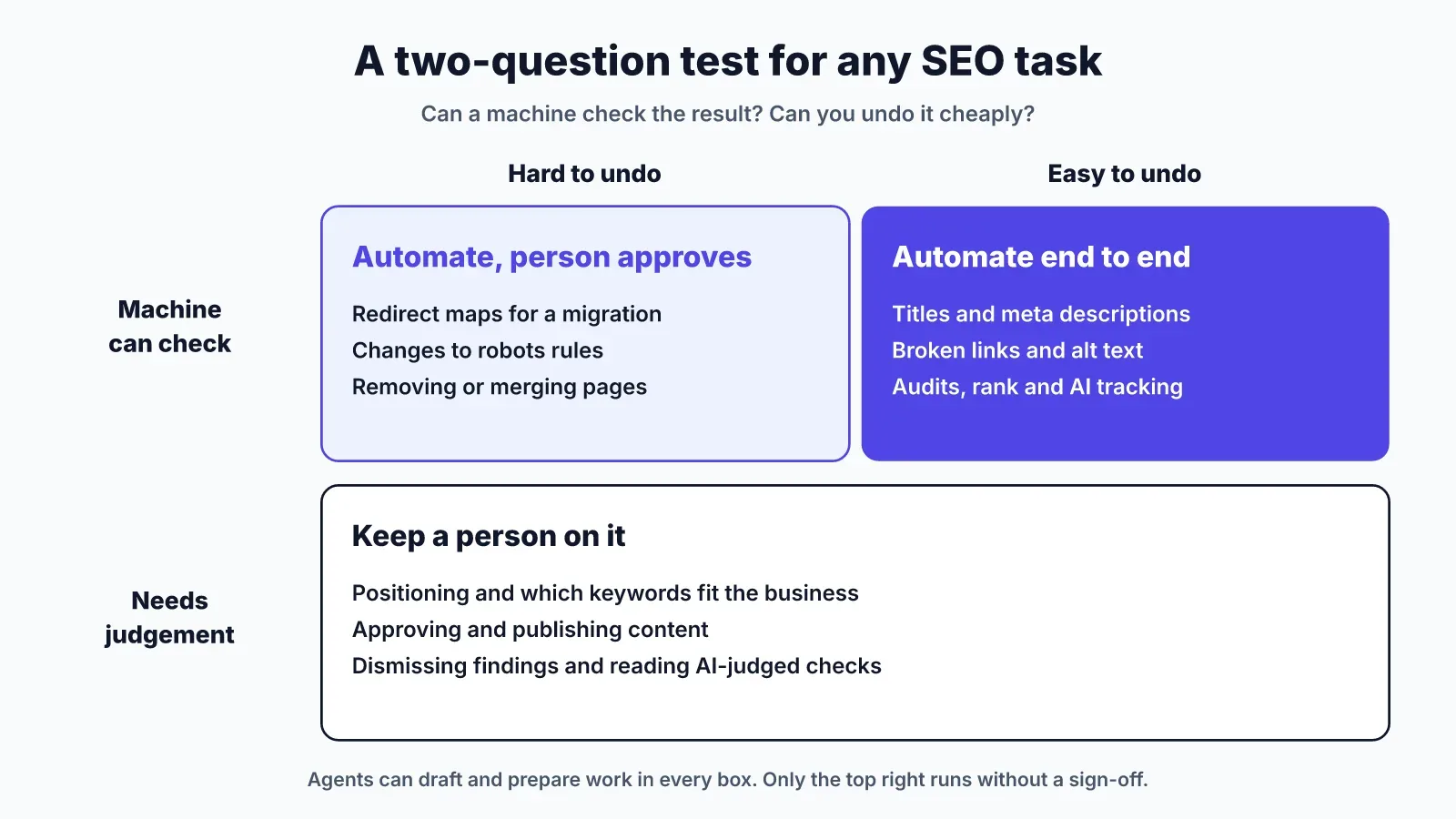
- Checkable and easy to undo: automate it end to end. Fixing an overlong meta description is the classic case.
- Checkable but hard to undo: automate the work and keep a person on the approval. A redirect map for a site migration fits here.
- Not checkable: keep a person on it. Positioning, topic choice and whether a page answers its search well all land here.
Use this when a new task shows up that isn't on any list. An agent that adds internal links passes both tests: the links resolve or they don't, and you can revert the commit. Let it run and review the pull request. An agent that rewrites your pricing page fails both, so it drafts and you decide.
The agent loop: find, fix, verify, approve
The loop that makes SEO automation safe has four steps: find the issue, fix it in code, verify the fix on the live site, and have a person approve anything public. Most SEO automation tools cover the first step and stop.
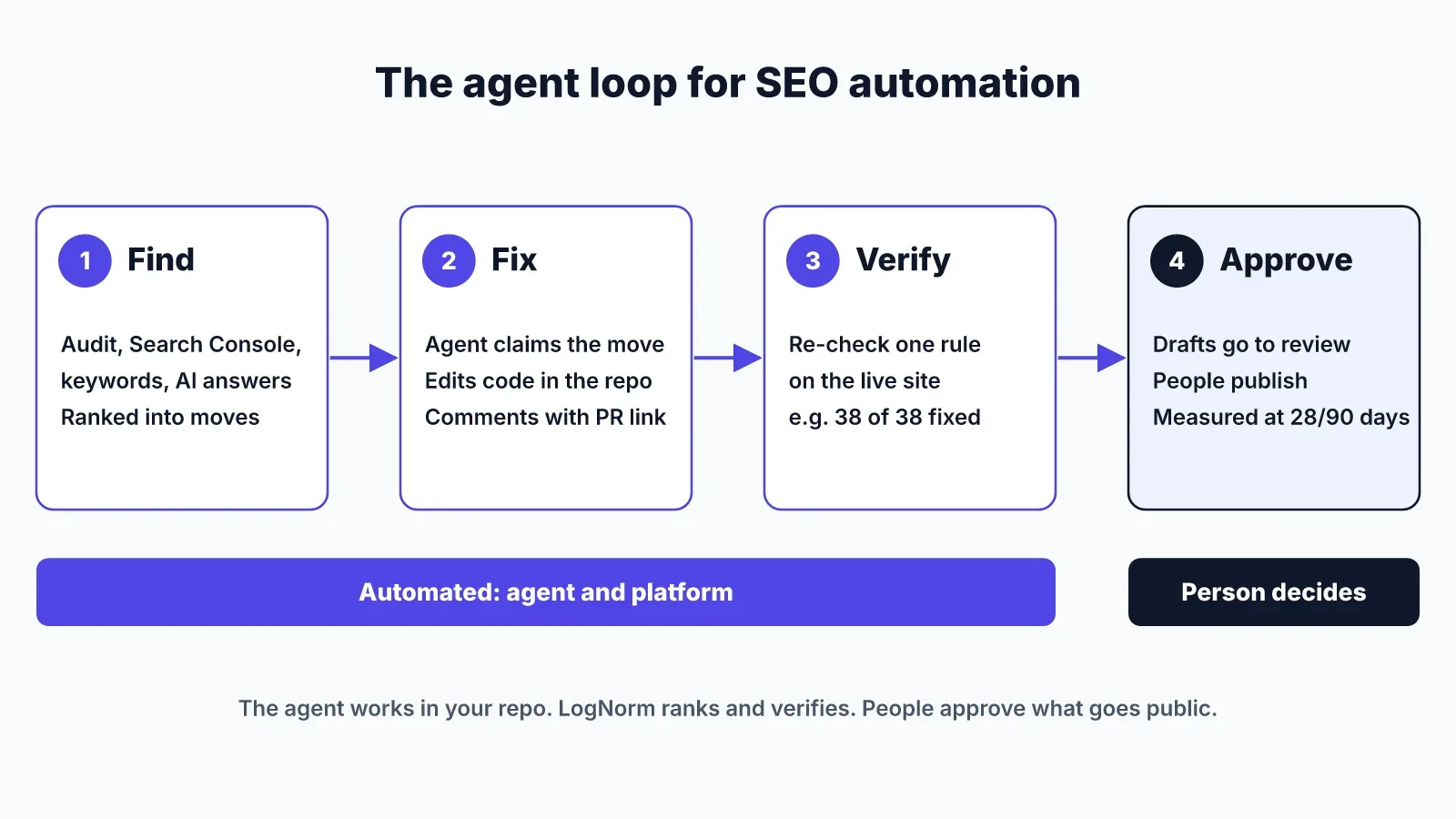
Here is how the loop runs in LogNorm with a coding agent such as Claude Code, Codex or Cursor:
- Find. LogNorm runs a site audit, reads Search Console, keywords, competitors and AI answers, and turns findings into moves. It ranks the moves head to head, and the team plans the best into a weekly Growth Plan.
- Fix. The agent claims a move, so no other agent works on it. It edits the code in your repo and leaves a comment on the move with the file paths and the pull request link.
- Verify. Once the change is deployed, the agent asks LogNorm to re-check that one audit rule on the live site. LogNorm runs the check itself, without re-running the whole audit, and reports a result such as "38 of 38 fixed".
- Approve. Content follows the same loop, but drafts go to review. People approve and publish. LogNorm then measures each shipped move at 28 and 90 days.
The verify step is the one to insist on, whatever tool you use. An agent saying "done" is a claim. A re-check against the live page is evidence. Without it, you find out a fix didn't deploy when the next monthly audit flags the same issue.
If you want to see these steps from the terminal, our guide to Claude for SEO walks through each workflow on our own site's audit. The wider setup lives in Claude Code for marketing.
Guardrails to set before an agent touches SEO
Give an agent the narrowest access that lets it do the job, and make every limit a switch you can flip. Decide these before the first session, not after the first surprise.
Set these limits:
- Permissions per capability: read data, work on moves, write drafts, re-check fixes, add to your knowledge base, and run paid research. Turn off what the agent doesn't need.
- One website per agent connection, so a fix for one site can't land on another.
- A spend cap on anything that costs credits or API calls.
- No publishing, no billing, no changes to team members or integrations, and no permanent deletes.
- A visible trail: every claim, comment and draft credited to the agent by name.
LogNorm's agent setup works this way. The agent joins as a named teammate with an editor or contributor role, signs in with OAuth, and its code runs in a sandbox with no network or file access. Text from third-party pages is screened before the agent reads it, which matters when an agent reads competitor pages that could carry hidden instructions.
How to choose SEO automation tools
Pick SEO automation tools by what happens after they find an issue. Most tools are good at finding. They differ in who makes the change, where the change lives, and whether anything checks it.
Ask five questions of any tool:
- Does it change your code, change pages at the edge, or only report?
- Does it verify the fix on the live site?
- Who approves what gets published?
- Does it rank the work, or hand you a flat list of 400 issues?
- Does it track AI answers as well as Google rankings?
The tools on the market fall into four groups:
- Workflow builders such as Gumloop, Make and n8n. They automate steps you design. They are flexible, but you build and maintain the logic, including any checks.
- On-page tools that apply changes without touching your code, such as Alli AI. They are fast to set up. The trade-off is that your repo and your live site stop agreeing, which gets confusing when developers change the same pages.
- SEO suites such as Semrush and Ahrefs. They are strong on tracking and research. Acting on the data stays with you.
- Agent plus platform, such as a coding agent connected to LogNorm. The agent fixes in your repo, the platform verifies and ranks, and people keep publishing.
Our position: if you have a codebase and a developer or coding agent, fix in the code. Changes stay reviewable in pull requests, and nothing on the live site exists outside version control. If you have no repo and work in a CMS, an on-page tool or a workflow builder may fit better. For a small team without an SEO hire, the SEO playbook for startups covers what to do first.
FAQ
What is SEO automation?
SEO automation is using software to run repeatable SEO tasks without a person doing each step. It covers audits, rank tracking, reporting, keyword research and, with AI agents, fixing issues in your site's code.
Can SEO be fully automated?
No. You can automate the checkable work: audits, metadata, broken links, tracking. Strategy, publishing and judgement calls such as dismissing false positives still need a person.
Is AI-generated content against Google's rules?
Not by itself. Google's policies target content made mainly to manipulate rankings, including many pages generated without adding value for users. Drafting with AI and publishing after human review is fine.
What is the best SEO automation tool?
The best SEO automation tool is one that fixes issues and then verifies the fix. For teams with a codebase, a coding agent connected to a platform that re-checks fixes on the live site covers the most ground. Workflow builders suit teams that want to design their own steps.
Can SEO automation track AI search visibility?
Yes. Tools such as LogNorm run your buyers' questions in ChatGPT, Gemini and Google AI Overviews on a schedule and record whether you are mentioned or cited. See how to rank in ChatGPT for what to do with the results.