Claude for SEO: Workflows That Fix Your Site, Not Just Advise
Claude SEO workflows from our own site audit: triage findings, fix metadata in your repo, expand thin pages and re-check each fix live.



Claude is good at SEO work when you give it your real site data and a repo to change. Without those, it writes advice. With them, it can triage an audit, fix metadata in your code and help expand thin pages, and you can check each fix on the live site.
Every example below comes from our own use of LogNorm on lognorm.com. On 2 October 2026 the site audit crawled 66 pages, up from 39 the day before, and scored 89 out of 100. Here is how to work through that audit with Claude, step by step.
What Claude can do for SEO
Claude can read audit findings, rewrite titles and descriptions, edit templates in your codebase and draft new page copy. What it can't do on its own is see your site the way a crawler does. It has no crawl data, rankings or Search Console numbers unless you connect a source.
Most pages ranking for "claude seo" are skills, such as the open-source claude-seo package for Claude Code. They give Claude a detailed checklist and have it crawl and score your site. The output is a report with a priority list.
A report is a fine start. The workflows in this post go one step further and end in a merged change, plus a re-check that the change is live. For that, Claude needs three things:
- A data source with your audit findings, connected over MCP (the Model Context Protocol, the standard way to give Claude tools).
- Access to the repo that builds your site.
- A way to re-check one finding on the live site after you deploy.
Chat Claude or Claude Code for SEO
Use Claude Code for any SEO fix that ships, and chat Claude for analysis and writing. The difference is where each one can act.
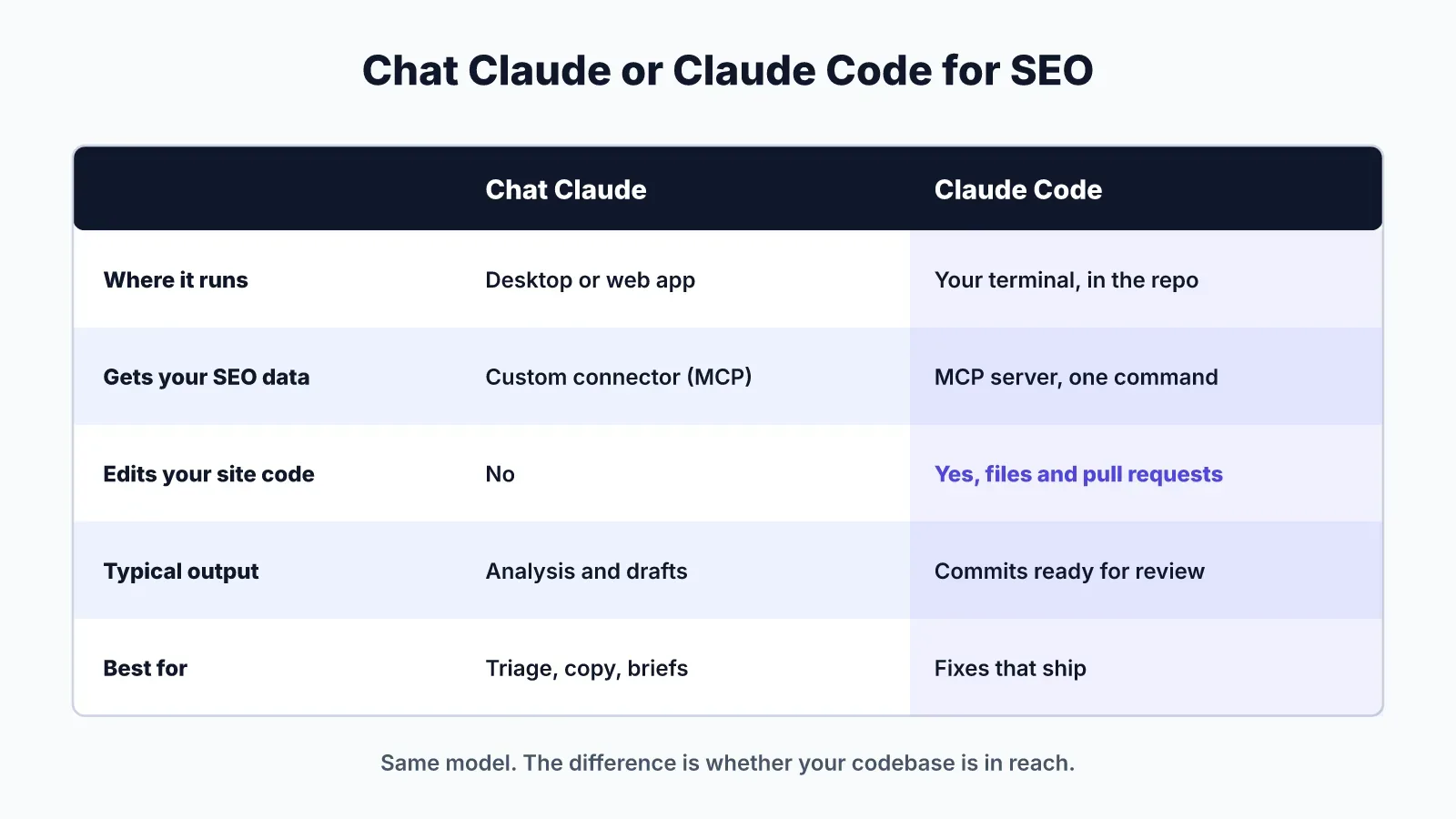
Chat Claude (desktop or web) works with what you paste or connect. It is good for reading an audit export, rewriting a batch of meta descriptions, or planning a page. You can add LogNorm under Settings, Connectors, Add custom connector, so it reads your findings directly. It can't open your repo.
Claude Code runs in your terminal inside the project. It can find where your titles are defined, edit the files, run your build and open a pull request. That is what "claude code seo" means in practice: the same model, with your codebase in reach.
Our rule on lognorm.com: triage and copy decisions can start in either, but every metadata fix and page change goes through Claude Code, so it lands as a reviewable commit.
Connect Claude Code to your SEO data
Connect Claude Code to LogNorm with one command, then sign in once in the browser. Run this in your terminal:
claude mcp add --transport http --scope user lognorm https://lognorm.com/api/mcpThen type /mcp in Claude Code, choose lognorm, choose Authenticate, and click Allow in the browser. Sign-in uses OAuth, so there are no API keys to copy. The shortcut is to paste this sentence into Claude Code: "Connect to LogNorm: follow https://lognorm.com/connect.md".
On the consent screen, the agent joins your workspace as a named teammate, as an editor or contributor. Each permission is a switch: read, work on moves, write drafts, re-check fixes, add to the Company Brain, and run research. You don't need an AI key, and the agent can't publish content or change billing. The agents page lists the rest.
Workflow 1: triage the audit before fixing anything
Start every Claude SEO session by sorting findings into real issues, false positives and noise. On our audit, that step removed every critical finding before Claude touched a file.
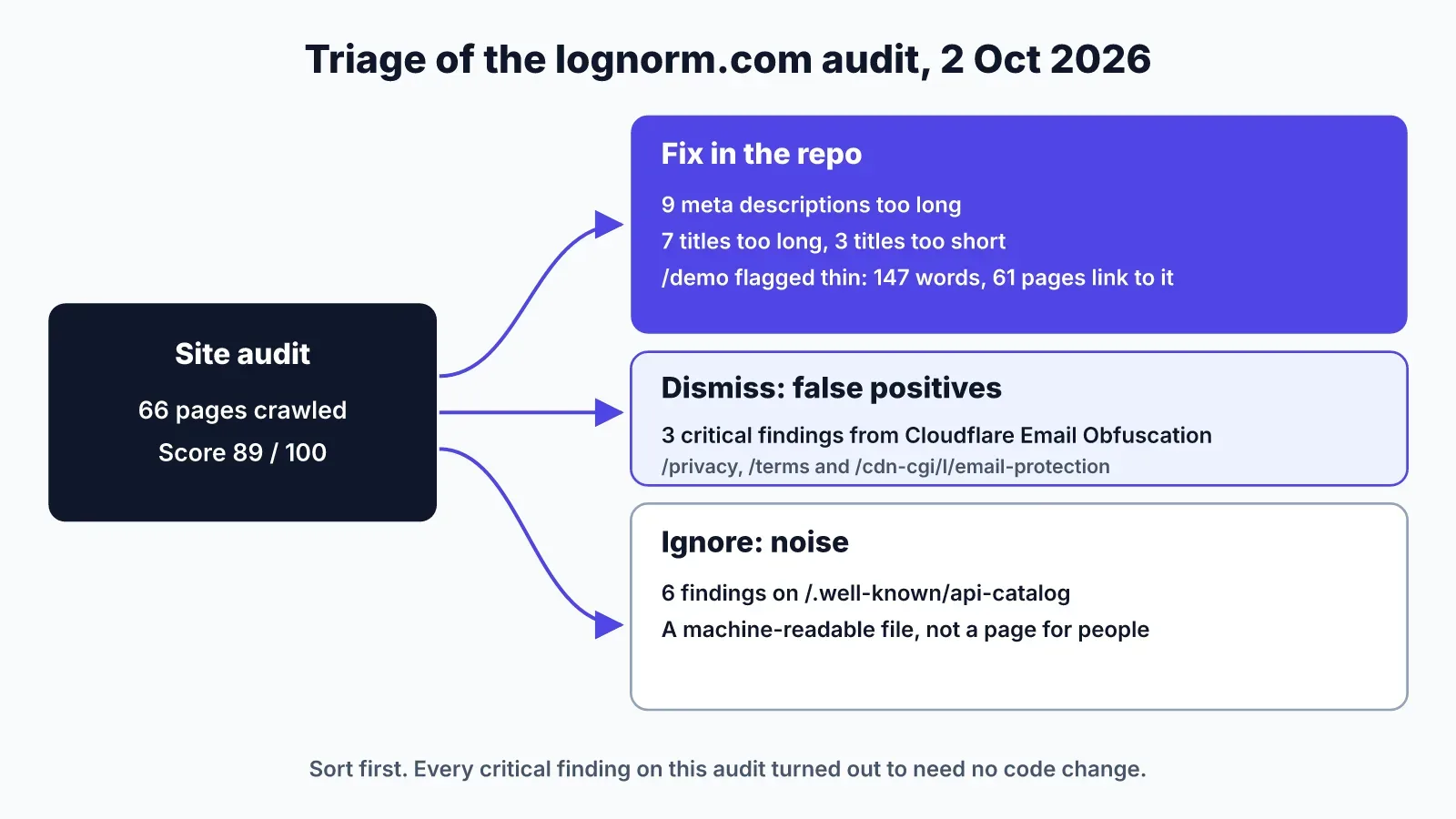
The audit flagged three critical findings: broken links on /privacy and /terms, and a 404 at /cdn-cgi/l/email-protection. We traced all three to Cloudflare Email Obfuscation. Cloudflare rewrites email addresses on a page into a link to that /cdn-cgi path, and a crawler following the link gets a 404. The pages were fine for readers, so we dismissed the three findings as false positives.
Six more findings sat on /.well-known/api-catalog. That URL is a machine-readable file that lists our APIs for agents, not a page for people. Rules about titles and word counts don't apply to it, so those findings were noise.
A prompt that works for this step:
Use the lognorm MCP tools to list open site audit findings, grouped by rule.
For each critical finding, check the affected URL and tell me whether it is
a real issue, a false positive, or a non-HTML file. Don't change any code yet.
Keep the decision to dismiss with a person. Claude can explain why a finding looks false. You confirm it, because a dismissed finding stops showing up.
Workflow 2: fix titles and meta descriptions in the repo
Have Claude Code find where each page's metadata is defined, rewrite the failing ones within the limits, and open a pull request. Then re-check the rule on the live site once the change is deployed.
Our audit listed three metadata notices:
- 9 meta descriptions too long
- 7 titles too long
- 3 titles too short
These are low severity on their own. They are also the clearest code fix an audit gives you, because the target is a character count.
Run it in this order:
- Ask Claude Code to pull the affected URLs and current values from LogNorm.
- Have it locate the source of each title and description. In a Next.js site that is usually a
metadataexport or a shared layout. In other stacks it may be front matter or a CMS field. - Have it rewrite each value within the limit, keeping the page's main keyword near the start.
- Review the diff yourself and merge.
- After the deploy, ask Claude to call validate_fix for each rule.
The validate_fix step re-checks one audit rule on the live site without re-running the whole audit. LogNorm runs the check and reports how many affected pages pass, for example "38 of 38 fixed". If a page still fails, the usual cause is a template that overrides the value you changed.
We haven't re-checked these lognorm.com findings at the time of writing, so this post shares no fix result.
Workflow 3: expand a thin page
Ask Claude to read the flagged page and its inbound links, then draft the sections it is missing, and keep the final copy with a person. Thin pages are a content fix, not a metadata fix, so the approval step matters more.
Our audit flagged /demo as thin: 147 words, with 61 pages linking to it. The link count is the reason to act. A page that 61 others point to is a page readers and crawlers reach often, and it has little to say when they arrive.
Thin content is an AI-judged check in the site audit, not a word count. It means the page may not deliver what its title promises. Read the page before you agree with the call. A booking page can be short on purpose.
For /demo, the work looks like this:
- Ask Claude what a visitor wants to know before they book: what the demo covers, how long it takes, and who should attend.
- Have it draft those sections from your product pages and Company Brain, so claims match what you sell.
- Edit the draft, then have Claude Code add it to the page template and open a pull request.
Don't let Claude pad the page to clear a threshold. Add what a visitor needs, then stop.
Where Claude SEO workflows go wrong
Most failures come from acting on findings without checking them, or checking fixes before they are live. These are the mistakes to watch for:
- Fixing a false positive. Without triage, Claude would have hunted for broken links on /privacy that don't exist.
- Running validate_fix before the deploy finishes. The check reads the live site, so it will report the old values.
- Editing the wrong source. If a layout sets a default title, changing the page file may do nothing.
- Trimming titles until they lose the keyword. A title that fits but no longer says what the page is about is worse than one that runs long.
- Treating a crawl jump as a new problem. Our page count went from 39 to 66 in a day. Each audit run reads pages the last one hadn't, so new findings can appear without anything breaking.
For the bigger question of which SEO work to hand to an agent and which to keep, read our guide to SEO automation. For running growth work from the terminal more broadly, start with Claude Code for marketing.
FAQ
Can Claude do SEO?
Yes. Claude can analyse audits, write titles and descriptions, and edit your site's code through Claude Code. It needs a data source for crawl and search data, because it can't see rankings or crawl results on its own.
How do you use Claude skills for SEO?
Install a skill in Claude Code or upload it in Claude's settings, then ask Claude to run it on your site. Skills add instructions and checklists. Pair one with an MCP data source if you want Claude to work from your real audit and re-check its fixes.
Which AI is best for SEO?
For SEO work that changes your site, a coding agent such as Claude Code is the strongest choice, because it can edit the repo and open pull requests. For writing and analysis, chat Claude works well with a connected data source.
How is this different from a site crawler?
A crawler finds issues and stops. The workflows here use a crawler's findings as input, then have Claude fix them in code and re-check them on the live site. You still need the crawl. See SEO for startups for where audits fit in a small team's week.