Claude Code for Marketing: Run SEO and Growth From Your Terminal
How to use Claude Code for marketing: set it up with skills and MCP, then run audits, fixes, keyword plans and drafts in a weekly growth loop.


Claude Code for marketing works best when you treat it as a teammate rather than a copywriter. Give it your site's data, a ranked list of what to do, permission to change your website's code, and a way to check its work on the live site. With those four things it can run audits, fix what they find, plan content from real keyword data and draft posts for you to approve.
Most guides stop at the first step: a skill that writes LinkedIn posts, or a script that scrapes a competitor. Those are useful. They aren't a marketing function. This guide covers the setup and four workflows we run on lognorm.com every week, using the same product we sell.
What Claude Code can do for marketing
Claude Code is Anthropic's agent that works in your terminal or desktop app. It reads files, runs commands and calls tools, so it can change your website and run research instead of only answering questions in a chat window.
That difference matters for marketing. Chat Claude can tell you a page's title is too long. Claude Code can open the template, shorten the title, commit the change and ask a tool to confirm the live page is fixed.
Usage has been moving in that direction. Anthropic reported that across seven months, "the share of sessions spent debugging fell by nearly half, and usage shifted toward more end-to-end agentic use: deploying and running code, analyzing data, and writing non-code documents". The same research found that on coding tasks "every major occupation succeeds" at nearly the same rate as software engineers. A marketer doesn't need to be a developer to get real work done.
Marketers mostly use it for four kinds of work:
- Site audits and technical SEO fixes in the codebase
- Keyword research and content planning
- Briefs and drafts in the company's voice
- Small internal tools: scrapers, reports, link checkers
On its own, though, Claude Code knows nothing about your rankings, your audit or your competitors. It also has no idea which of 40 possible tasks matters most this week. For broader context on where agents fit, see our guide to AI agents for marketing.
The missing pieces: data, priorities and a place to put the work
A skill library gives Claude Code instructions. It doesn't give it knowledge. A /seo-audit skill can crawl a page from the outside, but it can't see your Search Console queries, your keyword decisions or what your team shipped last month.
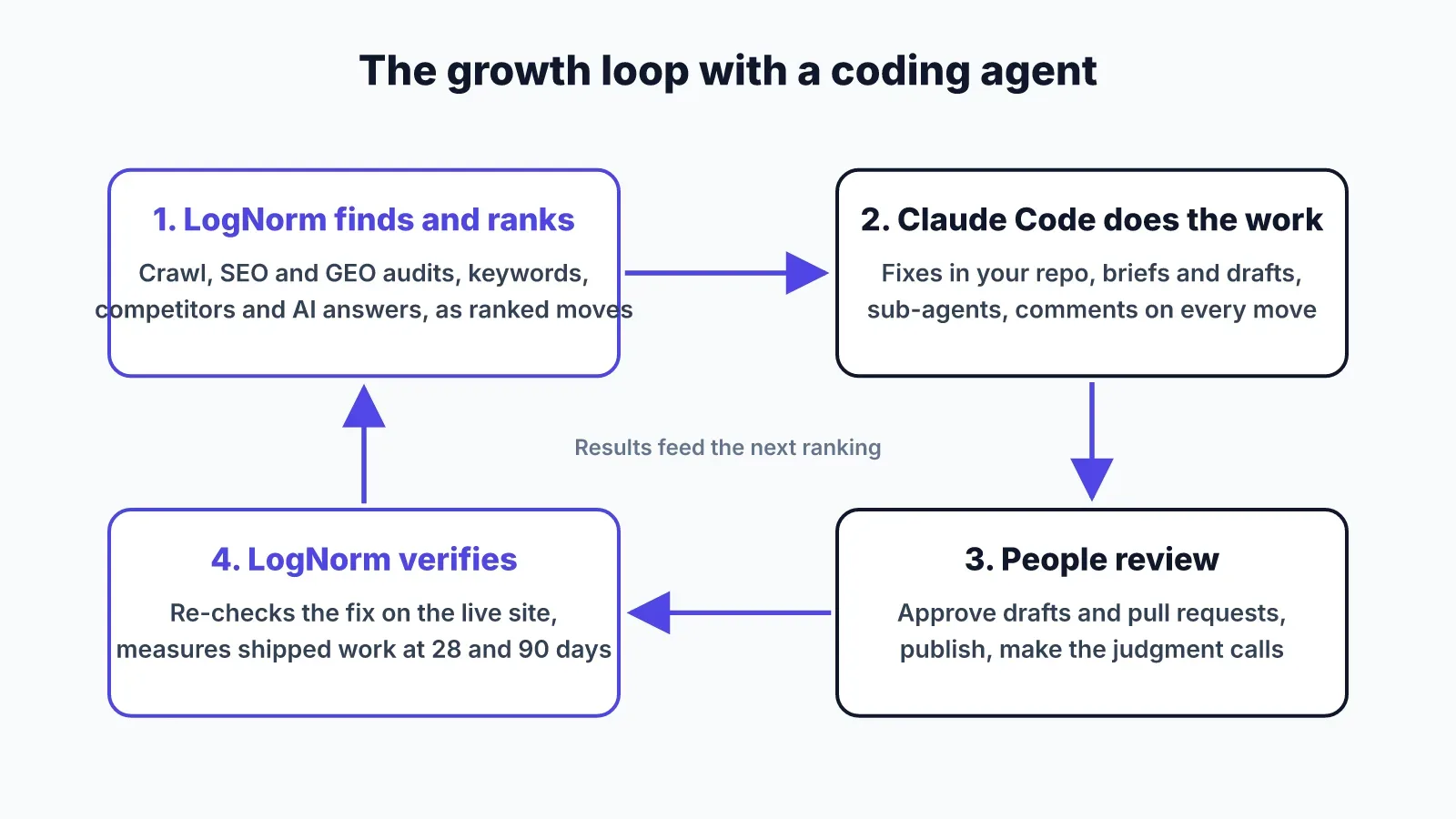
Priorities are the second gap. If the agent works on whatever you ask today, it works on the loudest task, not the most valuable one. Someone has to rank the backlog, and that someone is usually you at 11pm.
The third gap is where the work goes. Output that lives in a terminal session is gone when you close it. Fixes should become commits, drafts should go into a review queue, and decisions should be written down where the team can see them.
The last gap is verification. An agent that says "fixed" hasn't proven anything. The check has to run against the live site, after deploy.
This is the gap we built LogNorm's agent connection to close. LogNorm gathers the data (crawl, SEO and GEO audits, keywords, competitors, how ChatGPT, Gemini and Google AI Overviews answer your buyers). It turns findings into ranked moves and checks fixes on the live site. Claude Code does the work in between.
Set up Claude Code for marketing in 15 minutes
You need a paid Claude plan, Claude Code installed, and your website's repository on your machine. Open Claude Code in the repo, so it can fix issues where they live.
- Add a growth data source over MCP. MCP (Model Context Protocol) is the standard way to give an agent tools. For LogNorm, one command adds the server for every project:
claude mcp add --transport http --scope user lognorm https://lognorm.com/api/mcpSign in. Type
/mcp, choose lognorm, then Authenticate. Your browser opens LogNorm's consent screen and you click Allow. There are no API keys to copy. Sign-in uses OAuth with PKCE, and tokens last an hour with rotating refresh tokens.Install the skill, so Claude reaches for the right tools when you mention SEO, moves or content:
curl -fsSL https://lognorm.com/api/agents/skill.zip -o /tmp/lognorm-skill.zip && mkdir -p ~/.claude/skills && unzip -o /tmp/lognorm-skill.zip -d ~/.claude/skills- Restart Claude Code once so the skill and tools load.
The shortcut is to paste one sentence into Claude Code and let it do the steps above: Connect to LogNorm: follow https://lognorm.com/connect.md.
On the consent screen you choose what the agent may do. It joins as an editor or contributor, never above your own role. Each permission can be switched off: working on moves, writing drafts, re-checking fixes, adding to the Company Brain and running research. The agent leaves the team after 1, 7 or 30 idle days, or the moment you remove it.
You don't need an AI key. Every step that needs a model, from topic plans to drafts, runs on the Claude plan you already pay for. LogNorm's own processes (ranking, audits, research runs) keep running on LogNorm, and only those cost credits.
Workflow 1: Run a site audit and fix what it finds in the repo
Ask Claude Code to run a site audit. It starts a crawl and SEO audit in LogNorm, waits for the results and reads the findings rule by rule.
Here is what that looked like on lognorm.com this week. The crawl found 66 pages, up from 39 the day before, and the audit scored 89 out of 100. Three findings were critical: broken links on /privacy and /terms, and a 404 at /cdn-cgi/l/email-protection.
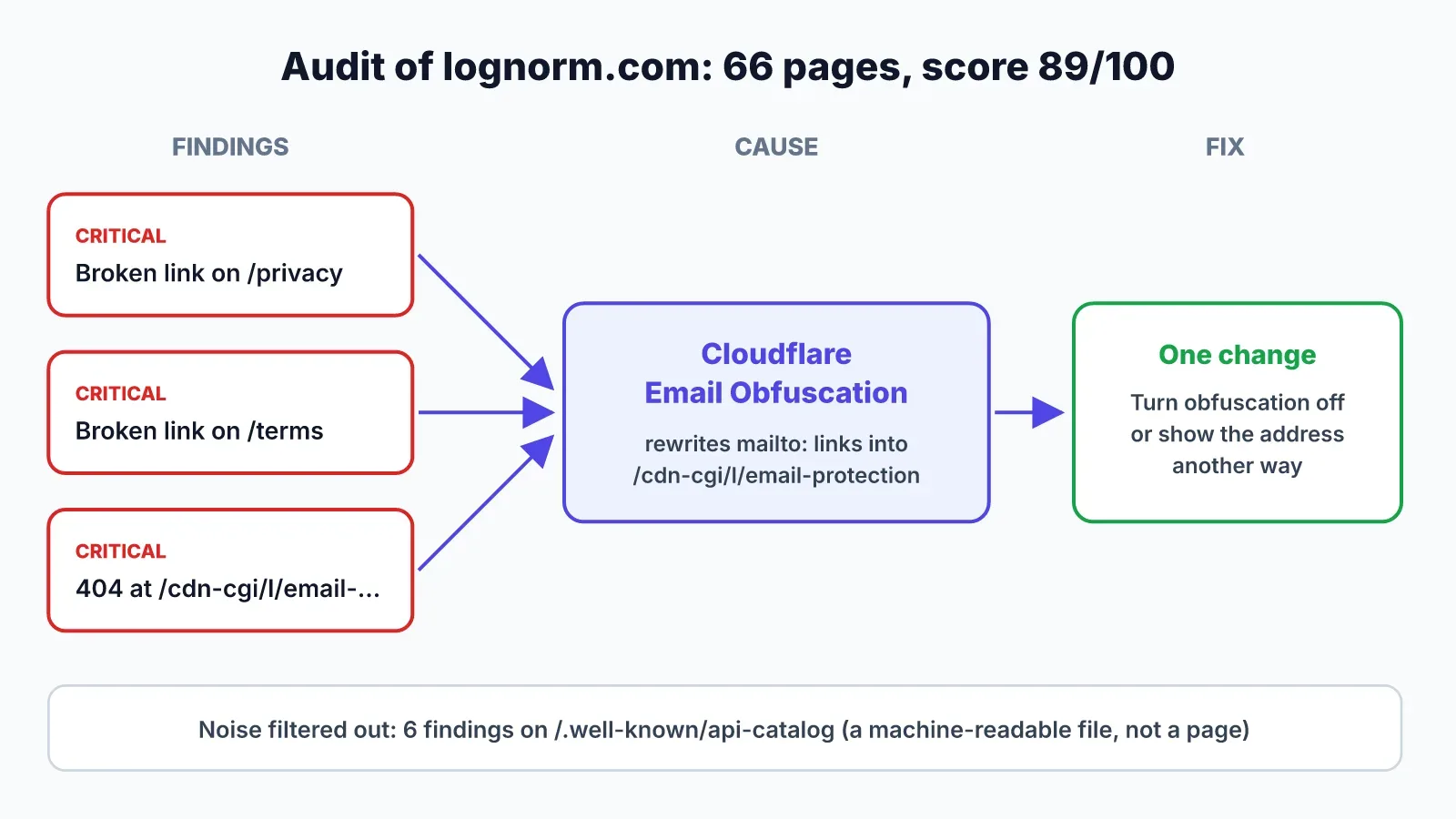
All three traced back to one likely cause. Cloudflare's Email Obfuscation feature rewrites mailto: links into that path, and a crawler sees a dead link. Turning it off, or showing the address another way, should clear all three. A human scanning a findings table would likely fix them one at a time.
The agent also separated noise from real problems. Six findings pointed at /.well-known/api-catalog: missing title, missing H1, missing meta description, no canonical. That file is a machine-readable catalog for agents, not a web page, so those rules don't apply. Meanwhile /demo was flagged as thin at 147 words while 61 pages link to it. That one is worth fixing.
The loop ends with verification. After the fix is committed and deployed, the agent asks LogNorm to re-check that one audit rule on the live site. You get "2 of 2 fixed" from a fresh check, not from the agent's word, and it doesn't wait for the next full audit.
Workflow 2: Plan a content cluster from real keyword data
Ask the agent to plan content around a launch or a theme. It pulls search volume, difficulty and intent for candidate keywords, reads the Google results for the unclear ones and groups them into a hub page with spokes.
We did this for the launch of LogNorm's agent connection. In one session the agent checked about 30 candidate keywords and built a 13-post cluster. The numbers made some calls easy. "Claude code vs cursor" gets 6,600 searches a month with difficulty 0, and "claude code vs codex" gets 5,400 at difficulty 6. Both became comparison posts aimed at marketing work rather than coding.
Checking the results page before committing caught a risk. "Growth agent" (1,000 a month) could have meant anything, so the agent read the top 10 results. They were AI growth tools, so the keyword stayed. It dropped "ai marketing agent" (1,900 a month) because we already have a post on the same intent, and two pages would compete with each other.
The plan didn't end up in a document. Each article became a move in LogNorm's backlog, ranked against every other piece of growth work, with its keyword, angle and the competitor pages it has to beat.
Workflow 3: Brief and draft posts that a person approves
Pick a content move and ask Claude Code to write it. The agent researches first: Google's top results and the pages ranking for the keyword, People Also Ask questions, verified facts with sources, and passages from your Company Brain, which holds your positioning, docs, pricing and voice.
From that research it writes a brief: audience, search intent, angle, an outline where every section says why it's there, and the internal pages to link. Then it drafts in your house style and only cites facts it can source.
The draft goes to review. People approve and publish. The agent can't publish on its own, and that's deliberate. Your name is on the blog, so a person signs off.
This article went through exactly that path. The agent read the five top-ranking pages and found their shared gap: they show individual builds but never say how the work gets prioritised or checked. That gap became our angle.
Workflow 4: Work the weekly plan with sub-agents
Once the setup works, hand the agent the week. Accept and order this week's moves in LogNorm, then give Claude Code a short prompt:
Use the LogNorm skill to work this week's growth plan. Read plan.week, claim the moves you can do in this repo, fix the audit issues, draft the content moves and send them for review. Run sub-agents in parallel where it helps.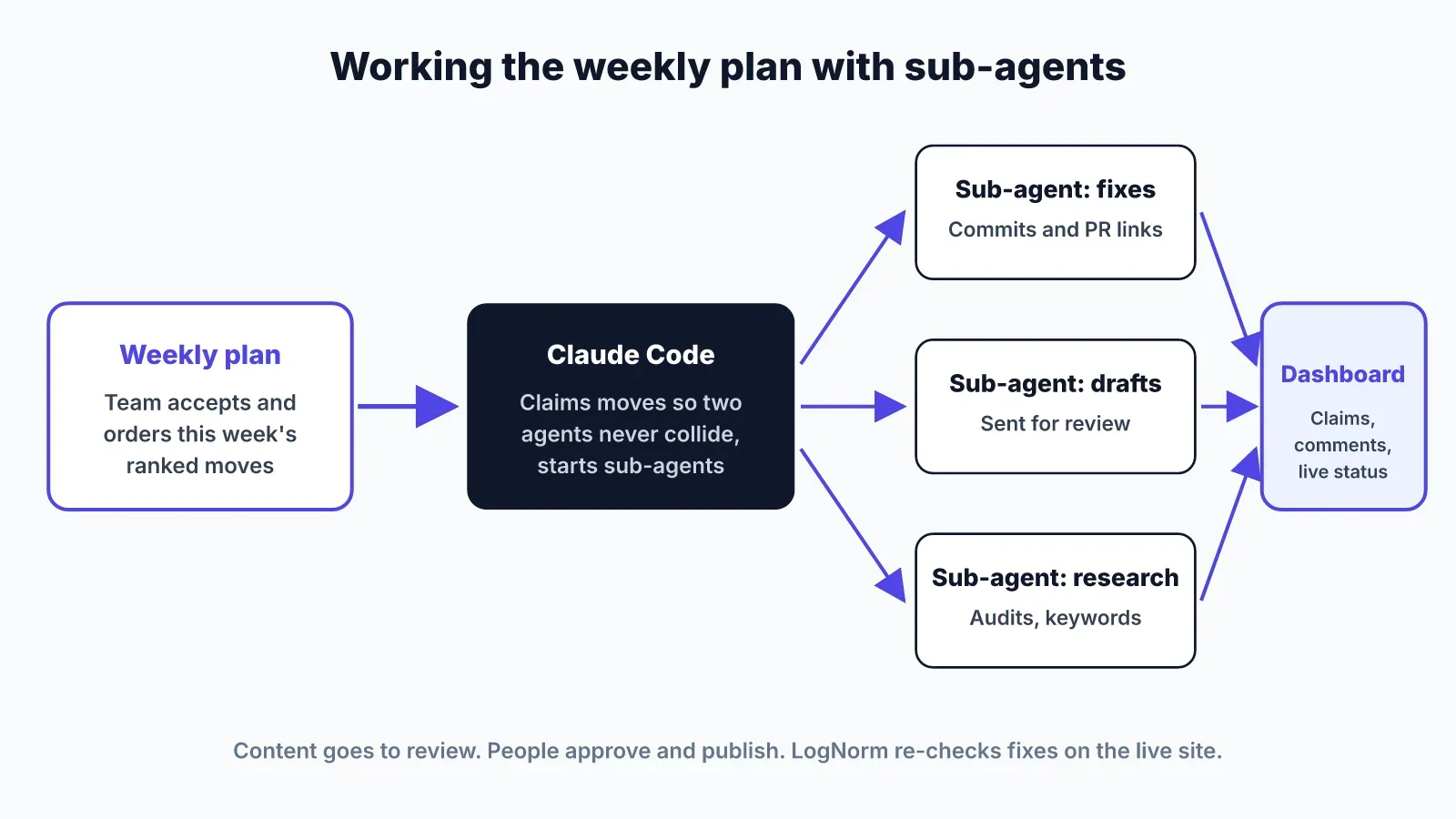
The agent claims moves, so two agents never work on the same one. It can start sub-agents for fixes, drafts and research, and each shows up under its own name. Every claim, comment and status update appears live on the dashboard, with file paths and pull request links in the comments.
Long runs are now realistic. Anthropic's data shows that among the longest sessions, "the length of time Claude Code works before stopping has nearly doubled in three months, from under 25 minutes to over 45 minutes". Expert sessions also chain more steps per prompt: about 12 actions against about five for novices. A week of small fixes and two drafts fits in one working session.
When a move needs a human decision, the agent hands it to a person with a note instead of guessing. For broader strategy questions, it can run a growth review and post its findings as a session your team can reply to.
Guardrails: what the agent can and can't do
The agent gets a teammate's freedom with clear limits. It can't publish content, change billing, members, integrations or AI keys, or delete anything permanently. Those stay with people.
Third-party text is the main risk with any marketing agent. Crawled pages, competitor pages and AI answers can contain hidden instructions. LogNorm screens all of it before the agent sees it: hidden characters are removed, and text aimed at AI agents is withheld with a note, so the agent can tell you something was removed.
The agent's code runs in a sandbox with no network, files or timers. It only ever sees the one website you connected. Every write is a separate tool, so Claude Code can ask before each one.
Decide how much you approve by hand. Anthropic found that "among new users, roughly 20% of sessions use full auto-approve, which increases to over 40% as users gain experience". A sensible start: auto-approve reads, approve every write for the first week, then relax approval for comments and status updates once you trust the trail.
FAQ
Do I need to know how to code to use Claude Code for marketing?
No. You talk to Claude Code in plain English, and it writes and runs the code. It helps to know what a repository and a commit are, because fixes land in your codebase. Have an engineer look over the first few pull requests.
Which Claude is best for marketing?
Use Claude Code when the work touches files: your website, your repo, scripts, reports. Use chat Claude (desktop or web) for thinking and drafting. Both can connect to the same MCP servers, but only Claude Code can fix your site's code directly.
What are the Claude Code skills for marketing?
A skill is a folder of instructions Claude loads when a task matches it. Marketing skills cover audits, copywriting, content calendars and outreach. A skill gives Claude a method. Pair it with an MCP server that gives it your actual data.
Do I need an API key to use Claude Code with LogNorm?
No. The agent's own thinking and writing run on your Claude plan and cost no LogNorm credits. Anything LogNorm runs for it, such as a crawl, a keyword lookup or a fix re-check, costs what it costs in the app, within your spend cap.
Can Claude Code publish to my website on its own?
It can commit code changes in your repository the way you already work with it, through your own commits or pull requests. Content is different: drafts go to review, and people approve and publish them from LogNorm.
Does this work with Codex or Cursor too?
Yes. LogNorm's MCP server works with Claude Code, Claude desktop and web, OpenAI Codex and Cursor. We compare the setups in Claude Code vs Codex and Claude Code vs Cursor for growth work.
To try the full loop on your own site, connect Claude Code to LogNorm and ask it for this week's plan.