Technical SEO Audit: How to Run One and Fix What Matters
A technical SEO audit in six areas, from crawl and indexing to AI crawler access, plus how to triage findings, fix them and verify each fix live.



A technical SEO audit checks whether search engines and AI crawlers can fetch, render, understand and index your pages, and whether those pages load fast enough to keep visitors. Most guides stop at the list of checks. This one covers the process, then the part that decides whether the audit was worth running: sorting real problems from false alarms, getting fixes merged, and proving each fix on the live site. The examples come from LogNorm's own audit of lognorm.com.
What a technical SEO audit is
A technical SEO audit is a review of the infrastructure under your content: status codes, robots rules, canonicals, rendering, internal links, sitemaps, speed and crawler access. It answers one question: can a crawler reach this page, read it and decide to show it?
A full SEO audit, sometimes called a website SEO audit, goes wider. It adds content quality, on-page targeting, backlinks and competitors. Technical issues are the foundation of that bigger review, because a page that can't be crawled or indexed can't rank no matter how good its content is.
| Audit type | What it covers | Typical owner |
|---|---|---|
| Technical SEO audit | Crawl, indexing, rendering, structure, speed, crawler access | Developer or technical founder |
| On-page and content audit | Titles, headings, intent match, thin or overlapping pages | Marketer or writer |
| Off-page audit | Backlinks, mentions, citations | Marketer or PR |
| Full SEO audit | All three, plus competitors and keyword gaps | Whole growth team |
The output of a good technical audit is short. You want a ranked list of fixes, each tied to the pages it affects and the evidence behind it. A 300-row export with every warning at the same weight is raw material, not an audit.
The six areas a technical audit covers
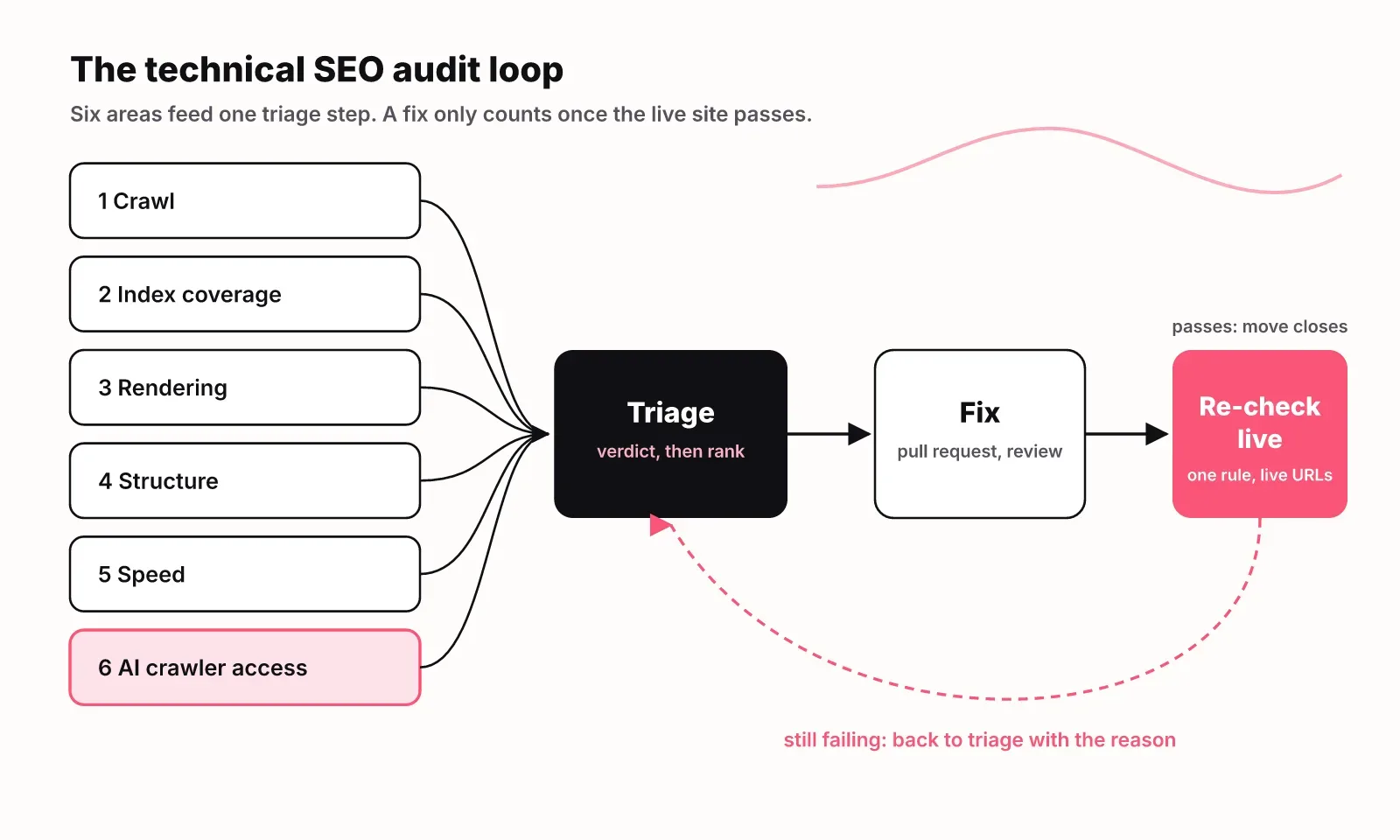
A technical SEO audit covers six areas: crawl, index coverage, rendering, site structure, speed and AI crawler access. The first five appear in every serious technical SEO checklist. The sixth is newer, and it is where many sites now lose visibility without noticing.
| Area | What to check | Where to check it | Common failure |
|---|---|---|---|
| Crawl | Status codes, redirects, robots.txt, broken internal links | A site crawler | Links to pages that return 404 |
| Index coverage | Which pages Google indexed and why others were excluded | Search Console page indexing report | Important pages excluded as duplicates |
| Rendering | Whether the main text is in the server HTML | View source, a no-JavaScript fetch | Empty shell filled in by scripts |
| Structure | Internal links, click depth, orphan and dead-end pages, canonicals | A site crawler | Key pages buried or unlinked |
| Speed | Core Web Vitals from real users | Search Console, PageSpeed Insights | Slow interaction on mobile |
| AI crawler access | robots.txt groups for AI bots, firewall rules, noindex | robots.txt, CDN settings, server logs | Bot rules that block AI search crawlers |
Small signal errors are common at web scale. In 2024, 8.43% of desktop pages and 7.40% of mobile pages failed Lighthouse's valid robots.txt check, according to the Web Almanac 2024 SEO chapter. The same chapter found canonical tags on 65% of mobile pages and 69% of desktop pages, so roughly a third of pages leave duplicate handling to Google's guess.
Conflicting directives are rarer but nastier. About 0.4% of pages set both a meta robots tag and an X-Robots-Tag header, per the Web Almanac 2025 SEO chapter. When the two disagree, the most restrictive one wins, and the person editing the HTML often has no idea the header exists.
How to run a technical SEO audit, step by step
Run a technical SEO audit in seven steps: set scope, crawl, compare the crawl with the index, check rendering, check structure, check speed, then check AI crawler access. Each step feeds the triage that follows.
- Set scope. List the pages that earn money or traffic: home, pricing, product, top articles, comparison pages. Every later finding gets weighed against this list.
- Crawl the site. Use a crawler that follows internal links from the home page and records status codes, titles, canonicals, robots directives and word counts. Include your XML sitemap as a second seed, so you catch pages that exist in the sitemap but nowhere in your navigation.
- Compare the crawl with index coverage. Open the page indexing report in Search Console. Pages you care about that are "crawled, currently not indexed" or "duplicate without user-selected canonical" are your first real leads. Pages in the index that you never meant to publish are the second.
- Check rendering. Fetch your key templates with JavaScript off and look for the main text. If the server sends a shell and scripts fill it in, Google may render it later, but many other crawlers will see a blank page.
- Check structure and the head. Look for orphan pages, dead ends with almost no links out, redirect chains and broken internal links. Validate the head too: invalid elements there can end parsing early, so tags after them get ignored. The Web Almanac 2024 found img tags in the head on 29% of desktop pages and div tags on 11%.
- Check speed with field data. In 2024, 48% of mobile sites passed the Core Web Vitals assessment, with pass rates of 59% for Largest Contentful Paint, 74% for Interaction to Next Paint and 79% for Cumulative Layout Shift (Web Almanac 2024). Big sites are not safe either: only 53% of the top 1,000 websites had a good INP score on mobile, against 74% across all sites (Web Almanac 2024 Performance). Use the real-user numbers in Search Console, not a single lab run from your laptop.
- Check AI crawler access. This gets its own section below, because it fails in places a normal crawl never looks.
If you want a quick first pass on a single page before setting up a crawl, LogNorm's free SEO checker checks titles, meta tags and common on-page issues. A whole-site audit needs a crawler. The item-by-item checks belong in our SEO audit checklist, which covers 30 checks in the order to run them.
How to audit AI crawler access
To audit AI crawler access, check four layers in order: robots.txt rules per AI crawler, CDN and firewall bot rules, whether the main text is in the server HTML, and whether noindex directives conflict. A page can be indexable by Google and still invisible to ChatGPT, Claude or Perplexity, so audit this separately from Google indexing.
Start with robots.txt. AI companies run several crawlers with different jobs, and each one follows the group that names it, ignoring the wildcard group whenever its own group exists. The ones to look for:
| Crawler | Operator | What it does |
|---|---|---|
| OAI-SearchBot | OpenAI | Fetches pages for ChatGPT search results |
| GPTBot | OpenAI | Collects pages for model training |
| ChatGPT-User | OpenAI | Fetches a page when a user asks ChatGPT to |
| ClaudeBot, Claude-SearchBot | Anthropic | Training and search fetching for Claude |
| PerplexityBot | Perplexity | Indexes pages for Perplexity answers |
| Google-Extended | A control token for Gemini training, not a separate crawler |
Decide per crawler. You can block training crawlers and still allow search crawlers, and the search crawlers are the ones that fetch pages to cite in answers. Write that decision down in a commented section of robots.txt:
# AI search crawlers: allowed, so answers can cite us
User-agent: OAI-SearchBot
User-agent: Claude-SearchBot
User-agent: PerplexityBot
Allow: /

# Training crawlers: our call, reviewed quarterly
User-agent: GPTBot
Disallow: /private/
On lognorm.com, LogNorm's GEO audit found that 14 of 14 AI crawlers it checks had no rule of their own, from OAI-SearchBot to Bytespider. Nothing was blocked, because the wildcard group allows everything. It was still flagged, as a low-severity notice, because the site's intent was undocumented: a future edit to the wildcard group would silently change AI access too.
Next, check the layer robots.txt can't see. CDN and firewall bot protection can challenge or block AI crawlers that robots.txt allows. Look at your CDN's bot settings and your server logs for AI user agents getting 403 responses or challenge pages.
Then check rendering again with AI crawlers in mind. LogNorm's GEO audit treats missing server-rendered text as critical, because most AI crawlers don't run JavaScript: text that only arrives through scripts may as well not exist for them. Server-render or pre-render the pages you want quoted.
Finally, check for noindex in both places: the meta robots tag and the X-Robots-Tag header. LogNorm's site and GEO audit checks robots rules for named AI crawlers, server-rendered text, noindex directives and agent readiness files such as llms.txt in the same run as the technical SEO checks.
How to prioritise audit findings
Prioritise audit findings in two passes. First give every finding a verdict: real, false positive, noise or intended. Then rank only the real ones by severity, the number of pages affected and how important those pages are. Skipping the first pass is how teams spend a sprint fixing things that were never broken.
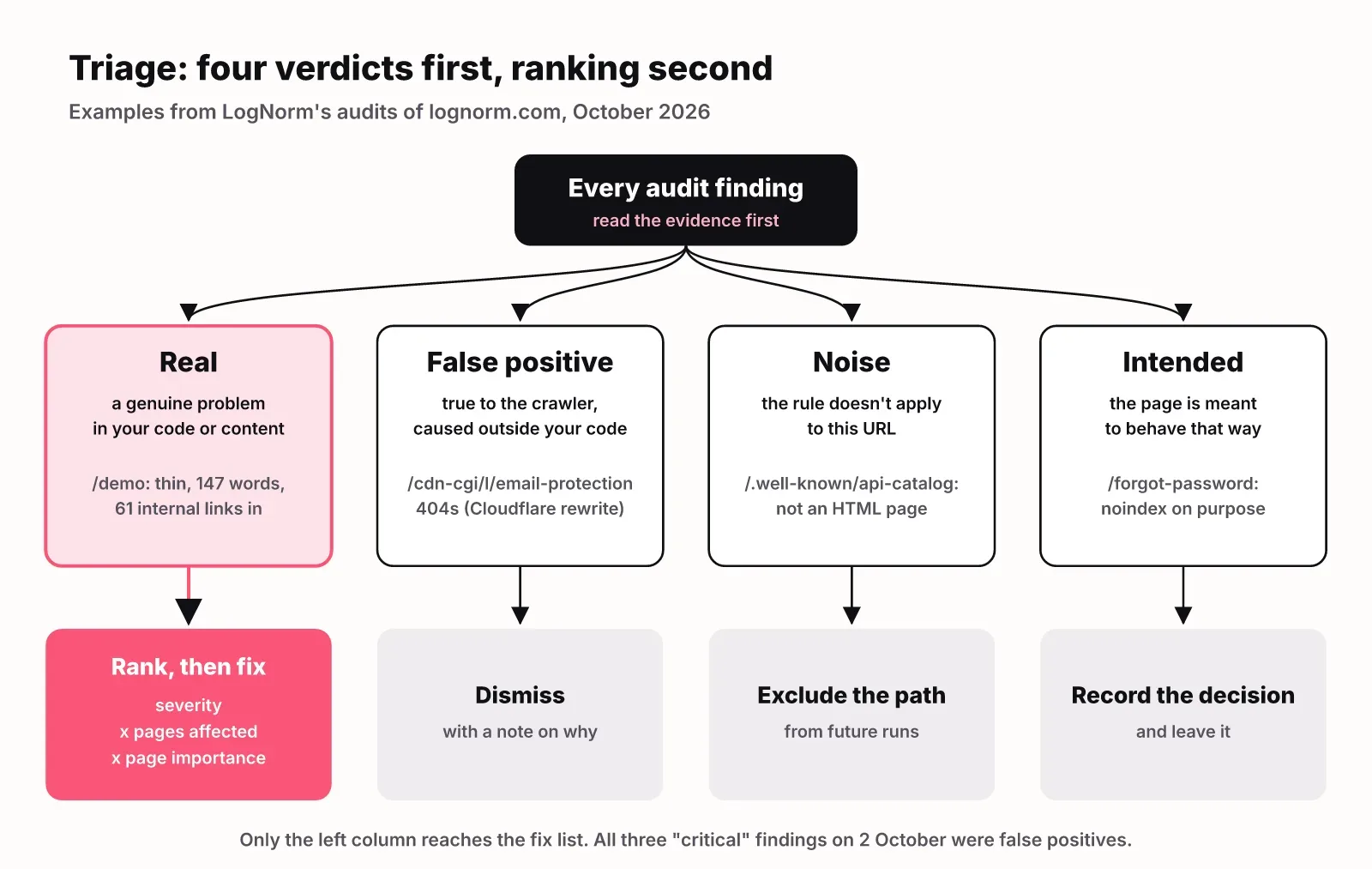
The four verdicts:
- Real: the crawler saw a genuine problem in your code or content. Rank it.
- False positive: the crawler saw something true, but the cause is outside your code, such as a CDN rewriting your HTML. Dismiss it with a note.
- Noise: the rule doesn't apply to this URL, such as an HTML rule run on a file that isn't HTML. Exclude the path.
- Intended: the page is meant to behave that way, such as a noindexed account page. Record the decision.
Here is how that worked on lognorm.com. LogNorm's audit on 2 October 2026 crawled 66 pages and scored 89 out of 100. On a first read, three critical findings looked urgent: broken internal links on /privacy and /terms, both pointing at /cdn-cgi/l/email-protection, which returned a 404.
That path comes from Cloudflare's Email Obfuscation feature. It rewrites mailto links in the served HTML so scrapers can't harvest addresses. The source code still has a normal mailto link, and browsers with JavaScript decode it. A crawler sees a link to a 404. The fix an eager agent might make, deleting the email links, would have made the pages worse. You can read the full walkthrough of that audit, including how the moves were dismissed.
| Finding | Pages | Verdict | What happens |
|---|---|---|---|
| Broken links to /cdn-cgi/l/email-protection | /privacy, /terms | False positive (CDN rewrite) | Dismiss with a note |
| 404 at /cdn-cgi/l/email-protection | 1 URL | Same cause | No code change |
| Missing title, H1, meta, canonical; thin | /.well-known/api-catalog | Noise (a machine-readable file, not HTML) | Exclude the path |
| noindex, and little text without JavaScript | /forgot-password (8 October run) | Intended (account page) | Record and leave |
| Thin content on a page with many inlinks | /demo | Real | Fix in the repo |
Two things in that table matter more than the specific URLs. Severity labels came from the rule, not from your site, so the "critical" findings were the least real. And the one real fix was a "warning": /demo had 147 words in that run and 61 internal links pointing at it. A page the whole site links to that doesn't deliver on its title is worth more of your week than any of the critical rows.
Once you have the real list, rank it. A simple order that holds up:
- Anything blocking indexing or crawling of money pages.
- Template-level issues that affect many pages at once.
- Issues on pages with the most internal links or traffic.
- Single-page cosmetic issues, such as a title a few characters too long.
When fixes compete with content and other growth work for the same hours, rank them against that work too, not only against each other. That is the idea behind a ranked weekly plan: one list, where a missing canonical on your pricing page and a new comparison article are compared head to head.
How to fix what the audit finds
Fix technical SEO issues at the source: the template, component or config that produced them, not page by page. One change to a layout component can close the same finding on 40 pages, and it stays fixed when someone adds page 41.
Each kind of issue has a natural owner:
| Issue type | Where the fix lives | Who usually fixes it |
|---|---|---|
| Missing or duplicate titles, metas, canonicals | Page templates, CMS fields | Developer or coding agent |
| Robots rules, redirects, headers | robots.txt, server or CDN config | Developer |
| Rendering problems | Framework config (SSR or SSG) | Developer |
| Thin or overlapping pages | Content | Marketer or writer, reviewed by a person |
| Speed | Images, scripts, hosting | Developer |
This is where coding agents earn their place. Claude Code, Codex and Cursor can read your codebase, find the component that renders a page, make the change and open a pull request. What they lack on their own is SEO context: which finding is real and which matters most. Give them the triaged, ranked list, not the raw export.
In LogNorm, each finding becomes a move with its evidence attached. An agent connected over MCP claims the move, posts a plan, edits the code and opens a pull request, then comments with the file path and the PR link. You review and merge it like any other change. Nothing ships without your merge. If you want to set this up, Claude Code for marketing walks through the workflow, and the AI SEO agent page explains how audit, fix and re-check connect.
Record the findings you dismiss as carefully as the ones you fix. A note that says "Cloudflare email obfuscation, not a broken link" saves the next person, or the next agent, from reopening it on the next run.
How to re-check fixes and how often to audit
Re-check a fix by fetching the live page after deploy and re-running the rule that flagged it. Merging a pull request is not proof: caching, a CDN rule or a second template can keep the old behaviour on the live site.
You don't need to re-run the whole audit for this. Re-test only the affected URLs against the one rule. In LogNorm that step is called validate_fix: it re-fetches the pages, re-runs that rule on the live site and posts a count on the move. The move closes only when every page passes. If one still fails, it stays open with the reason.
How often to audit depends on how often your site changes:
- Run a full crawl at least monthly on a site that ships weekly.
- Run one after every migration, redesign, framework upgrade or CDN change.
- Watch Search Console's indexing and Core Web Vitals reports continuously, since they report Google's view, not your crawler's.
Compare each run with the last one, not with zero. On lognorm.com, a later run on 8 October scored 91, and the same Cloudflare findings appeared again. That is expected for a false positive that lives in the CDN, and it is why the dismissal note matters.
This guide is the hub of our technical SEO audit series. The SEO audit checklist with 30 checks is coming next, followed by guides to noindex and to crawl budget.
FAQ
What is an SEO audit?
An SEO audit is a review of how well a website can be found in search. It covers technical health, on-page content, links and competition. A technical SEO audit is the part that checks whether crawlers can reach, render and index your pages.
How often should you do an SEO audit?
Run a technical crawl at least monthly if you ship changes every week, and always after a migration, redesign or CDN change. A full SEO audit with content and competitors fits a quarterly rhythm for most startups.
How long does an SEO audit take?
The crawl is the fast part. Most of the time goes into triage: checking each finding against the page, deciding whether it is real and ranking what is left. The bigger and more templated the site, the more one finding repeats, so triage time grows with the number of distinct issues rather than the number of pages.
How much does an SEO audit cost?
A self-run audit costs the tool subscription and your team's time. Agency audits are priced per project and vary with site size and depth. Either way, the cost that matters is the fixing, so judge an audit by how short and well-ranked its fix list is.
What are common mistakes to avoid during an SEO audit?
The most common mistake is trusting severity labels without reading the evidence, which leads to fixing false positives. Others are auditing without a list of important pages, fixing page by page instead of at the template, and never re-checking the live site after deploy.
How do you audit technical SEO issues that stop AI crawlers from indexing content?
Check robots.txt for groups that name AI crawlers such as OAI-SearchBot, GPTBot, ClaudeBot and PerplexityBot. Then check CDN and firewall bot rules, whether your main text is in the server HTML without JavaScript, and whether a noindex directive sits in the meta robots tag or the X-Robots-Tag header.
What are the benefits of regular SEO audits?
Regular audits catch regressions while they are small, such as a deploy that adds noindex to a template or a redirect chain after a URL change. They also give you a baseline, so you can tell whether a fix or a release moved the numbers.