Agentic SEO: Let Your Coding Agent Fix What the Audit Finds
Agentic SEO explained with a real audit: how a coding agent triages findings, fixes the code and lets LogNorm re-check the live site before closing.



Agentic SEO is SEO where an AI agent takes ranked work from an audit, makes the change in your code, and has the result checked on the live site, while people make the judgement calls. This post defines it in plain terms, then walks through one real audit of lognorm.com from 2 October 2026: what it found, what we dismissed, what we kept, and how the loop closes.
What agentic SEO means
Agentic SEO means an agent does the SEO work and proves it, instead of handing you a report. The loop has four steps: find the issue, rank it against everything else, fix it, then verify the fix on the live page.
Traditional SEO runs the same steps by hand. Someone exports an audit, picks what matters, files a ticket, and checks weeks later, if at all. An AI writing tool covers a slice of the middle: it writes text you paste somewhere.
The agent in agentic SEO is often the coding agent you already use. Claude Code, Codex and Cursor can read a codebase, edit a template and open a pull request. What they lack is SEO context: which issue matters, and whether the fix worked. That gap is where the rest of this post lives.
Why the agent needs an audit and a checker
A coding agent on its own is good at edits and poor at knowing which edits matter or proving they worked. Research on agent evaluation found that frontier coding assistants without domain-specific evaluation knowledge reached only a 30% execution success rate. On a large refactoring benchmark, the best model resolved 41.2% of tasks.
Those numbers are about general code work, but the lesson carries over. An agent should not decide alone what to fix, and it should not mark its own homework. So agentic SEO splits the jobs:
- The audit decides what is wrong, page by page, with evidence.
- The ranking decides what goes first.
- The coding agent makes the change in your repo.
- People review the change and make calls the data can't.
- A separate check re-fetches the live page and confirms the fix.
In LogNorm, the site audit does the first two, your agent does the third, and LogNorm's re-check does the last.
The audit: 66 pages, 89 out of 100
Our audit of lognorm.com on 2 October 2026 crawled 66 pages, up from 39 in the previous run, and scored 89 out of 100. The score starts at 100 and loses points for each failing rule, weighted by severity and by the share of pages affected.
Three groups of findings stood out:
- Three critical findings: broken internal links on /privacy and /terms, and a 404 at /cdn-cgi/l/email-protection.
- Six findings on /.well-known/api-catalog: missing title, H1, meta description and canonical, thin content, and few internal links out.
- Thin content on /demo: 147 words, with 61 internal links pointing at it.
Each finding becomes a move with its evidence attached: the rule, the affected URLs and how to fix it. Read cold, the critical findings look urgent. They turned out to be the least real.
Step 1: read the findings before touching code
The first thing an agent does with a move is read the evidence, not open an editor. Both broken-link findings pointed at the same target: /privacy and /terms each link to /cdn-cgi/l/email-protection, and that URL returns a 404.
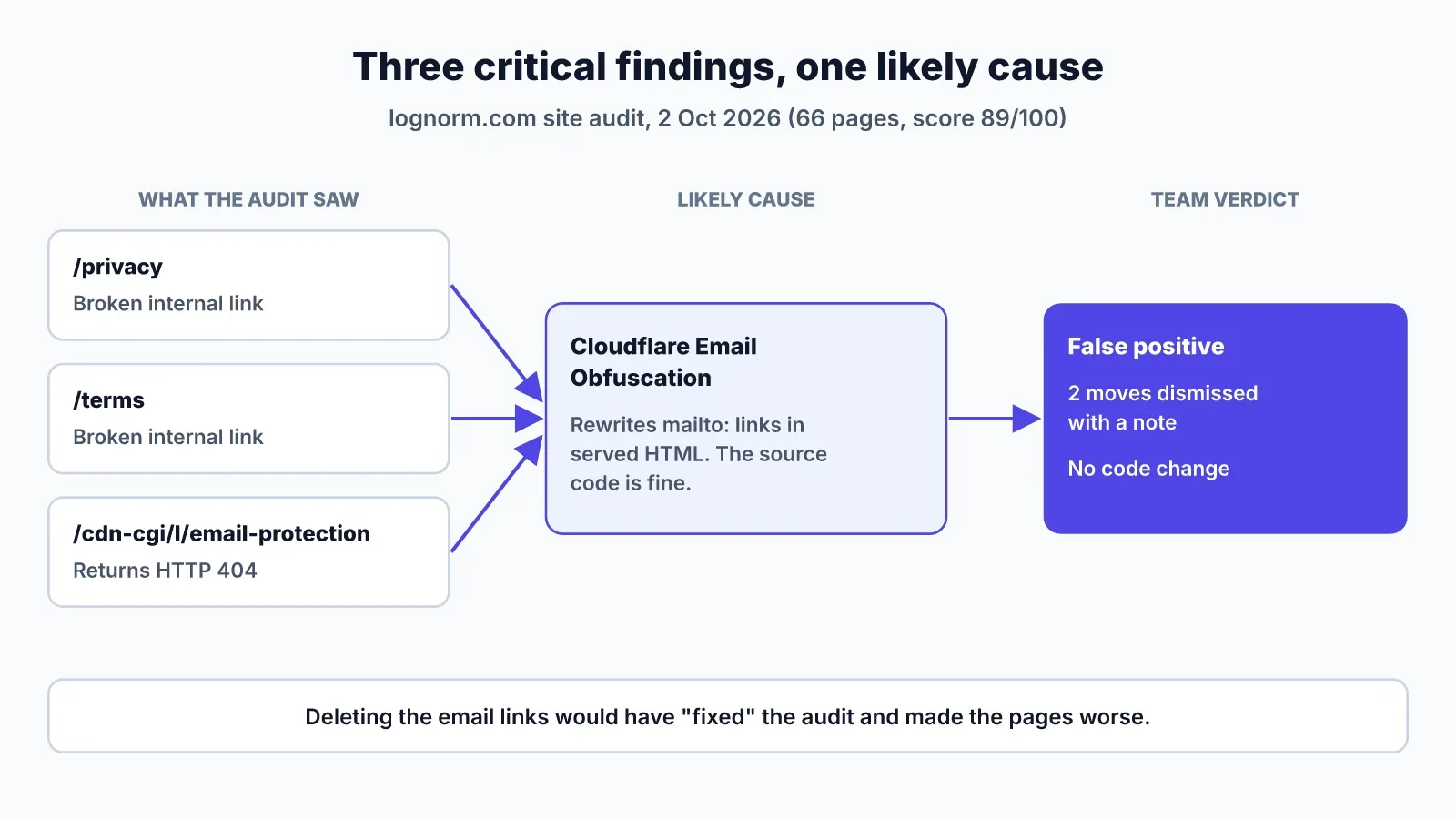
That path is a giveaway. Cloudflare's Email Obfuscation feature rewrites mailto: links in served HTML so scrapers can't harvest addresses, and it routes them through /cdn-cgi/l/email-protection. Your source code still has a normal mailto: link. Browsers with JavaScript decode it. A crawler sees a link to a page that returns 404.
So all three critical findings trace to one likely cause, and none of them is a broken link in our code. The team judged it a false positive and dismissed the two moves with a note explaining why. An agent that "fixed" this by deleting the email links would have made the pages worse.
This is the step most agentic SEO pitches skip. The audit is right that the crawler saw a 404. The judgement is about whether that matters, and that call belongs to a person, recorded on the move so the next run doesn't relitigate it.
Step 2: separate noise from real fixes
Six of the findings were noise, because /.well-known/api-catalog is not a web page. It is a machine-readable file defined by RFC 9727 that lists our APIs and agent discovery files. It has no title, H1 or meta description because it isn't HTML.
Adding a title tag to it would be wrong. The right comment on that move says what the file is and why the rules don't apply, so a person can close it or exclude the path from future audits.
The same audit also flagged /sign-in as thin at 45 words, with LogNorm itself unsure. A sign-in page is meant to be short and isn't meant to rank. That is another call for a person, not a task for the agent.
Here is how we sorted every finding from the run:
| Finding | Pages | Verdict | What happens |
|---|---|---|---|
| Broken links to /cdn-cgi/l/email-protection | /privacy, /terms | False positive (Cloudflare) | Moves dismissed with a note |
| 404 at /cdn-cgi/l/email-protection | 1 URL | Same cause | No code change |
| Title, H1, meta, canonical, thin, few links | /.well-known/api-catalog | Noise (not HTML) | Comment and exclude |
| Thin content, 147 words, 61 inlinks | /demo | Real | Fix in the repo |
Step 3: the real fix on /demo
The /demo page is the finding worth fixing: 147 words, and 61 internal links point at it. That much internal linking means the site treats it as important, and the page doesn't deliver on its title. Thin content is one of LogNorm's AI-judged rules, so the first task is to read the page and agree with the call. Here we do.
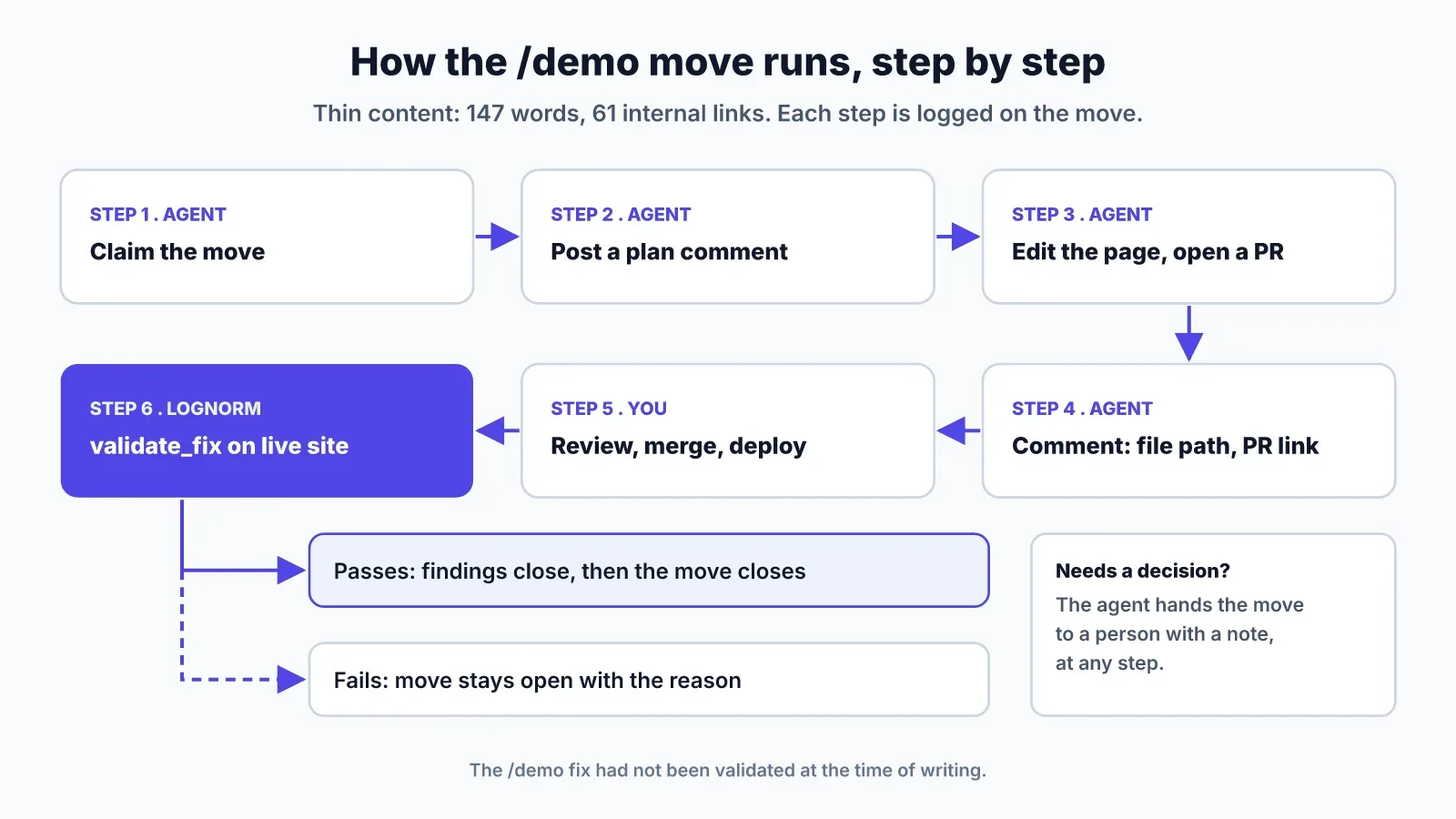
When your coding agent works this move, each step leaves a record on the move, credited to the agent by name:
- It claims the move, so no other agent or person works it at the same time.
- It posts a plan comment: which file renders /demo, what the page will add (what the demo covers, who it's for, what happens after booking), and what it won't touch.
- It edits the page in your repo and opens a pull request.
- It comments again with the file path and the PR link, so a reviewer can go straight to the diff.
- If a call needs a person, such as the exact claims on a sales page, it hands the move over with a note.
You review the pull request the way you review any code change. Nothing ships without your merge.
At the time of writing, this fix has not shipped yet. The steps above are how the loop runs; the next section is the step that will close it.
Step 4: validate_fix checks the live site
Once the change is deployed, the agent calls validate_fix on the move. LogNorm re-fetches the affected pages and re-runs that one audit rule on the live site, without re-running the whole audit. Findings that now pass close. The move closes when everything passes.
The result is a count, posted on the move. On a missing meta description move it reads like "38 of 38 fixed". If /demo still fails the thin content check, the move stays open with the reason, and the agent or a person picks it up again.
This is the part that makes the loop agentic rather than automated. The agent doesn't decide it is done. The live site does. You can read how validating a fix works in the docs, including which rules LogNorm measures and which it judges with AI.
The /demo move has not been validated. When it is, the result will show on the move, not in this post.
Set up the loop in your own repo
You can run this loop with Claude Code in two steps. First add LogNorm's MCP server:
claude mcp add --transport http --scope user lognorm https://lognorm.com/api/mcpThen type /mcp, choose lognorm, Authenticate, and click Allow in the browser. Sign-in is OAuth with PKCE, so there are no API keys to copy. You can also paste "Connect to LogNorm: follow https://lognorm.com/connect.md" into Claude Code, Codex or Cursor and it does the setup for you.
The agent joins your workspace as a named teammate, such as "Kuldeep's Panda", as an editor or contributor. Reading is always on. Each other permission can be switched off: work on moves, write drafts, re-check fixes, add to the Company Brain, run research. It can't publish content, change billing, members or integrations, or permanently delete anything. You don't need an AI key, because the agent's own plan does the thinking, while LogNorm runs the audits, ranking and re-checks.
Then ask it to work the top fix move in your plan. The full permission list is on the page to connect your coding agent. If you're choosing between tools first, our comparison of SEO agents sorts them by where their changes land. For the wider workflow, start with Claude Code for marketing.
FAQ
How is agentic SEO different from an AI writing tool?
An AI writing tool produces text when you ask. Agentic SEO takes a ranked issue, changes your site or code, and gets the result checked on the live page. Writing can be one step inside it.
Does agentic SEO change or publish content without permission?
It depends on the tool. With LogNorm, code changes go through your own pull requests and merges, and content goes to review. Agents can't publish.
Does agentic SEO replace SEO professionals?
No. The lognorm.com audit shows why: three critical findings were most likely a CDN side effect, and six more were a non-HTML file. Deciding that took judgement. Agents take the edits and the follow-up checks.
How is it different from asking ChatGPT?
A chat assistant like ChatGPT works from what you give it in the conversation and can't change your site. An agent connected to LogNorm reads your audit, Search Console and keyword data, edits your repo, and asks LogNorm to verify the fix.
What does agentic SEO cost?
With LogNorm, your agent's thinking and writing run on the Claude or Codex plan you already pay for. Re-checks, research runs and keyword lookups use LogNorm credits, within your spend cap.