15 Search Engine Optimization Free Tools for Bootstrapped Startups
Search engine optimization free tools for bootstrapped startups: the 7 every startup needs, 8 for specific jobs, their free limits and how to use them.


The best search engine optimization free tools for a bootstrapped startup are Google Search Console, Google Analytics 4, Bing Webmaster Tools, PageSpeed Insights, Screaming Frog, Ahrefs Webmaster Tools and Google Keyword Planner. Those seven cover every core SEO job for $0. Add a handful of single-job tools for metadata, schema, robots.txt and prioritising, and you can run a real SEO program for months before a paid subscription earns its cost.
This list has 15 tools, not 100. Each one does a job the others don't, each has a free tier you can actually use, and six of them are LogNorm's own free tools, labelled as ours. If you are still deciding what a paid toolkit should include, read our guide on how to choose search engine optimization tools. This post is about what you can do today without a card.
The free SEO stack at a glance
A complete free SEO stack needs one tool per job: indexing data, traffic data, a crawler, a speed test, a backlink source, a keyword source and a way to rank the work. Here are all 15 with what you get free.
| # | Tool | Job | What's free | Limit to know |
|---|---|---|---|---|
| 1 | Google Search Console | Indexing, queries, clicks | Everything | Your own verified sites only |
| 2 | Google Analytics 4 | Traffic and conversions | Everything for most startups | Needs a tag on your site |
| 3 | Bing Webmaster Tools | Bing indexing, backlinks, IndexNow | Everything | Your own verified sites only |
| 4 | PageSpeed Insights | Core Web Vitals, Lighthouse | Everything | One URL per test |
| 5 | Screaming Frog SEO Spider | Desktop site crawl | Full crawler | 500 URLs per crawl |
| 6 | Ahrefs Webmaster Tools | Site audit, backlinks | Audit and backlink data | Your own verified sites only |
| 7 | Google Keyword Planner | Keyword demand | Keyword ideas and volumes | Needs a Google Ads account |
| 8 | Google Trends | Seasonality, rising topics | Everything | Relative interest, not volumes |
| 9 | Google Rich Results Test | Structured data validation | Everything | One URL or snippet at a time |
| 10 | LogNorm website SEO checker (free growth scan) | Quick site audit with a score | 15 checks, growth score | 25 pages per scan |
| 11 | LogNorm title and meta checker | Pixel-width SERP preview | Everything | One page at a time |
| 12 | LogNorm robots.txt checker | Crawler access, including AI bots | 15 crawlers checked | Per-visitor rate limits |
| 13 | LogNorm schema generator | JSON-LD markup | 8 schema types | Runs in your browser |
| 14 | LogNorm llms.txt generator | llms.txt for AI assistants | Generate and validate | Per-visitor rate limits |
| 15 | LogNorm RICE and ICE calculator | Ranking SEO work | Everything, CSV export | Runs in your browser |
Nothing on this list asks for a card. The Google, Bing and Ahrefs tools need you to verify site ownership. LogNorm's free tools need no account at all.
The 7 SEO tools for startups that cover every core job
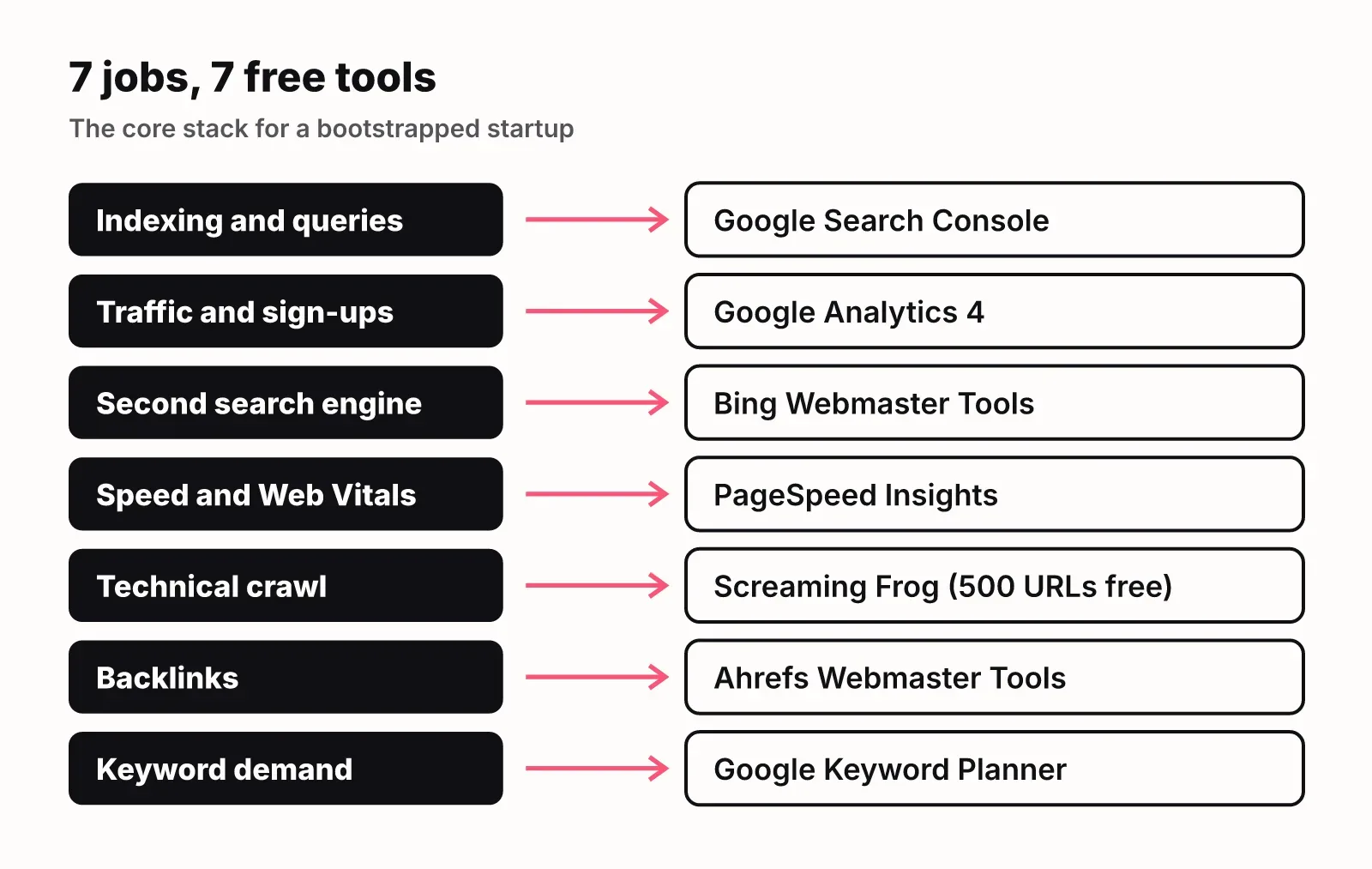
The seven SEO tools a startup actually needs are the ones that tell you how search engines see your site, what people search for, and what breaks. Everything else is a refinement. Set these up in your first week.
1. Google Search Console
Google Search Console is the one free SEO tool you cannot skip, because it is the only place Google tells you directly which pages it indexed and which queries you show up for. You see impressions, clicks, average position and click-through rate per query and per page, plus indexing errors and Core Web Vitals field data.
Use it weekly. Sort the Performance report by impressions and look for pages sitting in positions 8 to 20: they already rank, and a better title or a section that answers the query can move them onto page one. Use the URL Inspection tool to request indexing after you publish or fix a page. If you later want those queries turned into ranked tasks, you can connect Search Console to LogNorm.
2. Google Analytics 4
Google Analytics 4 answers what Search Console can't: what organic visitors do after they land. Search Console stops at the click. GA4 shows whether those visitors sign up, read a second page or leave.
For a startup, set up one conversion event (sign-up or demo request) and filter by the Organic Search channel. That turns "we got more traffic" into "organic search brought in this many sign-ups this month", which is the number your SEO work should move.
3. Bing Webmaster Tools
Bing Webmaster Tools is Bing's version of Search Console, and it gives you more than its market share suggests. You get indexing reports, a site scan, keyword research on Bing data, a backlink report for your site and IndexNow support, which tells Bing about new and changed URLs the moment you publish.
If you already verified your site in Search Console, you can import it into Bing instead of verifying again.
4. PageSpeed Insights
PageSpeed Insights tests a URL's speed and Core Web Vitals on mobile and desktop, using real Chrome user data where it exists and a Lighthouse lab test where it doesn't. Run it on your home page, your pricing page and your most-visited blog post.
The bar is not as high as it looks. According to the HTTP Archive Web Almanac, the share of mobile sites passing Core Web Vitals rose from 36% in 2023 to 44% in 2024 and 48% in 2025. Passing still puts you ahead of the 52% of mobile sites that don't. Fix the issue PageSpeed lists first (usually an oversized hero image or render-blocking script) before anything cosmetic.
5. Screaming Frog SEO Spider
Screaming Frog is a desktop crawler that walks your site the way a search engine does, and the free version crawls up to 500 URLs. Most early-stage startup sites fit inside that limit, so you get a full technical audit for free.
It finds broken links, redirect chains, missing or duplicate titles and descriptions, noindex tags, canonical problems and thin pages. One fix to get right: when you remove a page, don't redirect it to your home page. Google treats those redirects as soft 404s, so redirect to the closest matching page or let it return a 404.
6. Ahrefs Webmaster Tools
Ahrefs Webmaster Tools gives you Ahrefs' site audit and backlink data for sites you own, free. It is the cheapest way to see who links to you and which of your pages earn links, a job neither Google tool does well.
The catch is the same as Search Console: verified sites only. You can't research competitors' backlinks or keywords with it. That limit is the first real reason startups pay for a suite, and we come back to it below.
7. Google Keyword Planner
Google Keyword Planner shows search demand straight from Google's ad data: keyword ideas from a seed term or a competitor URL, monthly volume and how competitive the term is for advertisers. You need a Google Ads account, but you don't need to run a campaign.
Accounts that don't spend usually see volume ranges (for example 1K to 10K) instead of exact numbers. For a startup choosing between ten topics, ranges are enough. You are deciding which topics have demand at all, not forecasting traffic to the visit.
8 free tools for specific jobs
The next eight tools each do one job the core seven don't. Add them when you hit that job, not before.
8. Google Trends
Google Trends shows how interest in a search term changes over time and by region, on a relative 0 to 100 scale. Use it to check whether a topic is growing or fading before you write about it, and to spot seasonality so you publish ahead of the peak. It does not give search volumes, so pair it with Keyword Planner.
9. Google Rich Results Test
Google's Rich Results Test checks a URL or a code snippet for structured data and tells you which rich results it is eligible for. Run it after you add schema markup, and again after any template change, because a broken JSON-LD block fails silently on the live site.
10. LogNorm website SEO checker (the free growth scan)
Our website SEO checker crawls up to 25 pages of your site, runs 15 checks from LogNorm's site audit and gives you a growth score out of 100 with the fixes listed worst first. It is the same scan as the free growth scan on our home page. No sign-up.
The checks cover status codes, broken links, titles, meta descriptions, H1s, noindex, thin content and speed. A quarter of the score is buyer-journey coverage: whether you have pages for comparisons, alternatives, use cases and pricing. A fast site with only a home page and a blog still scores low, because buyers can't find you at most stages of their search. Use it when you want a ranked starting list in a minute rather than a 500-row crawl export.
11. LogNorm title and meta description checker
The title and meta checker measures your title tag and meta description in pixels, the way Google lays them out, rather than counting characters. Type your text or fetch a live page and you see the width against desktop and mobile limits, a preview of the result and where it gets cut off. Titles full of wide letters like M and W get cut sooner than a character count suggests.
12. LogNorm robots.txt checker
The robots.txt checker fetches your robots.txt and tells you, for 15 crawlers including Googlebot, GPTBot, ClaudeBot and PerplexityBot, whether each may fetch your home page and any path you add. It quotes the exact line that decides. Run it before and after every robots.txt change; one stray Disallow can hide your whole site from AI assistants without touching Google.
13. LogNorm schema markup generator
The schema generator builds JSON-LD for eight types: FAQ, Organization, Article, Product, Software app, Local business, Breadcrumbs and HowTo. It checks Google's required and recommended properties and tells you which types still earn rich results. It runs in your browser, so nothing you type is sent to us. Paste the output into your page, then validate it with the Rich Results Test.
14. LogNorm llms.txt generator
The llms.txt generator reads your home page, robots.txt and sitemap, picks your key pages and writes an llms.txt file in the llmstxt.org format: your name, a one-line summary and sections of links with a note on each. You can edit it, download it and validate it or any existing file. It is a small job, but it is one no Google tool does, and it helps AI assistants find the pages that explain your product. Our guide to generative engine optimization covers where it fits.
15. LogNorm RICE and ICE calculator
The RICE and ICE calculator ranks a list of ideas as you type. RICE multiplies reach, impact and confidence, then divides by effort; ICE multiplies impact, confidence and ease on 1 to 10 scales. It runs in your browser, exports CSV and shares as a link. It is on this list because the other 14 tools produce findings, and something has to decide which finding you fix first.
Turn free tool output into a weekly SEO backlog
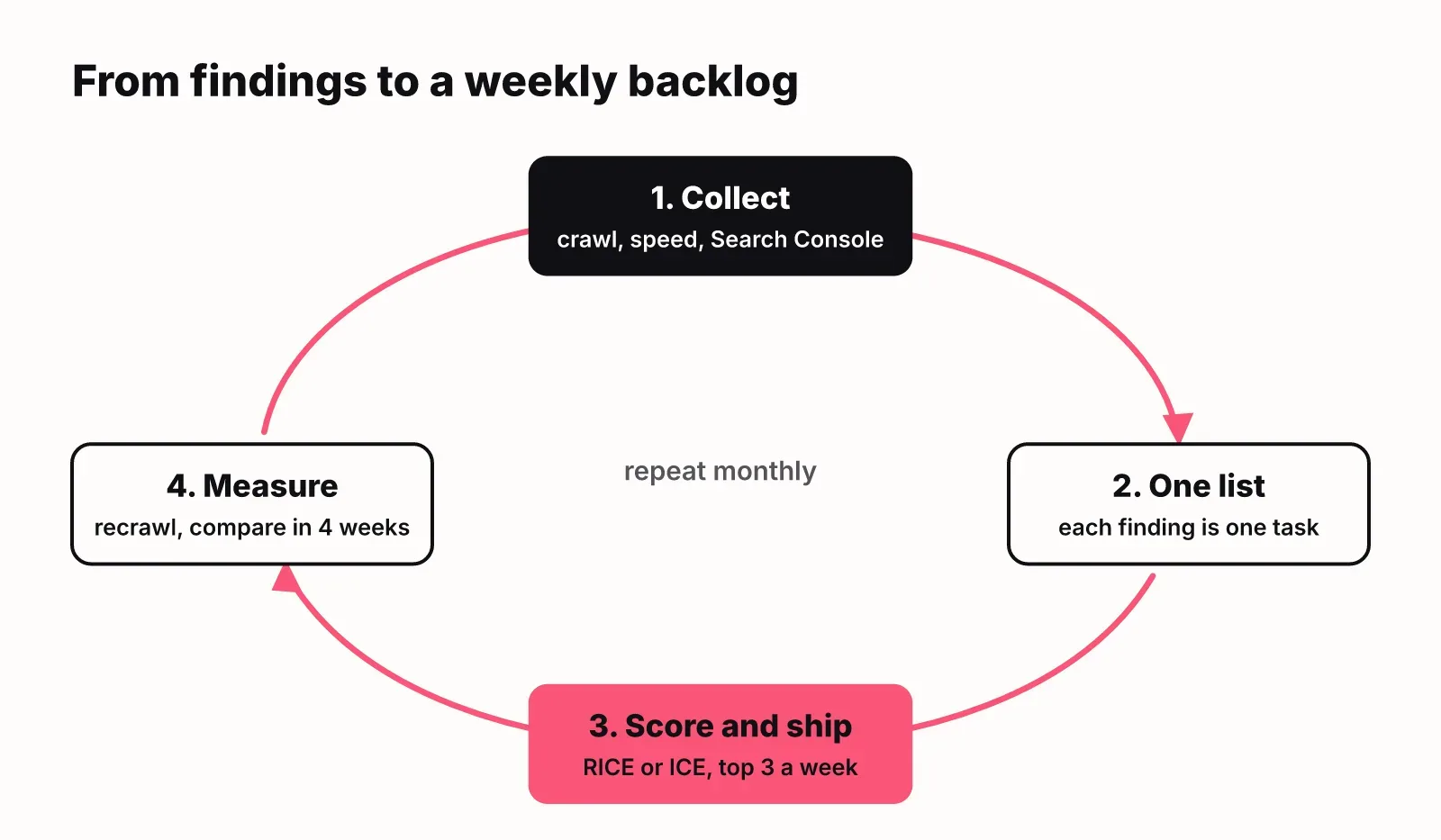
Free tools give you findings; a backlog turns findings into work. Without one, a bootstrapped team ends up with five browser tabs, a 400-row crawl export and no idea what to do on Monday. None of the pages that rank for this query cover this step, and it is the difference between collecting data and getting traffic.
A loop that works for a team of one or two:
- Once a month, run Screaming Frog (or the free growth scan), PageSpeed Insights on your top five pages, and the Search Console Performance report.
- Write every finding as one task in a single list: "Rewrite the title on /pricing", "Fix 12 broken links to /docs", "Write a page for the query we rank 11th for".
- Score each task in the RICE and ICE calculator. Use ICE when you can't estimate reach, which is most of the time early on.
- Ship the top three each week. Skip anything with a low score, even if a tool flags it red.
- After you ship, use URL Inspection in Search Console to request a recrawl, and note the date so you can compare clicks and position four weeks later.
Two rules keep it honest. Fix pages that already get impressions before you write new ones, because Search Console is telling you Google already considers them relevant. And don't fix a warning just because a tool raised it: a missing meta description on a page with no impressions can wait.
What free SEO tools can't tell you
Free SEO tools are built for one site, yours, and for one kind of search, the blue links. Three gaps show up as soon as you grow.
The first is competitors. Search Console, Bing and Ahrefs Webmaster Tools only show data for sites you verify, so you can't see which keywords a competitor ranks for or who links to them. That is the job Ahrefs and Semrush charge for, and it is why ChatGPT and Google's AI Overview recommend them when asked for growth tools for early-stage startups. They are worth paying for once you know which competitors and topics matter. Before that, they mostly produce more data.
The second is AI answers. Pew Research found that 58% of Google users ran at least one search in March 2025 that produced an AI summary, and SparkToro measured that only 360 of every 1,000 US Google searches send a click to the open web. No free tool on this list tells you whether ChatGPT, Gemini or Google AI Overviews mention your brand when a buyer asks about your category. The robots.txt checker and llms.txt generator make you readable to those systems; they don't measure whether you get named.
The third is prioritisation across everything at once. A spreadsheet and a RICE score work for 20 tasks. They get hard to keep honest at 200, across audits, keywords, competitors and AI answers, and nobody checks whether last month's fixes moved anything.
That last gap is what LogNorm is built for. It runs a full site and GEO audit, pulls in Search Console, does keyword research judged for your business, tracks how ChatGPT, Gemini and Google AI Overviews answer your buyers, and ranks every finding into a weekly plan of moves. Your team or your coding agent (Claude Code, Codex, Cursor) ships them, and LogNorm re-checks fixes on the live site and measures each shipped move at 28 and 90 days. There is a Free plan where you bring your own AI keys, and a 14-day Growth trial with 1,000 credits and no card if you want to start free. Stay on the free stack above until the backlog outgrows a spreadsheet; that is the honest signal to pay for anything.
FAQ
How do I do SEO for free?
You can do SEO for free with Google Search Console, a free crawler like Screaming Frog (500 URLs) and PageSpeed Insights. Fix what they find on pages that already get impressions, write pages for the queries Search Console shows you almost rank for, and rank the work with a simple score so you ship the most valuable fixes first.
Does Google have a free SEO tool?
Yes. Google Search Console is Google's free SEO tool, and it is the only source of Google's own data on your indexing, queries and clicks. Google also offers PageSpeed Insights, Google Analytics 4, Keyword Planner, Google Trends and the Rich Results Test for free.
What is the best free SEO tool?
Google Search Console is the best free SEO tool, because no other tool has Google's own data on which queries show your pages and which pages are indexed. If you can add only one more, add a crawler: Screaming Frog's free version or the free growth scan.
What are the best tools for an early-stage startup doing technical SEO?
For technical SEO at an early-stage startup, start with Search Console, Screaming Frog, PageSpeed Insights and a robots.txt checker that covers AI crawlers. Add Ahrefs or Semrush when you need competitor data. Add a growth engine like LogNorm when you need the findings from all of them ranked into one plan, fixed by your agents and measured after they ship.
How long does it take to see ranking improvements?
Technical fixes show up as soon as Google recrawls the page, which you can speed up with URL Inspection in Search Console; ranking changes take longer and vary by page and competition. Compare the same page's clicks and average position in Search Console over matching date ranges before and after the change, and give it at least four weeks before you judge it.
How do I check ranking changes after an SEO update?
Open Search Console's Performance report, filter to the page you changed, and use the date comparison to set the weeks before and after your change side by side. Look at impressions and average position first; clicks follow once the position improves.