Internal Linking Strategy for Small Sites
An internal linking strategy for sites with tens to a few hundred pages: hub-and-spoke links, anchor text, orphan pages and a monthly routine that fits.


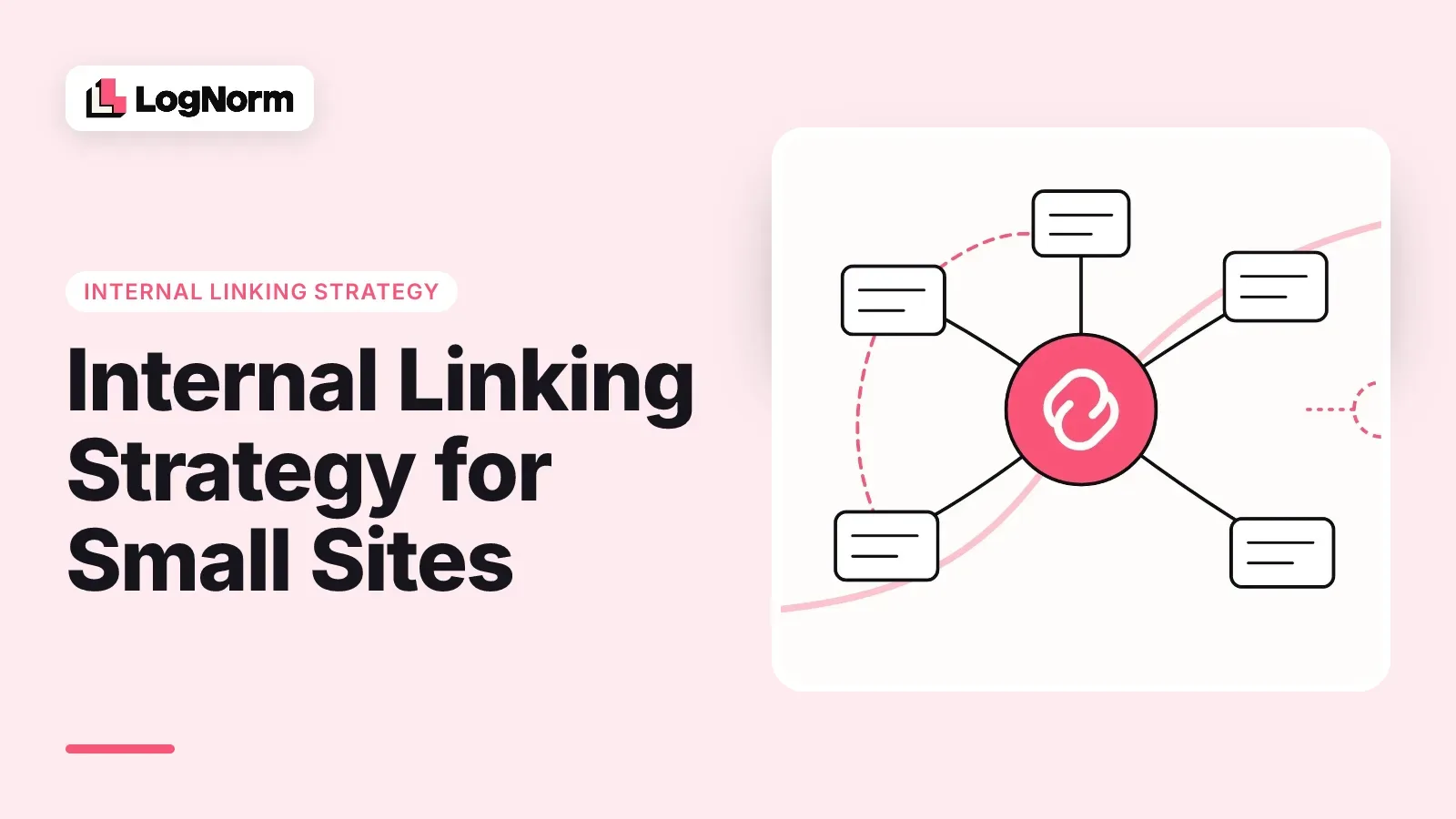
An internal linking strategy for a small site comes down to one rule and a short habit. The rule: every page you want found should get a link from at least one other page, using words that say what it is about. The habit: once a month, find the pages nobody links to and link them from the pages people already read.
This guide is for sites with tens to a few hundred pages: a SaaS marketing site, a startup blog, a docs section. You do not need link equity models or silo diagrams at that size. You need a clear structure, honest anchor text and a way to spot the pages that fell through the cracks.
Why internal links matter, according to Google
Internal links matter because they are how Google finds your pages and one of the ways it judges what each page is about. Google's link best practices say it plainly: "Google uses links as a signal when determining the relevancy of pages and to find new pages to crawl."
Discovery is the part small sites underrate. Google's SEO Starter Guide notes that "the vast majority of the new pages Google finds every day are through links." A sitemap helps, but a page that only exists in the sitemap gets no context from the rest of your site.
The same documentation sets the minimum bar: "Every page you care about should have a link from at least one other page on your site." That sentence is the whole baseline for this article. Everything below is about meeting it on purpose and then doing a bit better.
One technical condition sits underneath all of it. Google can only follow a link that is an HTML anchor element with an href attribute. Buttons that change the page with JavaScript, links built only from click handlers and menus that load after interaction may look fine to visitors and still be invisible to the crawler. If your site runs on a JavaScript framework, check that your navigation renders real links in the HTML.
The hub-and-spoke structure for a small site
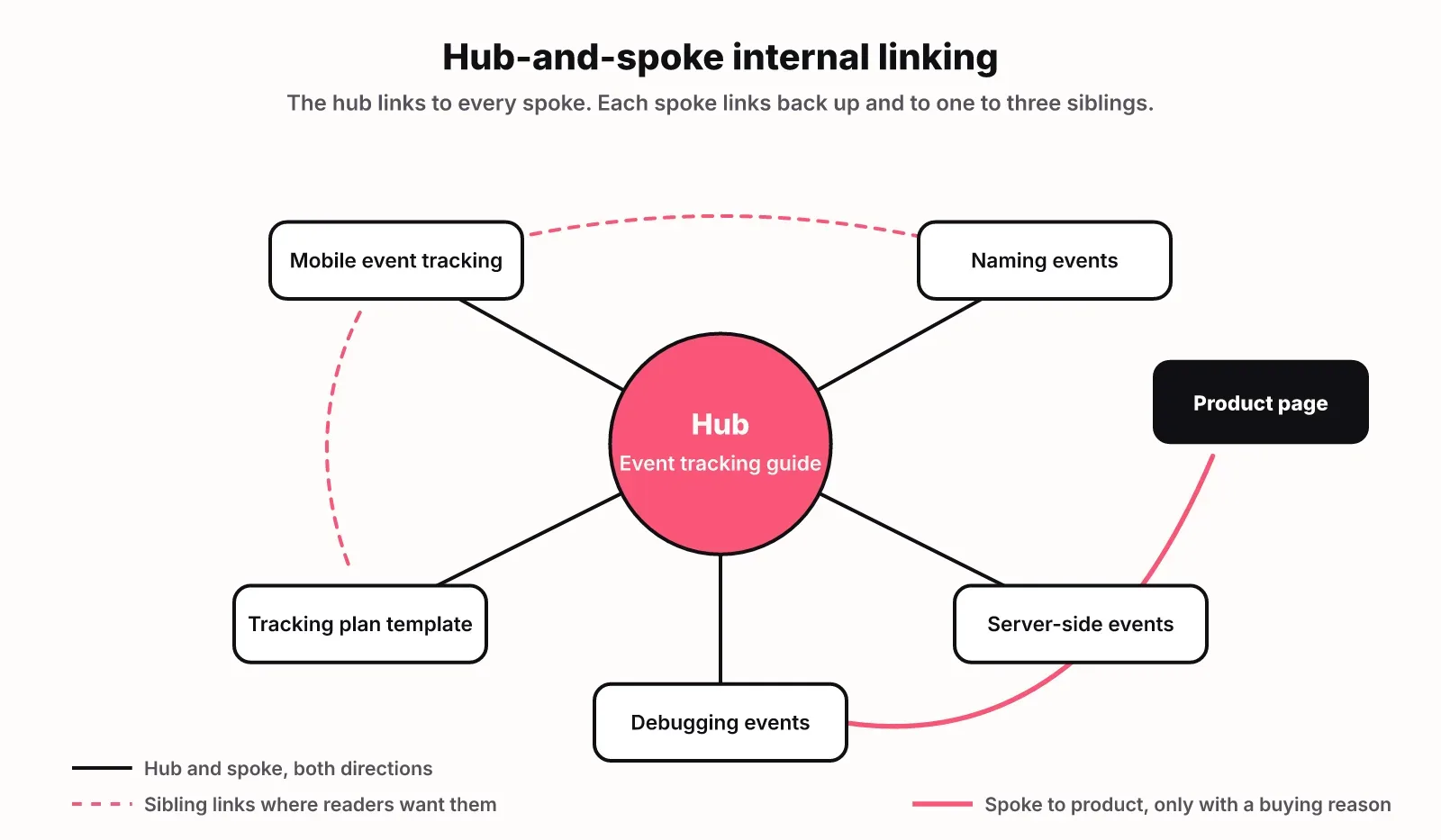
Hub-and-spoke linking means each topic you care about gets one hub page that links to every related article, and every article links back to its hub. On a small site, keep the hubs few: one for each topic you actually sell into.
Here is how to set it up:
- List the topics that map to what you sell. For an analytics product that might be dashboards, event tracking, retention and pricing. Skip topics that bring visitors who will never buy.
- Pick or write one hub per topic. It is a broad guide that answers the main question and points to the detailed articles.
- Link the hub to every spoke in that topic, in the body where each subtopic comes up, not only in a list at the bottom.
- Link every spoke back to its hub near the top, and to one to three sibling spokes where the reader would naturally want them.
- Link from spokes to the product or pricing page only where the reader of that spoke has a buying reason.
The structure gives Google a clear map of what each topic covers, and gives a reader a next step from any page. It also makes new articles easy to place: each one belongs to a hub, so you know where its first links come from. If you are still deciding which topics deserve a hub, our guide to SEO content strategy covers turning a keyword list into pages. Separate guides on topic clusters and pillar pages go deeper on planning the hubs themselves.
Avoid the opposite failure as well. A spoke that links to every other spoke turns the cluster into a mesh where no page stands out. Keep sibling links to the ones a reader would actually click.
Anchor text that tells readers and Google where they are going
Good anchor text describes the page it links to in a few words. Google's guidance asks for anchor text that is "descriptive, reasonably concise, and relevant to the page that it's on", and it lists "Click here to learn more" as an example of text that is too generic.
| Anchor text | Verdict | Why |
|---|---|---|
| click here | Bad | Says nothing about the target page |
| read more | Bad | Same problem, and often repeated many times on one page |
| our guide to event tracking | Good | Names the topic in natural words |
| event tracking for mobile apps | Good | Specific to the target page's angle |
| the best event tracking tool for SaaS startups in 2026 compared | Weak | Too long, reads like a keyword stuffed in a sentence |
| event tracking (on 40 different links to 40 different pages) | Bad | Same anchor to different pages blurs which one is about the topic |
Two habits keep anchors honest. First, write the sentence for the reader and then link the phrase that names the destination. Second, keep one anchor phrase pointing at one page. If "pricing analytics" links to three different articles across your site, you are telling Google three pages compete for the same idea.
You do not need exact-match keyword anchors everywhere. Variations that describe the page well are fine, and they read better.
Find orphan and weakly linked pages
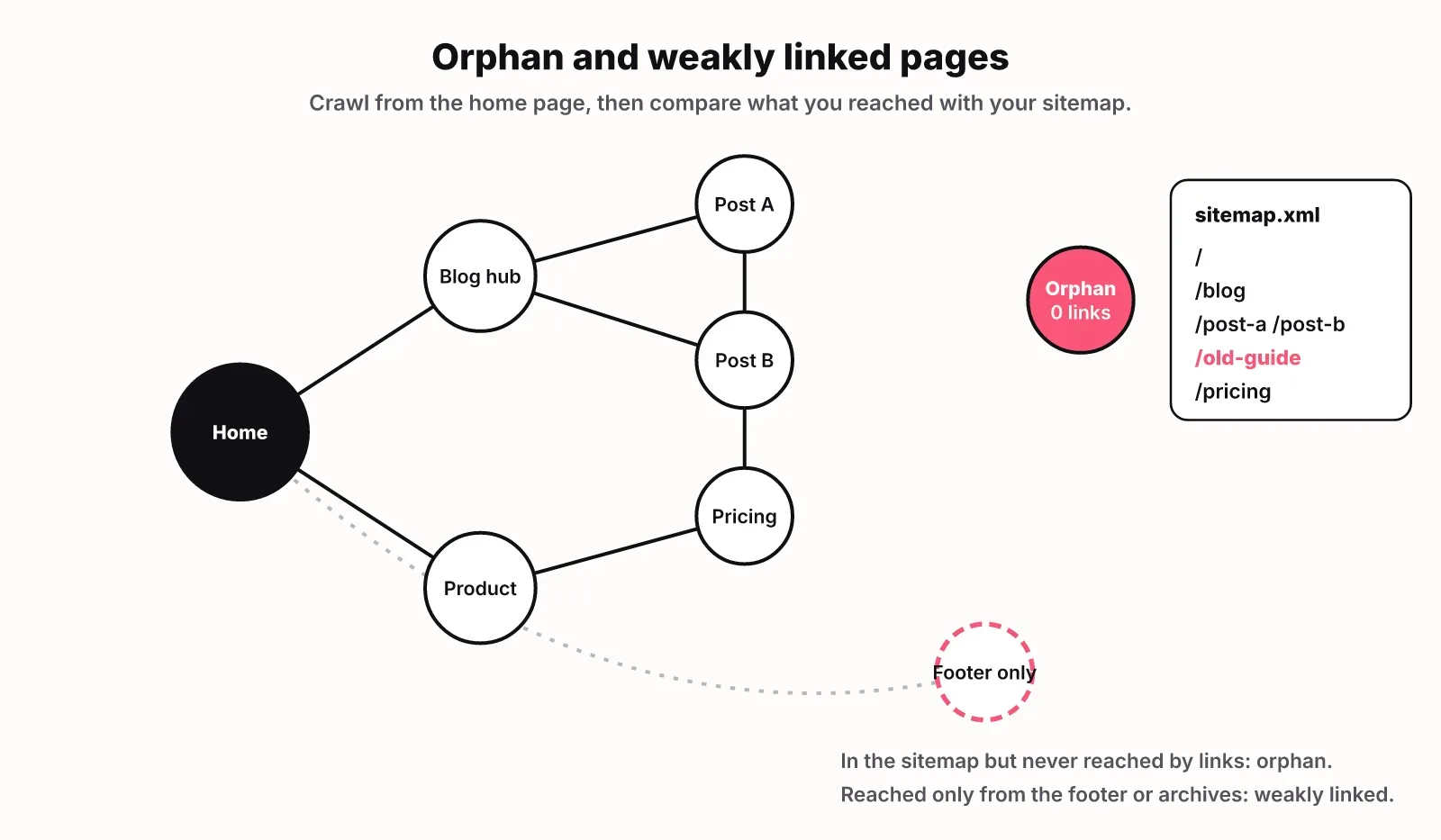
An orphan page is a page that exists on your site but receives no internal links from any other page. A weakly linked page receives only one, or only links from places with little context such as a footer, tag archive or paginated list. Both are common on small sites that publish steadily, because new posts get linked from the blog index and then slide off it.
Here is a way to find them without paid tools:
- Get a full list of your URLs from your sitemap or CMS export.
- Crawl the site starting from the home page with any crawler that reports inbound internal links per URL.
- Compare the two lists. Any URL in the sitemap that the crawler never reached, or reached with zero inbound links, is an orphan.
- Sort the crawled pages by inbound internal links, lowest first. Pages with one link, or with links only from navigation and archives, are weakly linked.
- Check depth. Pages you care about should be reachable in a few clicks from the home page. A product page buried five clicks deep gets less attention from crawlers and visitors.
Then decide for each one. If the page still matters, link it from its hub and from one or two related pages. If it is outdated or duplicates another page, redirect it to the better page and update the links that point at the old URL. Leaving it orphaned is the only bad option.
While you are in the crawl, fix broken internal links and links that point at redirects. A redirect still works, but every visitor and crawler pays an extra hop, and redirect chains build up over time. LogNorm's free SEO checker crawls up to 25 pages, flags broken links and includes internal linking in its score.
Link from pages that already get traffic
The fastest internal links to add are from pages that already get visits and impressions to pages that almost rank. Pages with traffic are crawled often and read by real people, so a link from them gets noticed quickly by both.
In Google Search Console, open the Pages report under Performance and sort by clicks for the last three months. On most small sites a handful of pages earn most of the clicks. Those are your link sources.
Then find targets. In the same report, filter by query to find pages that rank around positions 8 to 20 for searches you care about. These pages are close: Google already sees them as relevant but not as the best answer. For each target, add one contextual link from a high-traffic page on a related subject, with anchor text that names what the target covers.
Keep it relevant. A link from your most popular post to an unrelated pricing page will not help the reader, and it dilutes the post. The link should be one a reader of that paragraph would want to click.
How many links, and where to put them
There is no fixed number of internal links per page. Google's own guidance is that "if you think it's too much, then it probably is." For a typical blog post, a handful of body links covers it: one up to the hub, a few to siblings or deeper pages, and one to a product page if it fits.
Where a link sits changes what it does:
| Link place | What it does | Use it for |
|---|---|---|
| Body text | Gives the strongest context, since the surrounding sentence explains the target | Hubs, siblings, pages you want to rank |
| Main navigation | Reaches every page, tells visitors what matters most | Product, pricing, top hubs |
| Breadcrumbs | Shows where a page sits in the structure | Linking spokes back to hubs on docs and blogs |
| Related posts block | Adds sibling links automatically | Back-up for body links, not a replacement |
| Footer | Sitewide but low context | Legal, company and support pages |
Automated link suggestions from plugins or AI tools can save time, but review them before they ship. A 2026 research paper on internal linking models found that algorithmic link selection "generally produces stronger authority redistribution, with higher Authority Yield, but also larger semantic coherence costs" (WebKnoGraph, arXiv). In plain terms, the machine is good at spreading links around and worse at keeping them on topic. The authors propose generating candidates automatically and having a person review them, which is the right split for a small team too.
A monthly internal linking routine
A small site needs about an hour a month and a two-minute check on every new post. That covers almost everything above.
For every new post, before it goes live:
- Link it up to its hub near the top.
- Link it to one or two sibling posts where they fit.
- Add a link to it from the hub and from one or two older posts on the same topic.
Once a month:
- Crawl the site and fix broken internal links and links pointing at redirects.
- Check the orphan and weakly linked list and link or retire each page.
- Open Search Console, pick two or three pages ranking around 8 to 20, and link to them from your top traffic pages.
- Spot check anchors on new pages for generic text and duplicates.
- Note what you changed, so you can compare clicks and positions for those pages a month later.
If you would rather not run the crawl and the comparison by hand, LogNorm's site audit crawls the site and flags orphan pages, pages buried deep, broken internal links and internal links pointing at redirects. Orphan and depth checks only run when at least 90% of known pages are analysed, so a partial crawl never reports a clean result it did not check. The site audit docs explain the rules. With Search Console connected, pages ranking 8 to 20 become moves that include improving their internal links, and drafts written in LogNorm come with internal link suggestions you review before publishing. You can also hand the fixes to a coding agent, as described in our guide to Claude for SEO.
FAQ
Are internal links the same as backlinks?
No. Internal links point from one page on your site to another page on the same site. Backlinks come from other websites. You control internal links completely, which is why they are the first thing to fix on a small site.
How many internal links should a page have?
Google does not set a number and says that if it feels like too much, it probably is. For a typical blog post, a handful of body links is enough: one to the hub, a few to related pages and one to a product page where it fits.
Do internal links help SEO?
Yes. Google says it uses links to find new pages and as a signal of relevance. A page with no internal links is harder for Google to find and gets no context from the rest of your site.
Should internal link anchor text be an exact-match keyword?
Not necessarily. Google asks for anchor text that is descriptive, concise and relevant. A natural phrase that names the target page works well. Keep each phrase pointing at one page so two pages do not compete for the same idea.
How do I find internal linking opportunities?
Start with pages that already get clicks in Search Console and link from them to related pages ranking around positions 8 to 20. Then crawl the site and link any page with zero or one inbound internal link from its hub and related articles.
How often should a small site audit its internal links?
Once a month is enough for most sites with under a few hundred pages, plus a quick check on every new post before it publishes. Sites that publish several posts a week may want to check orphans every two weeks.