Claude Code vs Cursor for Marketing, SEO and Growth Work
Claude Code vs Cursor for growth teams: MCP setup, skills, sub-agents, SEO edits and drafting content, with a clear pick for who should use which.


Most Claude Code vs Cursor comparisons ask which tool writes better code. If you run growth for a startup, that is the wrong question. Your agent spends its day on title tags, schema, internal links, keyword research and drafts, and the tool that suits that work is not always the one that suits a backend refactor.
This guide compares the two on the jobs a growth team actually hands an agent. The running example is LogNorm connected to both tools over MCP, so every step below is one you can repeat on your own site.
Claude Code vs Cursor: the short answer for growth work
Pick Claude Code if you want to hand over a whole growth task and review the result. Pick Cursor if you want to watch and approve each edit inside an editor. Both connect to the same MCP servers and both read the same skill format, so the choice is about how you like to work, not about what each tool can reach.
In practice, founders who batch work ("fix the 14 pages missing meta descriptions, then draft this week's post") get more from Claude Code. Marketers who sit next to a developer and want to see every changed line in a familiar editor get more from Cursor.
What changes when the job is growth work
Growth work is many small, low-risk edits spread across a site, plus research and writing between them. A typical week might hold a schema fix on 30 product pages, a refresh of a decaying article, two new comparison pages and a keyword review. None of that needs deep algorithm design. All of it needs context from outside the repo: what the audit found, which keywords matter, what AI assistants say about you.
That shifts the comparison. The tool's model quality matters less than three things: how easily it connects to your growth data, how well it follows a repeatable playbook, and how comfortably you can review what it changed.
Review matters more than it sounds. A study of open-source projects that adopted Cursor found a large but short-lived jump in development speed, alongside a lasting rise in static analysis warnings and code complexity. Whichever tool you choose, plan to read the diff before a template change ships to every page.
Connecting LogNorm over MCP in each tool
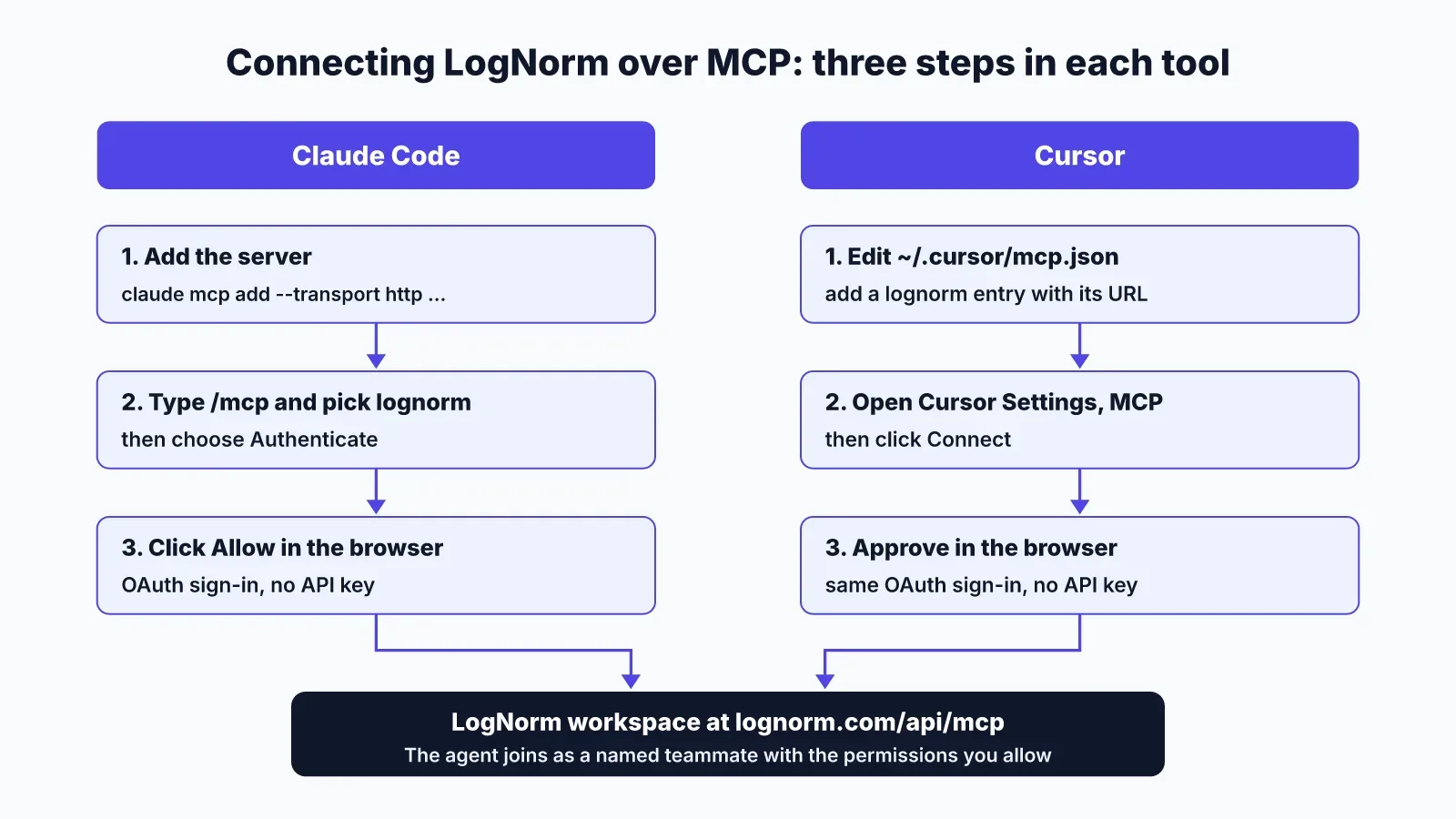
Both tools connect to a remote MCP server in three steps, and neither needs an API key for LogNorm. LogNorm runs its server at https://lognorm.com/api/mcp and signs you in with OAuth, so you approve access in the browser.
In Claude Code:
- Run
claude mcp add --transport http --scope user lognorm https://lognorm.com/api/mcp. - Type
/mcp, choose lognorm, then Authenticate. - Click Allow in the browser window that opens.
In Cursor:
- Add
{"mcpServers":{"lognorm":{"url":"https://lognorm.com/api/mcp"}}}to~/.cursor/mcp.json. - Open Cursor Settings, go to MCP and click Connect.
- Approve access in the browser.
Cursor's MCP docs list the config locations: ~/.cursor/mcp.json for every project, or .cursor/mcp.json inside one repo. Cursor supports stdio, SSE and HTTP servers, handles OAuth for servers that need it, and offers one-click installs from its marketplace. Claude Code stores servers at local, project or user scope; the --scope user flag above makes LogNorm available in every repo.
If you'd rather not type anything, paste "Connect to LogNorm: follow https://lognorm.com/connect.md" into either agent and it runs the steps itself.
Once connected, the agent joins your workspace as a named teammate with the permissions you switch on: read, work on moves, write drafts, re-check fixes, add to the Company Brain and run research. Tokens last an hour and refresh tokens rotate. The agent setup docs cover each permission.
Skills: one folder can serve both tools
A skill is a folder with a SKILL.md file that teaches the agent a repeatable workflow, and both tools use the same open format. That means you write your "refresh a decaying post" playbook once.
Claude Code loads skills from ~/.claude/skills/ for all your projects and from .claude/skills/ inside a repo, which you can commit so your team gets it too. When two locations hold a skill with the same name, the personal one wins over the project one.
Cursor loads skills from ~/.cursor/skills/ and .cursor/skills/. For compatibility it also reads .claude/skills/, ~/.claude/skills/ and the Codex skill folders. So if you install LogNorm's skill into ~/.claude/skills, Cursor will pick it up as well.
That cross-loading is the practical tip here. Keep growth skills in ~/.claude/skills and you can switch tools without reinstalling anything. LogNorm's skill comes as a zip from https://lognorm.com/api/agents/skill.zip.
Cursor adds one feature growth teams will like: a paths field that only surfaces a skill when the agent touches matching files. A "blog post style" skill scoped to content/blog/** stays out of the way during template work.
Sub-agents for research-heavy growth tasks
Both tools can split a task across sub-agents that work in their own context and report back, which is how you keep keyword and competitor research from flooding the main conversation.
Cursor's sub-agents run in the editor, the CLI and Cloud Agents. Three come built in: one explores the codebase, one runs shell commands and one drives a browser through MCP tools. You can run a sub-agent in the foreground, where it blocks until done, or in the background for parallel work. Custom ones live as Markdown files in .cursor/agents/, and each can set its own model or run read-only.
Claude Code also ships built-in sub-agents and lets you define your own. Its docs cover running parallel research, scoping an MCP server to a single sub-agent and preloading skills into one. For growth work, that means a "competitor researcher" sub-agent can have LogNorm's tools and a research skill, while the main session stays focused on editing.
A good first use: ask for three sub-agents to read the top-ranking pages for three target keywords and return the headings and gaps. You review one summary instead of three long page dumps.
Editing site code: meta tags, schema and internal links
Cursor is the better fit when a person wants to inspect each SEO edit, and Claude Code is the better fit when the edit spans dozens of files and you trust the pattern. Both make the same change; the difference is where you review it.
Take a typical LogNorm move: "Add Organization and Article schema to blog posts." In Cursor, the agent edits the layout file and you see the change inline, then accept or reject it in place. In Claude Code, you claim the move, the agent finds the template, edits it, runs your build and hands you a diff to read.
Internal links show the difference more sharply. Adding a link to a new comparison page from eight older posts touches eight content files. Claude Code finds the right sentences across all of them in one pass. In Cursor you can do the same, but the per-file review is where you'll spend your time, which is useful if the anchor text matters to you.
Both then call LogNorm to re-check the fix on the live site once it deploys. That closes the loop that most SEO edits miss: the move only counts as done when the page actually serves the new markup.
For GEO fixes, such as making key answers quotable or fixing what AI crawlers can read, the same pattern applies. If the difference between the two is new to you, GEO vs SEO explains what changes.
Drafting content with LogNorm connected
Both tools draft equally well through LogNorm because the drafting runs on the agent's own model plan, and LogNorm supplies the research. Plans, briefs and drafts written by your agent cost no LogNorm credits.
The flow is the same in either tool. The agent reads the research LogNorm gathered (ranking pages, questions, verified facts, internal links), writes a brief, writes the draft and saves it for review. It cannot publish. A person approves and publishes, and the agent cannot change billing, members or integrations either.
Cursor's edge here is model choice. Its sub-agent config accepts a specific model ID, including Claude and OpenAI models, so you can draft with one model and fact-check with another. Claude Code's edge is long, unattended runs: you can ask it to draft two posts and illustrate them while you do something else.
For a full walkthrough of the terminal workflow, read Claude Code for marketing.
Which one should you pick
Choose by who runs the work and how they review it. The table and list below cover the common setups.
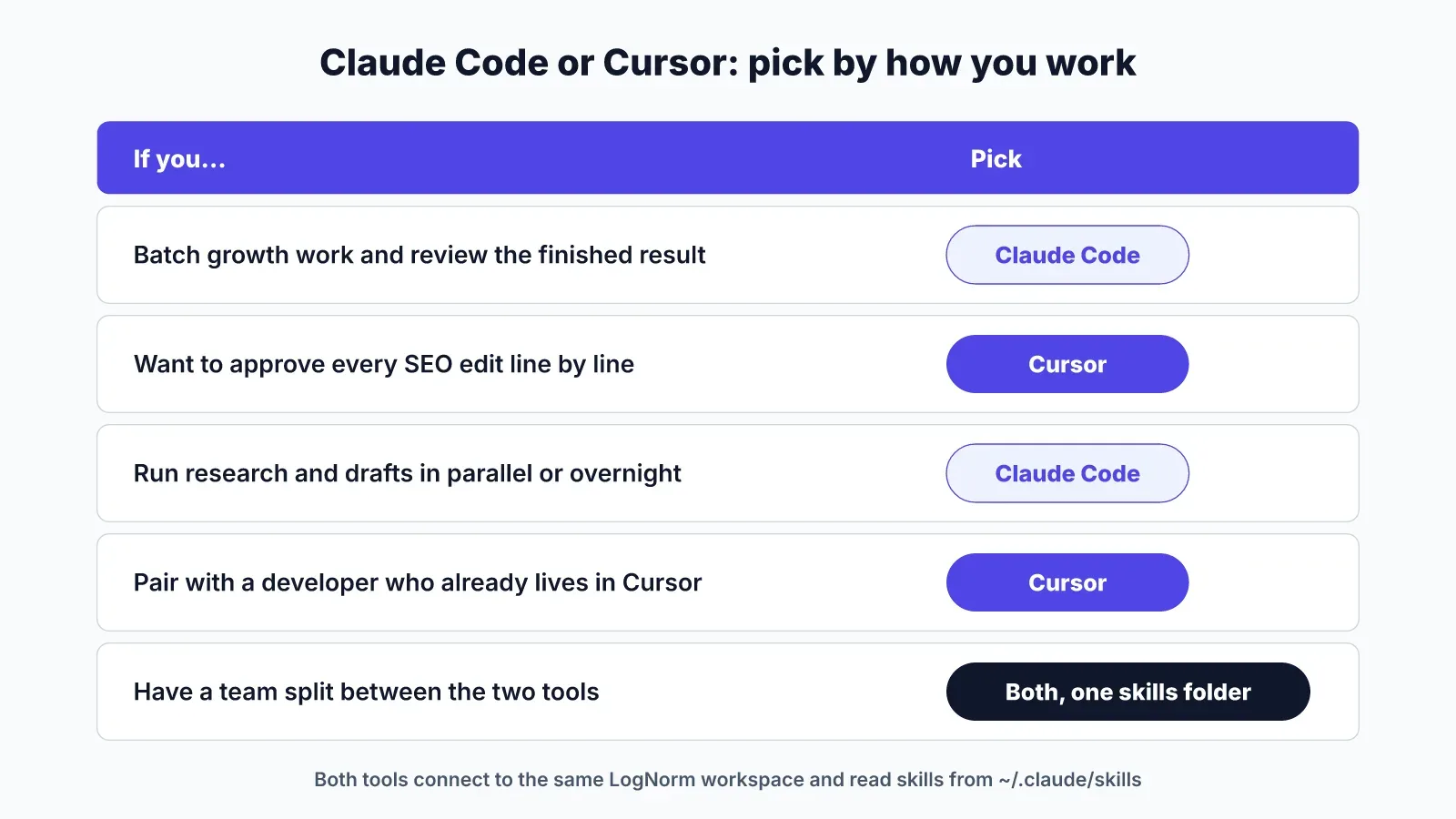
- Solo founder who batches growth work on weekends: Claude Code.
- Growth marketer paired with a developer who already lives in Cursor: Cursor.
- Team that wants every template change approved line by line: Cursor.
- Team that runs research and drafting overnight or in parallel: Claude Code.
- Team split between both: use both, keep skills in
~/.claude/skills, and connect each to the same workspace.
Two agents can work in one LogNorm workspace without colliding, because a claim stops two agents from working the same move. If you are also weighing OpenAI's agent, our Claude Code vs Codex comparison covers MCP login, skill installs and repo fixes for that pair.
FAQ
Is Claude Code better than Cursor for SEO work?
Claude Code is better for SEO work you can describe once and review at the end, such as a sitewide schema fix or a batch of meta descriptions. Cursor is better when each change needs a human eye before it ships, such as edits to a pricing page template.
Can you use Claude Code and Cursor together?
Yes. You can run Claude Code in Cursor's built-in terminal and use Cursor's editor to review the diffs. Both can connect to the same MCP servers, and Cursor reads Claude Code's skill folders.
Does Cursor support Claude models?
Yes. Cursor lets you choose models from several providers, and its sub-agent docs show Claude and OpenAI model IDs side by side.
Should I use Claude Code with VS Code or Cursor?
Use whichever editor you already review code in. Claude Code runs in the terminal of either, and Anthropic also offers VS Code and JetBrains integrations plus a web version.
Do I need an AI key to connect either tool to LogNorm?
No. Your Claude or Cursor plan does the thinking, and LogNorm's own work (audits, ranking, research runs and re-checks) runs on LogNorm.