AI Overviews: A Practical Guide
What Google AI Overviews are, when they appear, what they do to clicks, how to check if your pages are cited, which controls work, and how AI Mode differs.


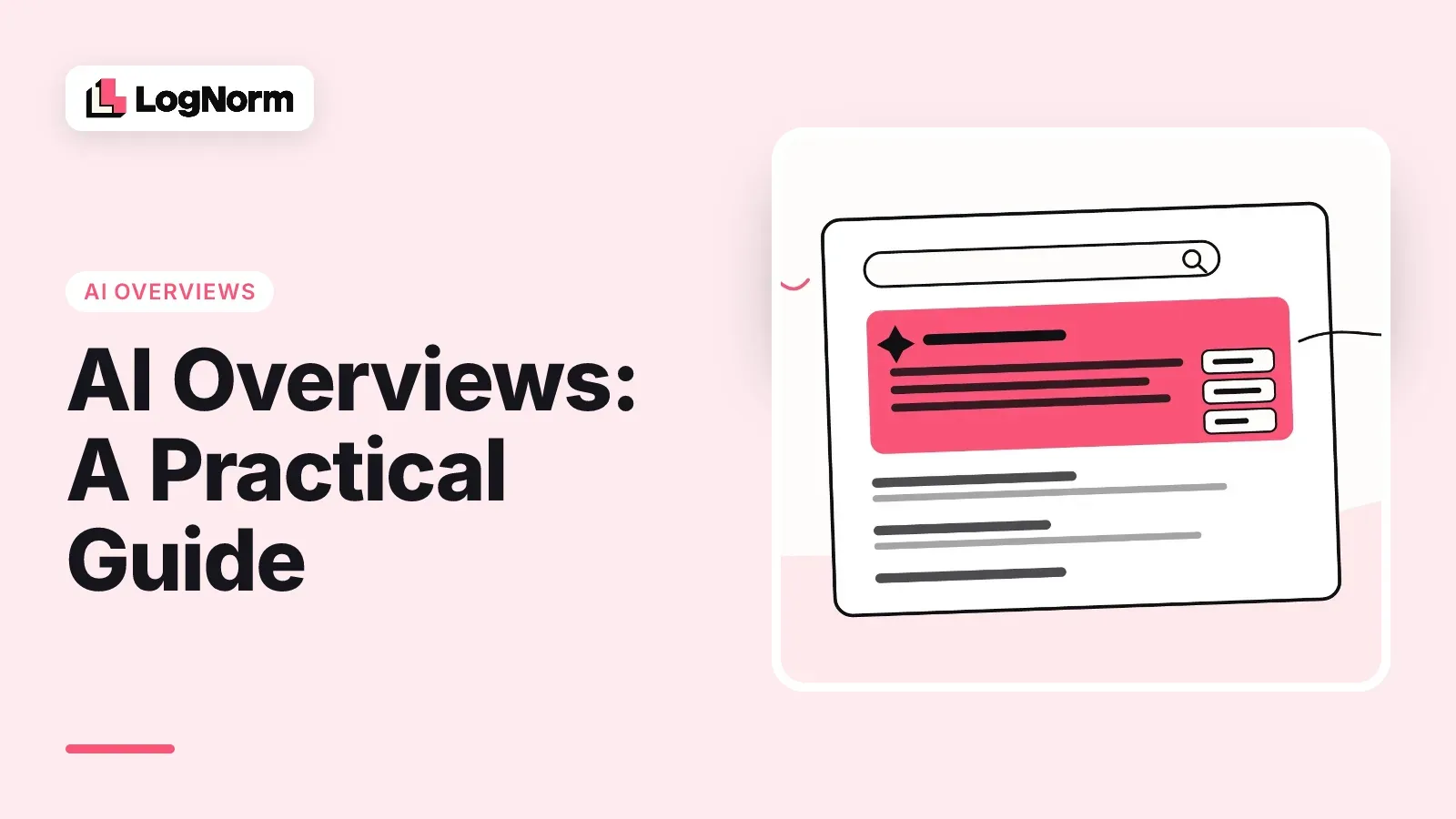
Google AI Overviews are AI-written summaries that Google places at the top of some search results, with links to the pages it drew on. They change how many people click through to your site, and they cite pages that often do not rank on page one. This guide explains how they work, when they show up, what they do to clicks, how to see whether your pages are cited, and which controls you have.
Everything below about how the feature works comes from Google's own documentation, read on 9 October 2026. The numbers come from two independent studies, each with its sample and date.
What are Google AI Overviews?
An AI Overview is, in Google's words, an "AI-generated snapshot with key information and links to dig deeper." It sits above the regular results and answers the query in a few paragraphs or bullets, with source links beside or inside the text.
Google builds it with generative AI and is direct about the limits: its help page says "AI Overviews can and will make mistakes." Overviews are available in many countries across the Americas, Asia-Pacific, Europe, the Middle East and Africa, in more than 70 languages. They can also appear when you search with an image or use Circle to Search.
For a site owner, the practical point is simple. An AI Overview is a new place on the results page where your brand can be named, your page can be linked, or neither.
How AI Overviews work
AI Overviews use a technique Google calls "query fan-out": the system issues multiple related searches across subtopics and data sources, then writes the answer and picks supporting pages while it does. Google's AI features documentation says this lets the feature show "a wider and more diverse set of helpful links" than a classic results page.
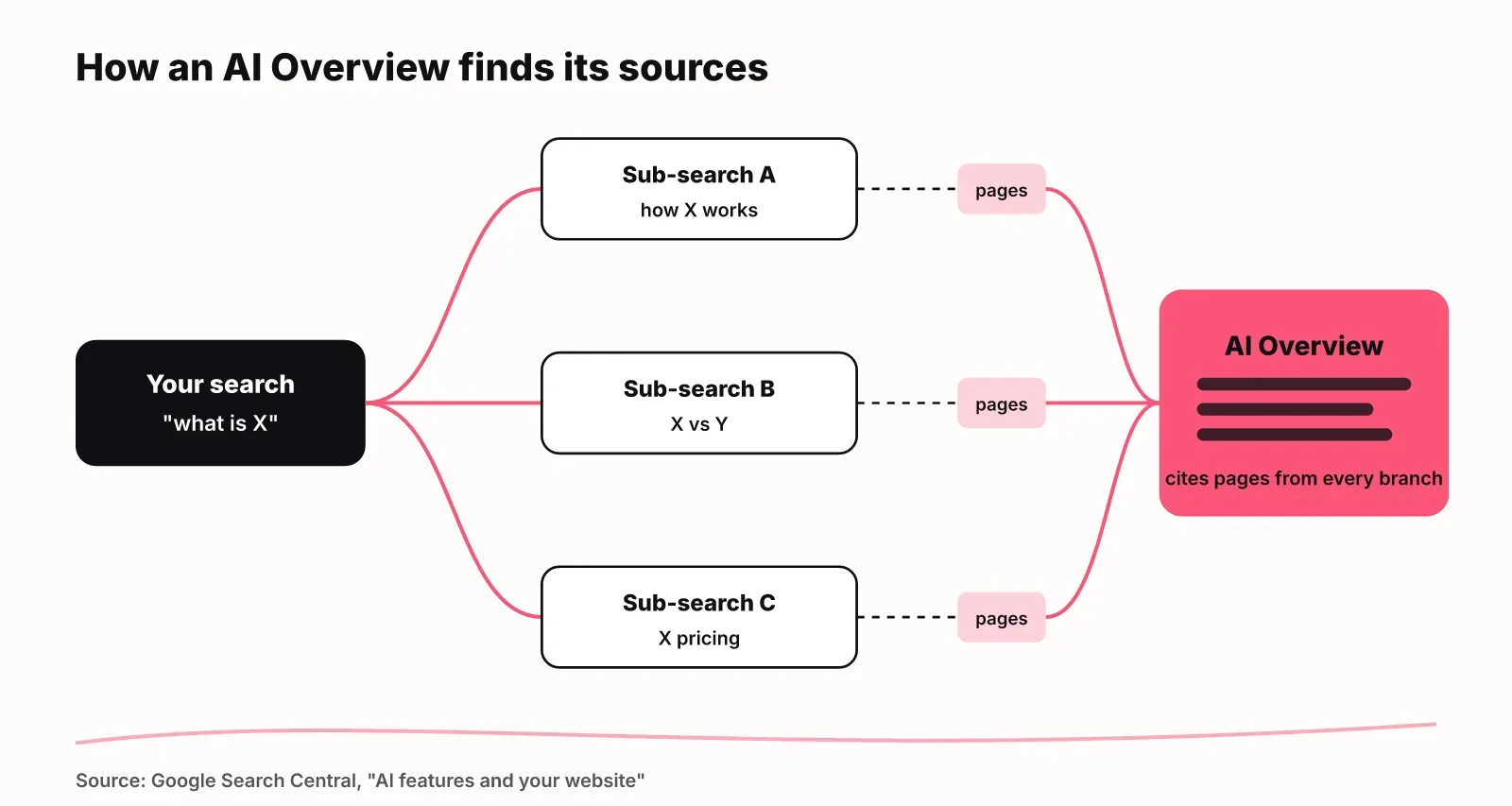
That mechanism explains a finding that surprises many SEO teams. A 2026 measurement study of US Google results found that nearly 30% of domains cited in AI Overviews do not appear in the first-page organic results shown for the same query. Your page can be cited for a query it does not rank for, because it ranked for one of the fan-out sub-queries instead.
The same study checked 98,020 individual claims in AI Overviews against the pages they cited. 11.0% were not supported by the cited source pages. If an overview cites you, read what it says next to your link. It may attribute something to you that your page does not say.
When do AI Overviews appear?
AI Overviews appear when Google's systems decide generative AI will be especially helpful, for example when you want to understand information from a range of sources. Google publishes no list of triggers, so the best guide is measurement.
Two independent studies give a range:
| Study | Sample | Share of searches with an AI Overview |
|---|---|---|
| Xu, Iqbal and Montgomery (arXiv, 2026) | 55,393 trending US queries, 13 March to 21 April 2026 | 13.7% overall, 64.7% for question-form queries |
| Pew Research Center (2025) | 68,879 real searches by 900 US adults, March 2025 | 18% of searches |
The pattern is clear: phrasing matters more than topic. A query written as a question ("how does X work", "what is Y") is far more likely to get an overview than a short keyword. If your buyers search in questions, assume most of their searches show one.
Overviews also vary between runs. The same query can show an overview today and plain results tomorrow, so one manual search tells you little.
Searchers cannot switch AI Overviews off. Google's help page says features "cannot be turned off", but the Web filter above the results shows text links only, without AI Overviews.
What AI Overviews do to clicks
When an AI Overview appears, people click regular search results about half as often. Pew Research Center tracked the real browsing of 900 US adults in March 2025 and found that users clicked a traditional result in 8% of visits with an AI summary, versus 15% without one.
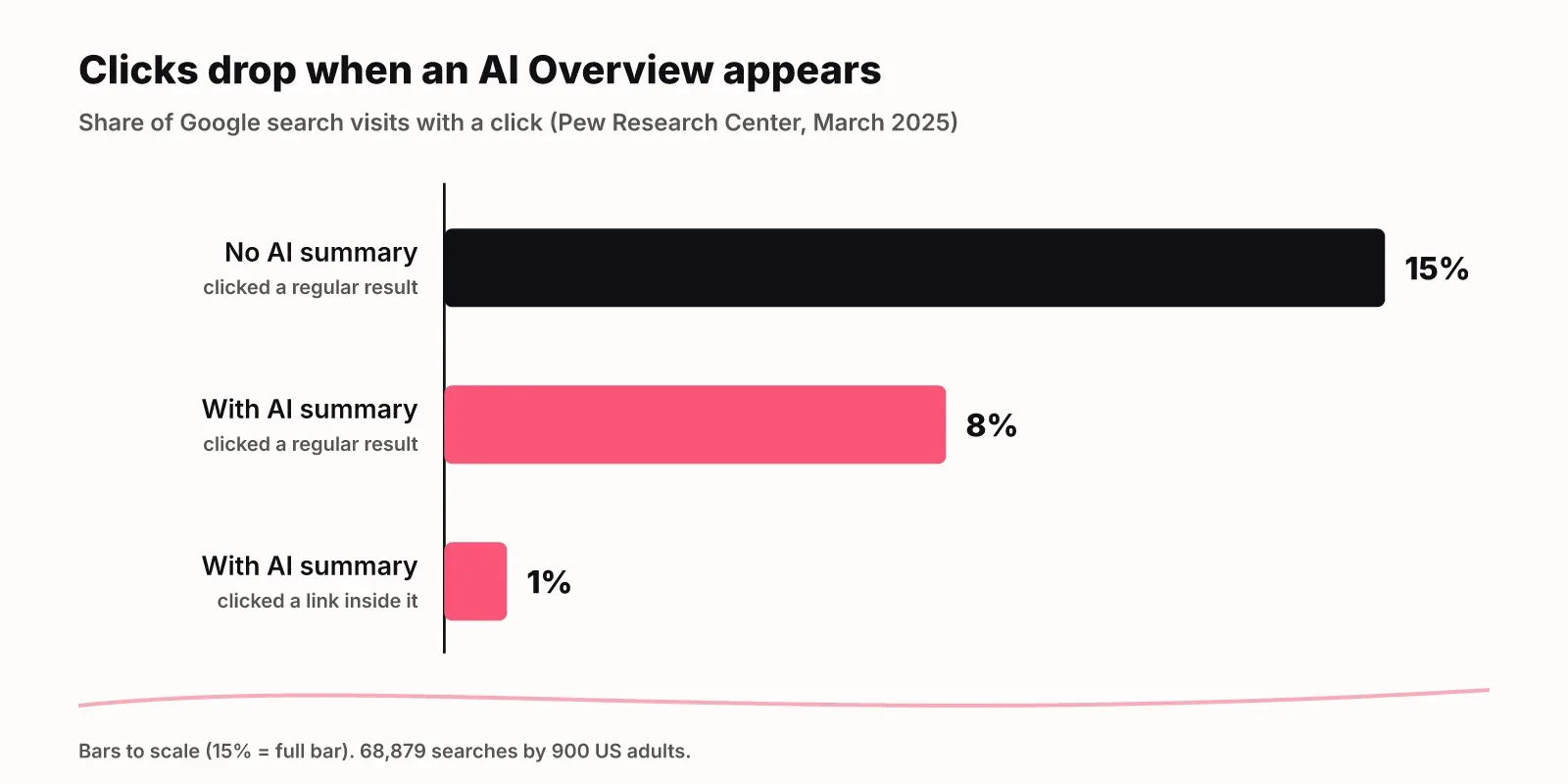
Two more numbers from the same study matter for publishers. Users clicked a link inside the summary itself in just 1% of visits. They ended their browsing session on 26% of pages with an AI summary, against 16% of pages with only regular results.
Google's position is different. Its documentation says that when people click from results pages with AI Overviews, "these clicks are higher quality (meaning, users are more likely to spend more time on the site)." Google has not published the numbers behind that statement, so treat it as a claim, not a measurement.
What this means for your plan:
- Expect fewer clicks on informational queries that trigger overviews, even if your rankings hold.
- Judge those pages on engaged visits and conversions, not raw clicks.
- Track whether you are named or cited in the overview, because that is where a growing share of attention goes.
How to see whether your pages are cited
Search Console includes AI Overview traffic in the Performance report under the "Web" search type, but it has no separate AI Overview filter. You can see the clicks and impressions. You cannot see which of them came from an overview.
Google's Performance report documentation sets the counting rules:
- Clicking a link to an external page in an AI Overview counts as a click.
- Standard impression rules apply.
- An AI Overview occupies a single position, and every link inside it gets that same position.
So a page cited in an overview at the top of results can show an average position near 1 in Search Console, even if its blue link ranks much lower. A sudden jump in position on a query with no matching jump in clicks is often an overview citation.
To see the citation itself, you need to look at the overview. Manual checks work for a handful of queries, with two caveats: results differ by country and language, and the overview may not appear on every run.
Tracking at scale is what an AI Overview tracker is for. In LogNorm, each tracked prompt runs as a real Google search from your market's country and language. LogNorm reads the overview text, the pages it cites and the top results under it. It records "no AI Overview" as its own outcome and keeps it out of your rates. It also counts a mention (your brand named in the text) separately from a citation (your page among the sources). The AI visibility docs explain each rate.
Controls: how to limit or opt out of AI Overviews
You control AI Overviews with the same tools that control regular search snippets; Google says "there are no additional technical requirements" for appearing. A page is eligible when it is indexed and eligible to show a snippet in regular Search.
| Control | What it does in AI Overviews | Cost to you |
|---|---|---|
nosnippet robots meta tag |
Page text is not used as a snippet, including in AI features | No text snippet in regular results either |
data-nosnippet HTML attribute |
Excludes a marked section of the page | Only that section is hidden; the rest stays usable |
max-snippet:[number] robots meta tag |
Caps how much text Google can show | Shorter regular snippets too |
noindex |
Removes the page from Search entirely | All search traffic to that page |
| Google-Extended (robots.txt token) | Controls whether crawled content can train future Gemini models | Does not change Search inclusion or ranking |
The last row is a common mistake. Blocking Google-Extended does not keep you out of AI Overviews. Google's crawler documentation says it "does not impact a site's inclusion in Google Search nor is it used as a ranking signal."
For most startups, opting out is the wrong call. Overviews cite pages that rank well below page one, which is a cheaper route into the top of the results than ranking. Use data-nosnippet for specific content you must not see summarised, such as pricing that changes often.
AI Overviews vs AI Mode
AI Mode is a separate, conversational search experience; AI Overviews are a summary inside the normal results page. Google describes AI Mode as expanding "what AI Overviews can do with more advanced reasoning and ways of interacting."
| AI Overviews | AI Mode | |
|---|---|---|
| Where it appears | Top of some regular results pages | Its own tab, google.com/ai or the Google app |
| When it appears | Only when Google decides it helps | Every time you choose it |
| Follow-up questions | No; "Show more" can move you into AI Mode | Yes, in a running conversation |
| How it searches | Query fan-out | Query fan-out across subtopics, run at the same time |
| Search Console | Counted in the Web search type, one position for the whole overview | Counted in Web; each follow-up counts as a new query |
AI Mode also falls back to a set of web links when Google is not confident in the quality of an AI answer. The same eligibility rules and snippet controls apply to both, so you do not need a separate setup for AI Mode.
Getting cited, in brief
Getting cited in AI Overviews starts with ordinary SEO: Google says the same best practices apply, and a page must be indexed and snippet-eligible. Beyond that, pages that answer a sub-question directly in their first sentence give fan-out searches something easy to quote.
The full playbook, with steps and examples, is in our guide on how to get cited in Google AI Overviews. If you are working on visibility across ChatGPT and Gemini too, start with what AI visibility is and how to measure it and our guide to generative engine optimization.
FAQ
Is an AI Overview the same as ChatGPT?
No. An AI Overview is a Google Search feature that appears above regular results for some queries and cites web pages Google found through its own searches. ChatGPT is a separate assistant made by OpenAI. Both write answers with generative AI, but they use different models, different sources and different rules for when they cite.
What triggers Google AI Overviews?
Google shows an overview when its systems decide generative AI will be especially helpful. In practice, question-style queries trigger them most: one 2026 study found overviews on 64.7% of question-form queries, against 13.7% of trending queries overall.
Why do I keep getting AI Overviews?
You see them because they are on by default in supported countries and languages, and Google's help page says the feature cannot be turned off. To see only links, choose the Web filter above the results after you search.
Can websites opt out of AI Overviews?
Yes, with the standard snippet controls: the nosnippet or max-snippet robots rules, the data-nosnippet attribute for specific sections, or noindex for the whole page. Each also limits regular search snippets. Blocking Google-Extended does not remove you from AI Overviews.
How often do AI Overviews appear in Google?
Measured rates range from about 14% to 18% of searches. A 2026 study of 55,393 trending US queries found 13.7%, and Pew Research Center found 18% across real searches by 900 US adults in March 2025. Question-form queries trigger them far more often.
Where can you see AI Overview clicks data?
In Search Console's Performance report, under the Web search type. AI Overview clicks and impressions are included there but not separated, and every link in an overview shares one position. To see which overviews cite your pages, you need an AI Overview tracker or manual checks.