llms.txt: What It Is, Whether It Works and How to Write One
llms.txt is a Markdown map of your site for AI agents. What the spec says, what the evidence shows about AI answers, and an example file you can copy.


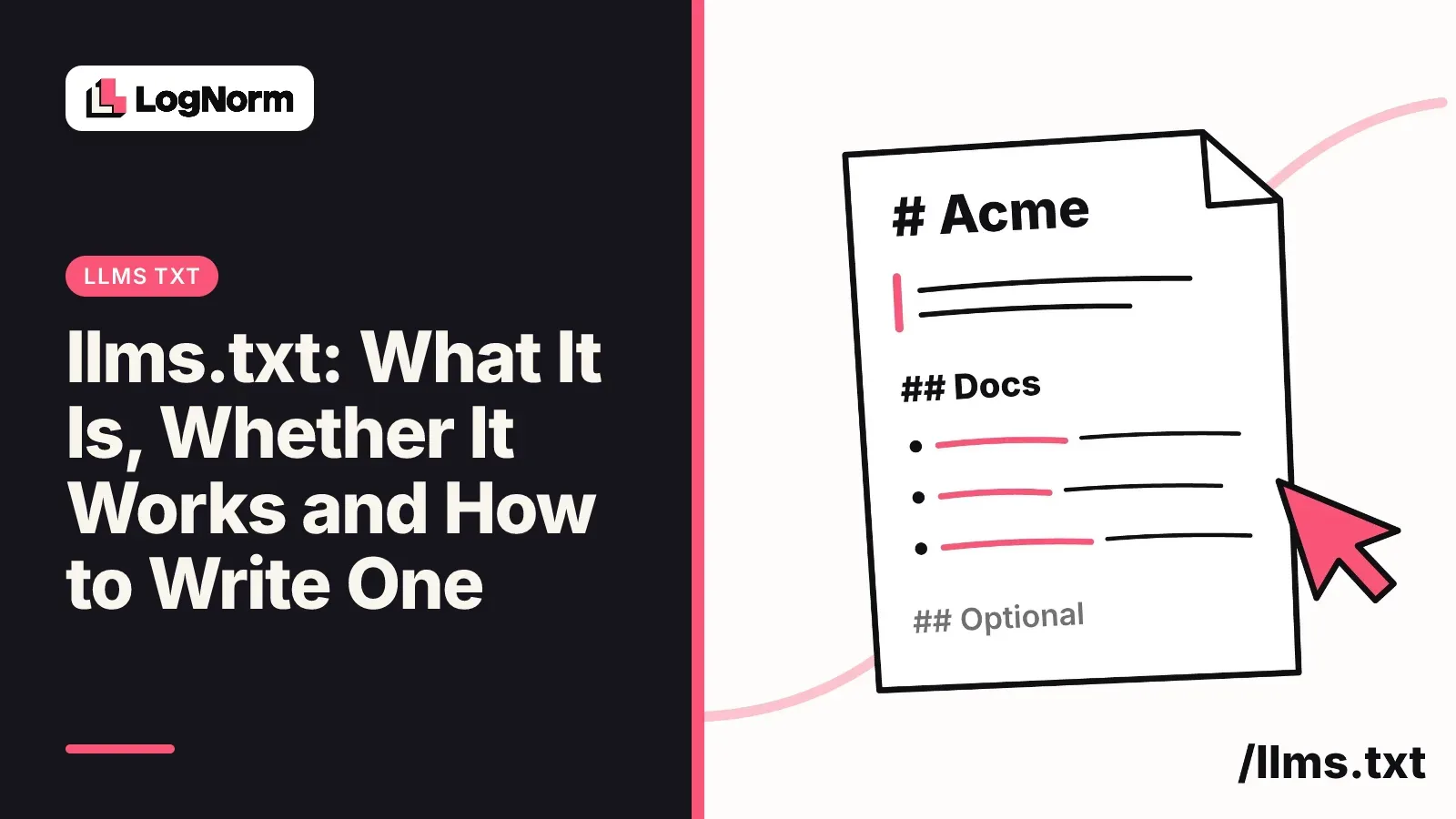
llms.txt is a Markdown file you publish at /llms.txt to give AI agents a short, curated map of your site: who you are in one line, then links to the pages that matter, each with a note. It is a proposal, not a ranking factor. This guide covers what the llms.txt specification says, what is verified about who reads the file, a correct example you can copy, and the checks that matter more if you want AI answer engines to use your content.
What is llms.txt?
llms.txt is a plain Markdown file at the root of a website (or at any subpath, such as /docs/llms.txt) that gives language models and agents concise background and a structured list of links to your key content. That is how the official specification defines it, and the current version is v2.
The problem it solves is practical. HTML pages wrap their content in navigation, scripts and layout, and an agent with a limited context window wastes tokens stripping that out. An llms.txt file hands the agent a short index instead. The agent reads the index, then opens only the pages it needs.
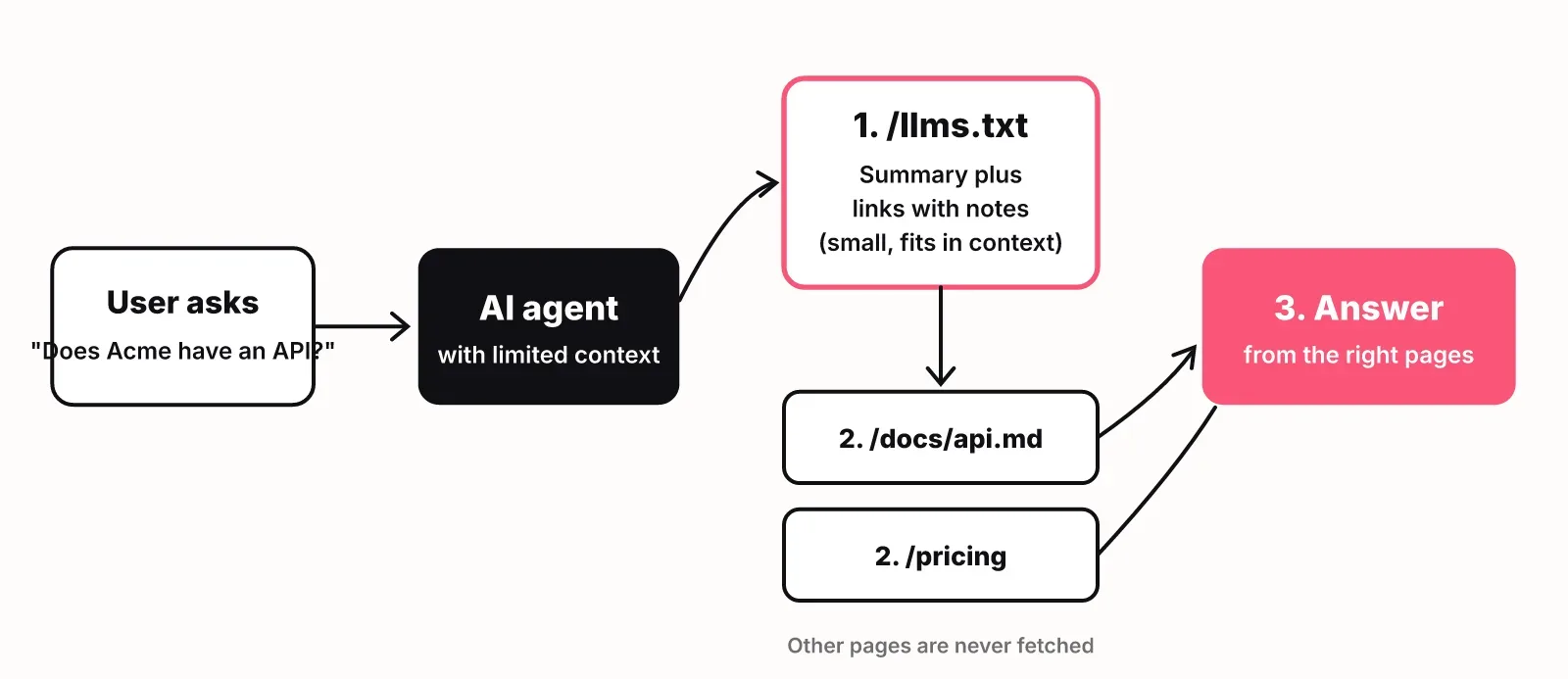
The spec is explicit that the file is used on demand: when an agent needs information about your product while helping a user, not as a crawl instruction. The spec notes it is used most heavily for software documentation, where coding agents follow it to find API references and tutorials.
llms.txt vs robots.txt vs sitemap.xml
llms.txt does not grant or block access to anything. robots.txt controls which crawlers may fetch which paths, sitemap.xml lists every indexable URL, and llms.txt curates a small set of pages with notes for an agent to read. Several popular guides describe llms.txt as a way to tell AI crawlers what they may use for training. The spec says nothing of the kind.
| File | Job | Read by | Format | Controls access? |
|---|---|---|---|---|
| robots.txt | Says which bots may fetch which paths | Crawlers, before they fetch | Plain-text directives | Yes (by convention) |
| sitemap.xml | Lists every indexable URL | Search engine indexers | XML | No |
| llms.txt | Curated summary and links with notes | AI agents and assistants, on demand | Markdown | No |
If you want to stop a model from training on your content, that is a robots.txt job (or a firewall rule), not an llms.txt job.
Does llms.txt work? What the evidence shows
llms.txt works as a reading aid for agents that look for it, and there is no verified evidence that it changes what ChatGPT, Gemini or Google AI Overviews cite. Here is what we could verify for this article, and what we could not.
What is verified:
- Chrome's Lighthouse includes an llms.txt check in its agentic browsing audits. It checks for a machine-readable summary at the domain root, alongside agent-facing accessibility and layout stability checks.
- The spec positions the file for agents at inference time: a coding agent looking up your docs, or an assistant reading about your product while answering a user.
What is not verified:
- None of the sources we verified show an AI answer engine reading llms.txt to decide which brands to mention or which pages to cite.
- We found no controlled study tying an llms.txt file to more AI citations or better rankings.
Our position: publish one, because it takes under an hour and agents and Lighthouse look for it. Do not expect it to move AI answers on its own. Being mentioned in answers depends far more on what your pages say and whether AI crawlers can reach them, which we cover in how to rank in ChatGPT.
The llms.txt format, line by line
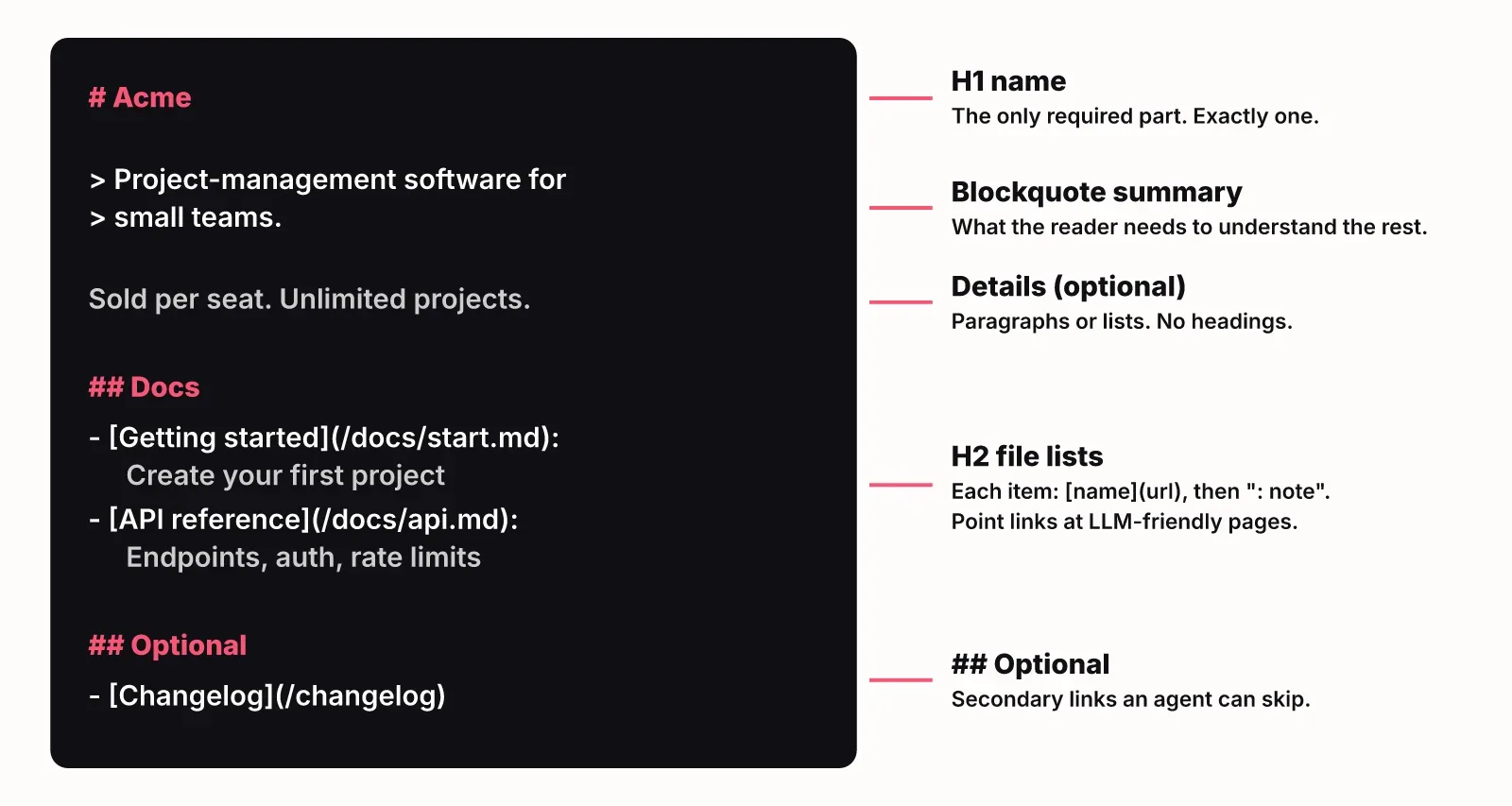
An llms.txt file has one required part, an H1 with your site or project name, followed by optional parts in a fixed order. The spec lists them like this:
- An H1 with the name of the project or site. This is the only required section.
- A blockquote (
>) with a short summary that a reader needs to understand the rest of the file. - Zero or more paragraphs or lists with more detail. No headings allowed here.
- Zero or more H2 sections, each holding a "file list": a Markdown list where every item starts with a link
[name](url), optionally followed by a colon and a note.
By convention, an H2 called ## Optional holds secondary links an agent can skip when it is short on context. In v2 this is a convention, not a rule tools must follow.
Because the format is this strict, a parser or a regex can read it, and so can a person. That is the point of using Markdown instead of XML or JSON.
An llms.txt example you can copy
Here is a complete, valid llms.txt for a fictional SaaS product. Replace the names, URLs and notes with your own.
# Acme

> Acme is project-management software for small teams: plans, tasks and status updates in one place. It runs in the browser, with iOS and Android apps.

Acme is sold per seat. All plans include unlimited projects. Pricing and limits below are the current source of truth.

## Product

- [Pricing](https://acme.com/pricing): Plans, seat prices and what each includes
- [Integrations](https://acme.com/integrations): Slack, GitHub and Google Drive
- [Security](https://acme.com/security): Data storage, SSO and compliance

## Docs

- [Getting started](https://acme.com/docs/start.md): Create a workspace and your first project
- [API reference](https://acme.com/docs/api.md): REST endpoints, auth and rate limits

## Optional

- [Changelog](https://acme.com/changelog): Release notes by month
- [Blog](https://acme.com/blog): Product updates and guides
For a real file, here is the opening of the one we publish at lognorm.com/llms.txt, shortened:
# LogNorm

> LogNorm is the decision layer for growth, for teams and AI agents: it holds the data, the strategy and your company knowledge, ranks what to do next, and lets agents and people carry out one plan, with every result checked and measured.

LogNorm is a web app for startup founders and small growth teams. ...

## Product

- [Product overview](https://lognorm.com/product): How the pieces fit together: research, ranking, content, publishing and measurement in one loop.
- [Site & GEO Audit](https://lognorm.com/product/site-audit): A technical SEO audit and a GEO audit for AI crawlers. ...
- [Pricing](https://lognorm.com/pricing): Plans for solo founders, startup teams and agencies, credit packs, add-ons and what a credit buys.

## Free tools

- [llms.txt generator](https://lognorm.com/tools/llms-txt-generator): Free llms.txt generator: enter a URL and get an llms.txt built from your real pages, sitemap and robots.txt, in the llmstxt.org format. Validate it too.
Two choices in our file are worth copying. The paragraph after the summary defines our own terms (Move, Growth Plan, Company Brain), so an agent reads the rest correctly. And because agents are a big part of our audience, the file also tells them how to connect to LogNorm over MCP.
How to write and publish yours
Writing a good llms.txt is mostly editing: pick the 10 to 40 pages an agent needs, write one useful note for each, and publish the file as plain text at your root. The steps:
- List the questions an agent will get about you: what you sell, for whom, what it costs, how it integrates, how to get started.
- Pick the one page that best answers each question. Skip blog archives, tag pages and anything thin.
- Write the H1 and a one-sentence summary that names your category and customer. Avoid slogans; an agent cannot quote a tagline.
- Group links under H2s such as Product, Docs and Company. Give every link a note that says what is on the page, not that it is "great".
- Put legal pages, the changelog and old posts under
## Optional. - Publish at
https://yourdomain.com/llms.txt, served as plain text. Open the URL and confirm it returns the file, not your HTML 404 page. - Add a reminder to update it when you ship or retire a key page. A stale file points agents at dead URLs.
The v2 spec adds two optional extras for sites that want to go further. You can publish a clean Markdown version of a page at the same URL with .md added (page.html.md) or swapped in (page.md). And you can help agents find these files with link relations: rel="alternate" type="text/markdown" for a page's Markdown version and rel="describedby" for the llms.txt that covers it, either as HTML <link> tags or as an HTTP Link: header. Documentation-heavy sites gain the most from both.
You may also see llms-full.txt. It is a convention, not part of the core spec, for putting the full text of your key pages in one file so an agent can read everything without following links. Start with llms.txt; add llms-full.txt only if you have docs worth reading end to end.
Common mistakes:
- Content above the H1, or more than one H1.
- Headings in the detail section between the summary and the first H2.
- List items that do not start with a link.
- Links with no notes, which leaves the agent guessing.
- The server returning an HTML page at
/llms.txtbecause of a catch-all route. - Using it to "block" AI crawlers. It cannot.
LogNorm also has a free llms.txt generator that drafts a file from your live pages, sitemap and robots.txt in the spec's format and validates an existing one. Treat its output as a first draft and edit the notes yourself.
What to check before llms.txt: AI crawler access
If AI answer engines are not using your content, check crawler access first, because a blocked crawler cannot read any file you publish. Run these checks in this order:
- robots.txt rules per AI crawler. Separate answer crawlers (such as OAI-SearchBot, Claude-SearchBot and PerplexityBot), on-request fetchers (such as ChatGPT-User) and training crawlers (such as GPTBot and Google-Extended). Blocking all of them when you only meant to block training can keep you out of live answers.
- Your CDN or firewall. robots.txt can say yes while a bot-protection rule returns a challenge page to AI user agents. Request your home page with those user agents and compare the response.
- Content that needs JavaScript. If your text only appears after JavaScript runs, assume some AI crawlers will not see it. Check the raw HTML.
- noindex tags and headers, and canonicals pointing elsewhere.
- Whether your pages open with a direct, quotable answer that an engine can lift.
The LogNorm GEO audit runs these checks the way AI crawlers read your site: without JavaScript, through your robots.txt and response headers. Its AI crawler access card shows what your robots.txt tells 14 AI crawlers, and it requests your home page with their user agents to catch CDN blocks. Its llms.txt card checks whether /llms.txt and /llms-full.txt exist, rates the file's quality out of five and lists problems such as a missing title or links without notes. LogNorm can generate both files, and your coding agent can commit them.
Once access is fixed, measure whether answers change. AI visibility tracking asks ChatGPT, Gemini and Google AI Overviews your buyers' questions and records whether each answer mentions or cites you.
FAQ
Is llms.txt an official web standard?
No. llms.txt is a proposal published at llmstxt.org, now in its second version. No standards body has adopted it, but Chrome's Lighthouse agentic browsing audits already check for it.
Does llms.txt help SEO or AI visibility?
Not in any way we could verify. It helps agents that look for it read your site efficiently. We found no verified source showing that Google rankings or AI answer engines' citations respond to it.
Where do I put the llms.txt file?
At the root of your domain, for example https://acme.com/llms.txt. The spec also allows a file at a subpath, such as /docs/llms.txt, which covers the pages under that path. When more than one file applies, agents should use the most specific one.
What is the difference between llms.txt and llms-full.txt?
llms.txt is a short index of links with notes. llms-full.txt is a convention for one file that contains the full text of your key pages, so an agent can read it all without following links.
Can llms.txt stop AI companies from training on my content?
No. llms.txt has no allow or deny rules. To block training crawlers, use robots.txt rules for those user agents, and enforce them at your CDN if you need certainty.
How long should an llms.txt file be?
Short enough for an agent to read in one go. The detail belongs behind the links, which the agent opens only when it needs them.