Best MCP Servers for SEO and Marketing in 2026
The best MCP servers for SEO and marketing in 2026: keyword, SERP, Search Console and analytics data, plus one that ranks the work. With setup notes.


The best MCP servers for SEO and marketing in 2026 are DataForSEO, Semrush or Ahrefs for keyword and SERP data, a Search Console server and Google's Analytics server for your own numbers, Firecrawl for reading pages, and LogNorm to rank the work and let the agent act on it. Most marketers need one from each group, not all seven.
Most "best MCP servers" lists are written for developers. They recommend GitHub, Kubernetes and database servers. This list covers the servers that help with keywords, rankings, traffic and content, and it tells you what each one needs before it will connect.
The best MCP servers for SEO and marketing at a glance
Pick one keyword data server, add your own Search Console and analytics data, then add one server that decides what to work on. Here are the seven, grouped by the job they do:
| Server | Job | Where it runs | How you sign in |
|---|---|---|---|
| LogNorm | Ranks the work; the agent acts and LogNorm re-checks it | Hosted | OAuth in the browser |
| DataForSEO MCP | Keywords, SERPs, backlinks, on-page data | Hosted or local | DataForSEO API login |
| Semrush MCP | Keywords, rankings, competitors, traffic | Hosted | OAuth or API key |
| Ahrefs MCP | Ahrefs API data | Hosted | Consent screen, MCP-scoped key |
| mcp-gsc | Google Search Console | Local, with HTTP and Docker options | Google OAuth or service account |
| Google Analytics MCP | GA4 reports | Local | Google credentials, read-only scope |
| Firecrawl MCP | Scrape, crawl and search web pages | Hosted or local | Keyless tier, OAuth or API key |
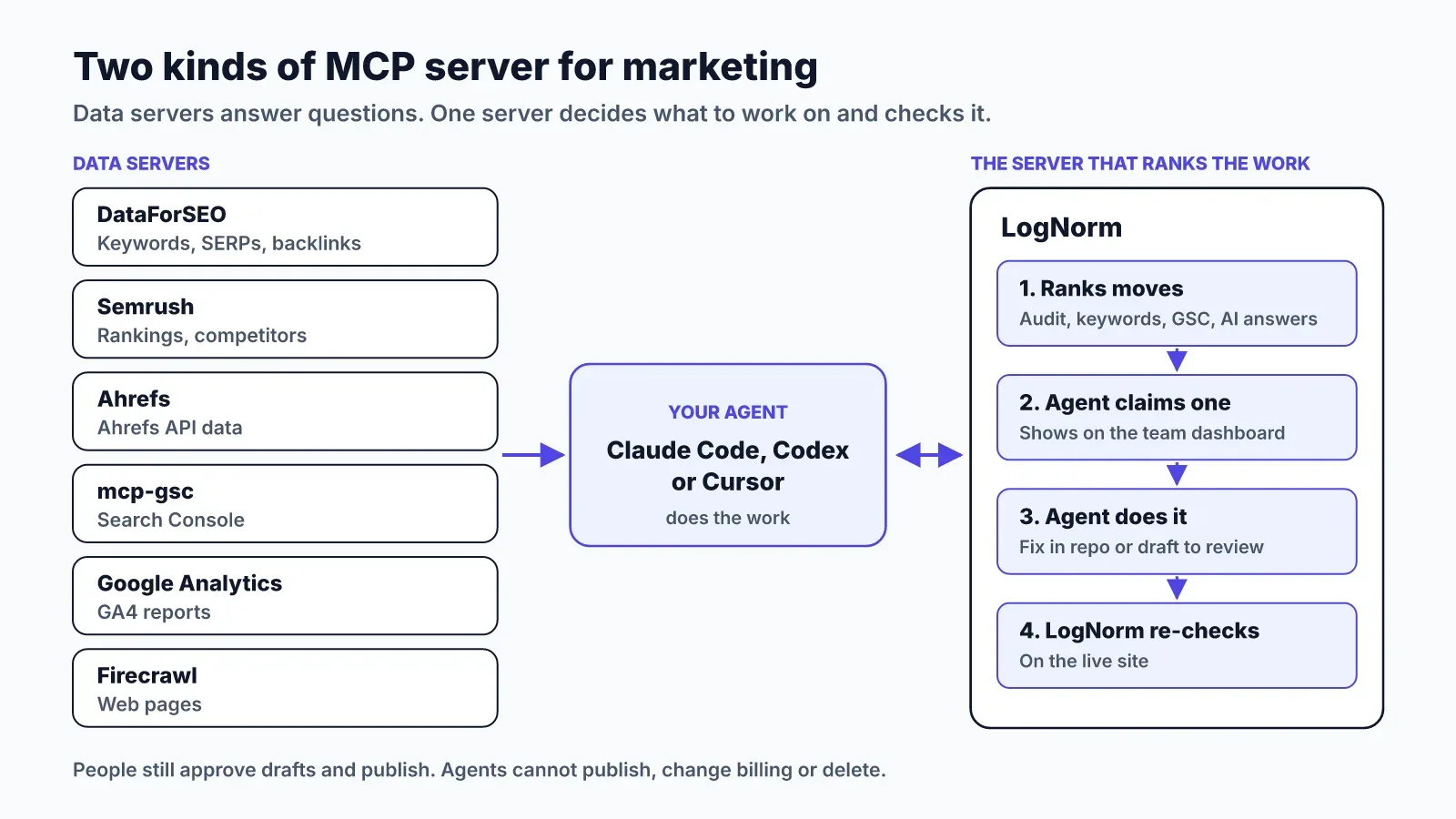
The split that matters is between the first row and the rest. Six of these servers answer questions. One decides which question to ask this week and checks whether the answer worked.
How we chose these servers
Every server on this list has a public page from its vendor or maintainer, and every claim below comes from that page. We left out servers whose pages we couldn't verify, and we didn't guess at prices.
We judged each one on four things:
- The marketing job it does, and whether another server on the list does it better.
- How you sign in, and which credentials it keeps.
- What it can write or change, not only what it reads.
- How usage is metered: API units, credits or your own API account.
Quality varies more than the directories suggest. One study of 856 tools across 103 MCP servers found 97.1% of tool descriptions had at least one quality problem, and 56% didn't state their purpose clearly. Vague descriptions make an agent pick the wrong tool, which costs you API units for nothing.
SEO data servers: keywords, SERPs and backlinks
These three servers give your agent the keyword, ranking and backlink data you'd otherwise export from a dashboard. Pick the one whose data you already pay for.
DataForSEO MCP
DataForSEO is the best fit if you want raw SEO data without a seat-based SEO suite. Its MCP page lists the SERP, Keyword Data, DataForSEO Labs, Backlinks, On-Page, AI Optimization, Business Data and Domain Analytics APIs. The company describes its pricing as pay-as-you-go.
You can run it locally with npx or connect to the hosted server. Both use your DataForSEO API login. In Claude Code, the local version looks like this:
claude mcp add dataforseo --env DATAFORSEO_USERNAME=your_api_login --env DATAFORSEO_PASSWORD=your_api_password -- npx -y dataforseo-mcp-serverThe hosted server at https://mcp.dataforseo.com/v3/mcp takes a Basic authorization header instead. Keep that token out of chat and put it in your client's config.
Semrush MCP
Semrush MCP is the easiest pick if your team already lives in Semrush. Its knowledge base says it connects ChatGPT, Claude, Gemini, Perplexity, Cursor, VS Code and Claude Code to live Semrush data, through OAuth or an API key. It is listed as an official app in ChatGPT, Claude and Perplexity.
Access is read-only, so the agent can query but not change anything in your account. You get keyword suggestions, organic and paid rankings, competitor overlap and backlink data.
Plans matter here. Semrush says MCP access comes with Semrush One Starter, Semrush One Pro+, SEO Classic Pro and SEO Classic Guru, each with 50,000 MCP API units that refresh on renewal. Traffic and market data need a Trends API plan. Every query uses units, so ask for "top 50 keywords in the US", not "all keywords".
Ahrefs MCP
Ahrefs MCP suits teams on an Ahrefs plan who want its data inside their AI tools. Ahrefs runs a hosted server at https://api.ahrefs.com/mcp/mcp over Streamable HTTP, available on paid plans from Lite upward.
When you connect, you approve a consent screen and Ahrefs creates a dedicated API key tagged for MCP. Workspace admins can set a monthly API unit limit on each key, which is a useful guard against an agent that loops. Calls draw from the same monthly API units as direct API use.
Ahrefs states that the endpoint is for supported AI tools only. Using it through custom scripts or bridges is not permitted, so use their public API for automation.
Your own data: Search Console and Google Analytics
Your own search and traffic data is the one source no SEO vendor can sell you. Two servers bring it to your agent.
mcp-gsc for Google Search Console
mcp-gsc is a community-built Search Console server described as "Google Search Console Insights with Claude AI for SEOs". Its setup recommends OAuth with your own Google account, with a service account option for automation or team use. It installs with uvx and also documents HTTP transport and Docker.
The README has a section titled "Safety: Destructive Operations". Read it before you connect the server to a property that matters. A Search Console server that can do more than read deserves the same care as a teammate with owner access.
Google Analytics MCP
The Google Analytics MCP server lives in the googleanalytics GitHub organisation and is marked experimental. It runs locally, uses the Analytics Admin and Data APIs, and needs credentials with the read-only Analytics scope.
Its tools cover account and property details, core reports, funnel reports and realtime reports. Setup is the heaviest on this list: you enable two APIs in a Google Cloud project, set up Application Default Credentials, then add it with pipx. The Claude Code command is:
claude mcp add analytics-mcp --scope user -e "GOOGLE_APPLICATION_CREDENTIALS=PATH_TO_CREDENTIALS_JSON" -e "GOOGLE_PROJECT_ID=YOUR_PROJECT_ID" -- pipx run analytics-mcpReading the web: Firecrawl
Firecrawl is the server to add when your agent needs the full text of competitor pages, docs or search results. The Firecrawl MCP server can scrape a URL, map a site's URLs, crawl many pages and search the web.
It has the lowest barrier on this list. The hosted endpoint at https://mcp.firecrawl.dev/v2/mcp offers scrape, search and parse without an API key on a rate-limited free tier. Crawl, map and its agent tool need a key, or you can connect through its OAuth endpoint.
One warning applies to any server that reads the open web. Competitor pages can contain hidden instructions aimed at AI agents. Ask how a server treats that text before you let an agent act on what it reads.
The server that ranks the work: LogNorm
LogNorm is the server that tells your agent what to work on, lets it do the work and then checks the result. The six servers above answer questions well. None of them decides whether this week's best move is a title fix, a refresh of a decaying post or a new comparison page.
LogNorm gathers the data itself: a crawl and SEO audit, a GEO audit, keywords, Google Search Console, competitors, and how ChatGPT, Gemini and Google AI Overviews answer your buyers. It turns findings into ranked moves, and your team plans the best into a weekly Growth Plan.
Your agent connects as a named teammate. It can claim a move, fix the issue in your codebase, save a draft and send it to review, then ask LogNorm to re-check the fix on the live site. Publishing, billing, members and deletion stay with people.
Setup takes one command and a browser click. In Claude Code:
claude mcp add --transport http --scope user lognorm https://lognorm.com/api/mcpThen type /mcp, choose lognorm, then Authenticate, and click Allow. In Codex, run codex mcp add lognorm --url https://lognorm.com/api/mcp and codex mcp login lognorm. In Cursor, add {"mcpServers":{"lognorm":{"url":"https://lognorm.com/api/mcp"}}} to ~/.cursor/mcp.json.
There's no API key to copy and no AI key to add. Your agent's own plan does the thinking, so briefs and drafts cost no LogNorm credits. Audits, research runs and re-checks run on LogNorm and use credits within your spend cap. The Agents and MCP docs list every permission you can switch off.
How to add an MCP server to Claude Code, Cursor or Codex
Remote servers need a URL and a browser sign-in, while local servers need a command and credentials in environment variables. That's the whole difference, and it decides how much setup you're in for.
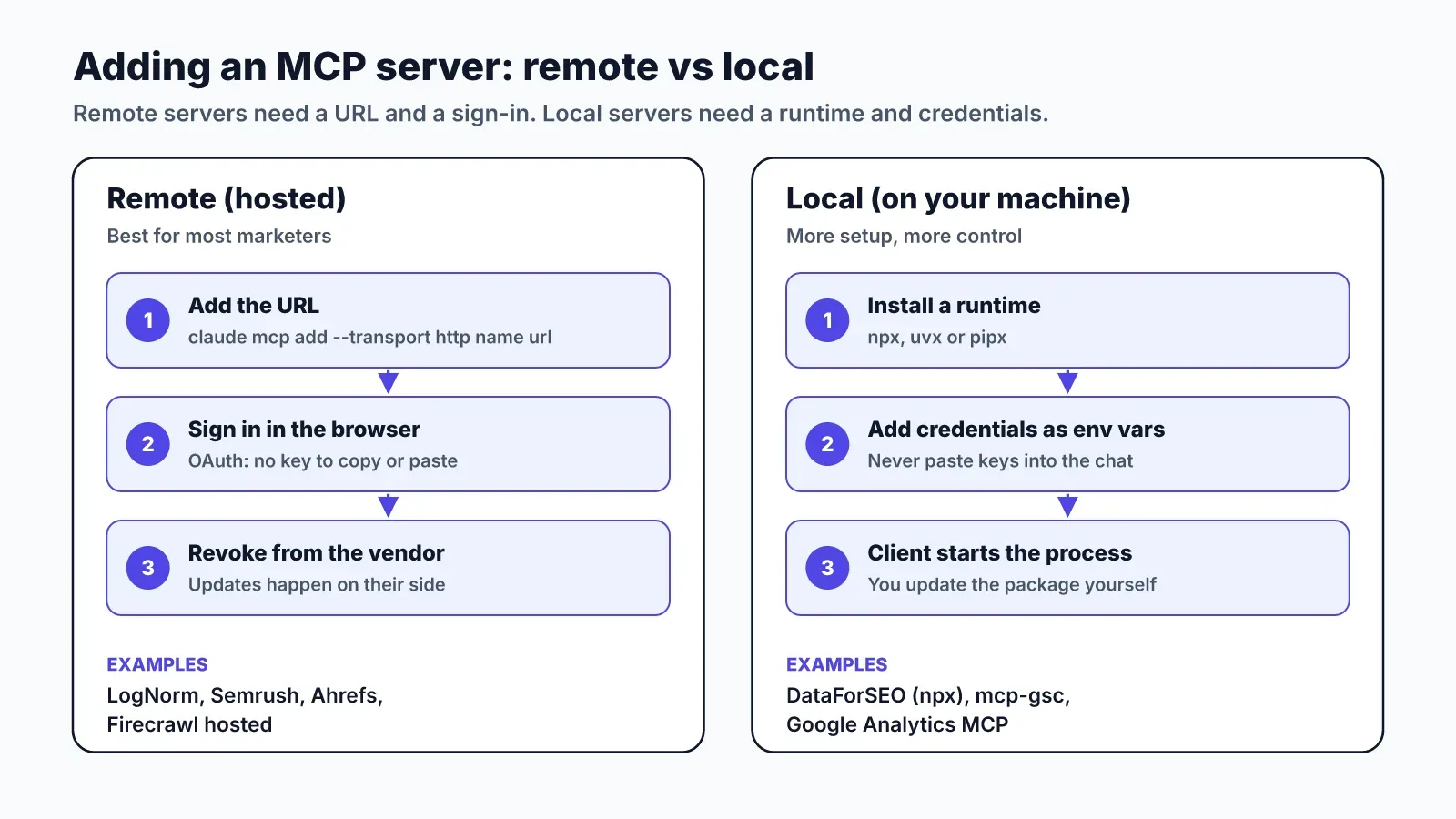
For a remote server in Claude Code, use claude mcp add --transport http <name> <url>, then sign in through /mcp. Add --scope user to make it available in every project. Codex uses codex mcp add <name> --url <url>, and Cursor reads servers from ~/.cursor/mcp.json.
For a local server, the command runs a package on your machine with npx, uvx or pipx. Credentials go in --env flags or the config file's env block. Never paste an API key into the chat itself.
Start with remote servers if you're not a developer. They update themselves, and OAuth means you can revoke access from the vendor's side. Our guide to Claude Code for marketing walks through a full setup and four weekly workflows.
What to check before you connect any server
Check what the server can write before you check what it can read. A study of 1,723 MCP applications found only 37.2% gated tool execution behind a blocking approval step. In most setups, an enabled tool runs when the model calls it.
Security is uneven too. Of 1,899 open-source MCP servers studied, 7.2% had general software vulnerabilities and 5.5% showed MCP-specific tool poisoning. Official servers from the vendor whose data you use are the safer default.
Run through this list for each server:
- Does it write or delete anything, and can you switch those tools off?
- Which credentials does it hold, and can you revoke them in one place?
- How is usage metered, and can you cap it?
- How does it handle text from third-party pages?
- Is it maintained by the vendor or by an individual, and when was it last updated?
For a wider look at what agents can do across the marketing job, read our guide to AI agents for marketing.