Semrush MCP vs Ahrefs MCP vs DataForSEO MCP Compared
Semrush MCP, Ahrefs MCP and DataForSEO MCP compared on data, setup and billing from each vendor's docs, plus what your agent still needs.


Semrush MCP, Ahrefs MCP and DataForSEO MCP all do the same basic job: they let an AI agent like Claude call a vendor's SEO API in the middle of a conversation. They differ in what data comes back, how you sign in and how you pay. Pick Semrush or Ahrefs if you already pay for that tool, and DataForSEO if you want pay-per-call data with no subscription.
Every fact below comes from each vendor's own public documentation, read in October 2026. Where a vendor doesn't say something, we don't guess. Check the vendor's docs before you buy, because plans and unit costs change.
What an SEO data MCP server gives your agent
An SEO data MCP server turns a vendor's API into tools your agent can call on its own. MCP (Model Context Protocol) is an open standard for connecting AI tools to outside data. Once connected, you ask "which keywords does this competitor rank for in the US?" and the agent fetches the rows itself.
What comes back is data: keywords, positions, backlinks, traffic estimates. The server does not tell you which of those rows matters most this week. That judgement stays with you, or with the agent reading the rows in its context window.
If you are new to agents in marketing, start with our guide to Claude Code for marketing. It covers the setup basics this post assumes.
Semrush MCP: data, setup and billing
Semrush MCP is a hosted server at https://mcp.semrush.com/v2/mcp that gives your agent read access to Semrush's public APIs. According to Semrush's developer docs, it uses streamable HTTP only, and it signs you in with OAuth by default.
What it returns
Semrush says the server provides data from three APIs:
- All of the SEO (Standard) API: keyword research, organic and paid rankings, competitor overlap, backlinks and referring domains.
- The Trends API, depending on your Trends subscription level: traffic and market data, such as traffic by source.
- All read-only methods of the Projects API (v3), so the agent can read your Semrush projects but not create or change them.
Semrush's knowledge base says the connection is read-only. Your agent can retrieve data but can't modify or delete anything in your account.
How you connect
Semrush ships official apps for Claude, ChatGPT and Perplexity. In Claude, you go to Customize, then Connect your apps, search for Semrush, click Connect and approve access. You then tag @Semrush in a chat.
In Claude Code, Semrush documents this command:
claude mcp add semrush https://mcp.semrush.com/v2/mcp -t httpThen run /mcp, pick Semrush and finish the OAuth sign-in in your browser. Semrush also documents setup for Cursor, VS Code, Gemini tools and Lovable. If your client can't do OAuth, you can send your Semrush API key in an Authorization: Apikey header instead.
How you pay
Semrush MCP is billed in API units, the same units as the Semrush API. Each request uses units based on the report type and the amount of data. Semrush's docs list these plans as including MCP access to SEO data:
- Semrush One Starter, Semrush One Pro+, SEO Classic Pro and SEO Classic Guru, each with 50,000 API units that refresh on your renewal date.
- SEO Classic Business or Semrush One Advanced, plus an API units package of 2, 5, 10 or 20 million units.
Traffic and market data needs a separate Trends API plan (Basic or Premium), which includes MCP access. Semrush's own tip for saving units: be specific. "Top 50 keywords in the US" costs less than "all keywords globally."
Ahrefs MCP: data, setup and billing
Ahrefs MCP is a hosted server at https://api.ahrefs.com/mcp/mcp that lets your agent query the Ahrefs API, available on paid plans from Lite upward. Ahrefs' developer docs say it uses streamable HTTP and syncs across devices linked to your account.
What it returns
Ahrefs' own MCP page lists four use cases: keyword research (search volume, traffic potential, growth trend, keyword difficulty), international SEO opportunities, competitor organic traffic over time, and backlink profiles with Domain Rating history. Ahrefs does not publish a full tool list on those pages, so check its docs for the exact endpoints your plan can reach.
How you connect
Ahrefs offers a Claude connector and a ChatGPT app, where you mention @Ahrefs in a chat. For other clients you add the remote URL above. In Claude Code, that's a standard remote server:
claude mcp add --transport http ahrefs https://api.ahrefs.com/mcp/mcpWhen you approve the consent screen, Ahrefs creates a dedicated API key tagged with MCP scope. Workspace admins can set a monthly API unit limit on each key, which is a useful guard against a runaway agent. You can also generate an MCP key by hand.
Ahrefs is strict about how you use it. Its docs say custom scripts, bridges or standalone HTTP clients against the MCP endpoint are not permitted. For programmatic access, Ahrefs points you to its public API instead.
How you pay
Ahrefs MCP uses API units from your monthly allowance, the same way direct API calls do. Each plan also caps the rows per request an agent can pull. Lite, Standard, Advanced and Enterprise all include MCP, with higher tiers getting more units and more rows. Enterprise customers can buy unit add-ons. Ahrefs keeps the exact numbers on its pricing page, so check there.
DataForSEO MCP: data, setup and billing
DataForSEO MCP is an open-source server you can run yourself or reach as a hosted endpoint, and you pay per API call with no subscription. It is the only one of the three built for people who want raw API access more than a dashboard.
What it returns
DataForSEO's MCP page lists eight APIs the server connects to:
- SERP API: live Google, Bing and Yahoo results for any location and language.
- AI Optimization API: LLM prompt data and aggregated AI responses.
- Keyword Data API and DataForSEO Labs API: keyword research and market data.
- On-Page API: crawl and on-page checks.
- Backlinks API: backlinks and referring domains.
- Business Data API: reviews, listings and social data.
- Domain Analytics API: technologies and Whois records.
The AI Optimization API stands out. Neither Semrush's nor Ahrefs' MCP docs list LLM answer data as part of their MCP scope.
How you connect
You have three routes, per DataForSEO's setup guide:
- Run it locally with
npx dataforseo-mcp-server, which needs a current Node.js. - Run the Docker image
dataforseo/mcp. - Point your client at DataForSEO's hosted HTTP endpoint.
For Claude Code, the local route looks like this:
claude mcp add dataforseo \
  --env DATAFORSEO_USERNAME=your_api_login \
  --env DATAFORSEO_PASSWORD=your_api_password \
  -- npx -y dataforseo-mcp-server
Authentication is your DataForSEO API login and password, not your dashboard login. Hosted connections take them as a Base64 Basic auth header. Keep those values in environment variables or your client's config. Never paste them into a chat.
How you pay
DataForSEO pricing is pay-as-you-go: you pay for the calls you make, with a minimum payment of $50. The account panel lets you set spending limits. Per-call prices vary by API, so check DataForSEO's price list for the endpoints your agent will hit most.
Semrush MCP vs Ahrefs MCP vs DataForSEO MCP side by side
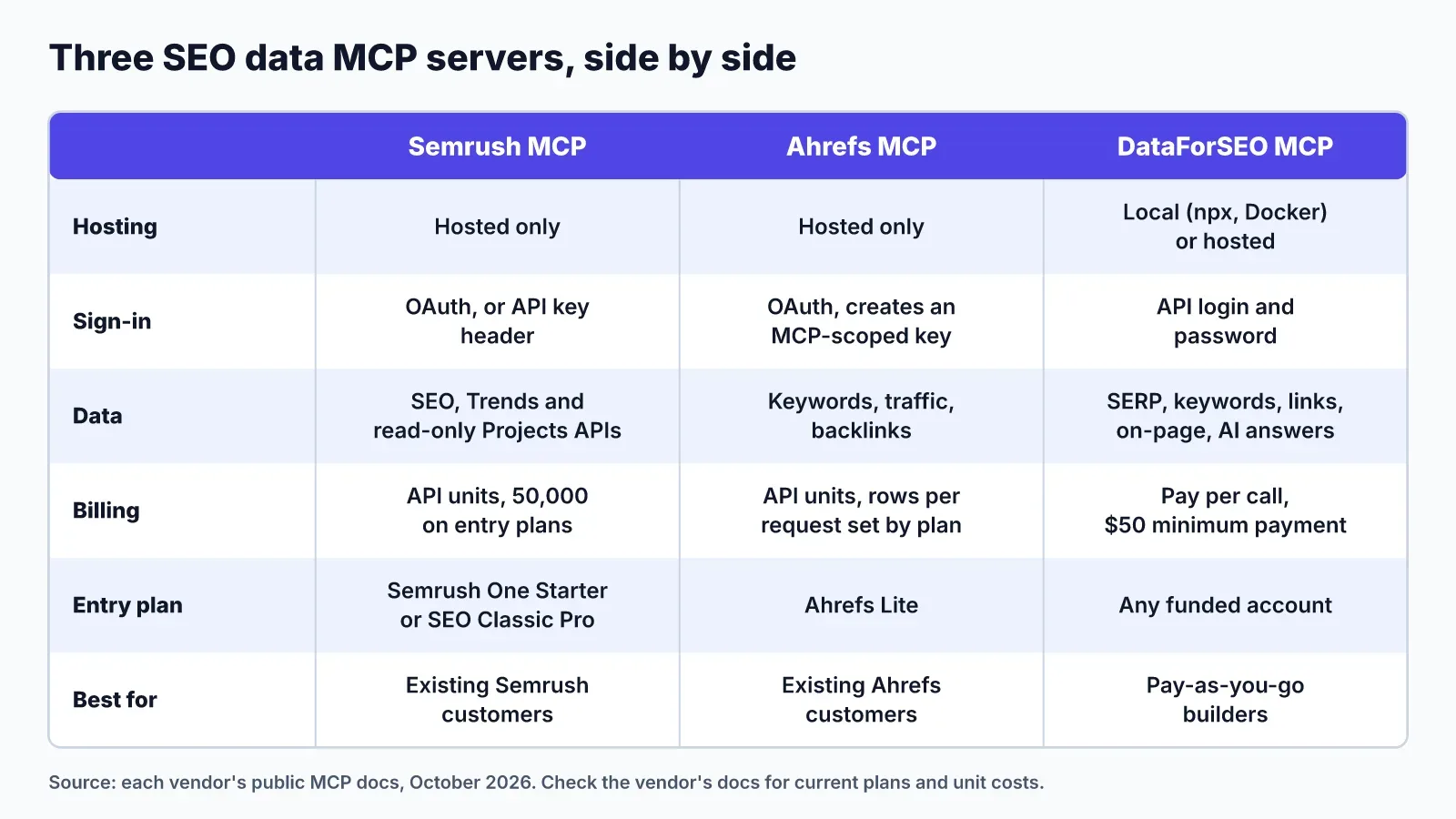
Choose by what you already pay for. If your team lives in Semrush or Ahrefs, its MCP server costs you nothing extra beyond units. If you don't, DataForSEO lets you start without a subscription, and it covers SERP and AI answer data the other two don't list.
| Semrush MCP | Ahrefs MCP | DataForSEO MCP | |
|---|---|---|---|
| Hosting | Hosted only | Hosted only | Local (npx, Docker) or hosted |
| Sign-in | OAuth, or API key header | OAuth consent creates an MCP key | API login and password |
| Data | SEO API, Trends API, read-only Projects | Keywords, traffic, backlinks (check docs for full list) | SERP, keywords, Labs, backlinks, on-page, AI answers, business data |
| Billing | API units; 50,000 on entry plans | API units; rows per request by plan | Pay per call; $50 minimum payment |
| Entry point | Semrush One Starter or SEO Classic Pro | Ahrefs Lite | Any funded account |
| Best for | Semrush customers | Ahrefs customers wanting backlink depth | Builders and pay-as-you-go teams |
Two cautions apply to all three. Each call spends units or money, and a vague prompt can fetch thousands of rows. Raw rows also land in your agent's context window, where they compete with your instructions for space.
What none of the three gives your agent
All three servers answer "what is the data?" None of them answers "what should we do first, who's doing it, and did the fix work?" That is the gap you notice after the first week of using one.
Here is what a data server leaves to you:
- A ranked plan. An audit with 200 issues and a keyword export with 3,000 rows are inputs. Something still has to weigh a title rewrite against a new comparison page.
- A place to put the work. A chat transcript isn't a backlog. Your teammates can't see what the agent found or claimed.
- A check that a fix landed. After you ship, nothing re-runs the check or measures the result.
You can build all of this yourself with prompts, a spreadsheet and discipline. Most small teams don't keep it up.
How LogNorm's MCP server fills that gap
LogNorm runs its own MCP server that hands your agent ranked work instead of raw rows. LogNorm gathers the data itself (site crawl and SEO audit, GEO audit, keywords, Google Search Console, competitors, and how ChatGPT, Gemini and Google AI Overviews answer your buyers). It turns each finding into a move, ranks the moves against each other, and your team plans the best into a weekly Growth Plan.
When you connect your agent to LogNorm, it joins your workspace as a named teammate. It can claim a move, fix the issue in your codebase, draft a post and send it for review, and ask LogNorm to re-check a fix. Every step shows up on your dashboard under its name.
Setup in Claude Code is one command:
claude mcp add --transport http --scope user lognorm https://lognorm.com/api/mcpThen run /mcp, pick lognorm, choose Authenticate and click Allow in your browser. Sign-in is OAuth with PKCE, so there's no API key to copy. LogNorm also works with Claude desktop and web, OpenAI Codex and Cursor.
A few design choices matter if you've used a data server:
- Reads go through an
executetool that runs JavaScript against a read-only client in a sandbox, with no network or file access. Filtering happens there, so your agent's context gets ten rows, not ten thousand. - You don't need an AI key. Your agent's own plan does the thinking. Keyword lookups and research runs use LogNorm credits.
- Agents can't publish content or change integrations. Publishing stays with people.
- Third-party text, including search queries, is screened before your agent sees it.
The full list of tools is in LogNorm's agent docs.
Using a data server and LogNorm together
Many teams run a data server and LogNorm in the same agent, and that's a sensible setup. The data server answers one-off research questions. LogNorm holds the plan, the moves and the record of what shipped.
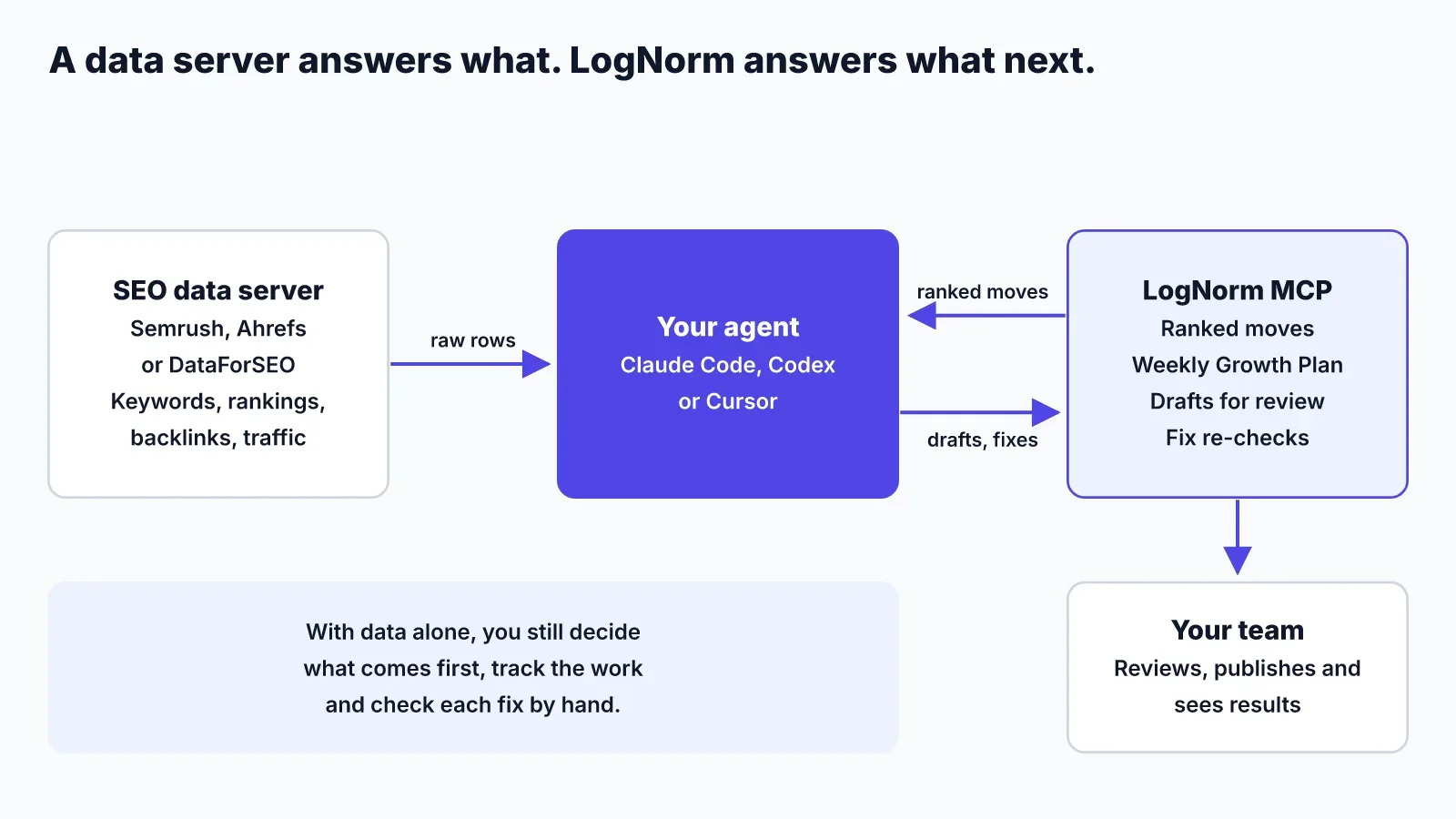
A typical flow looks like this:
- Your agent claims a LogNorm move to publish a comparison page against a competitor.
- It pulls that competitor's top pages and backlinks from Semrush, Ahrefs or DataForSEO to sharpen the brief.
- It writes the draft in LogNorm and sends it for review, with the extra evidence noted in a comment.
- After you publish, LogNorm measures the result at 28 and 90 days.
LogNorm already does its own keyword research, judged for your business, so you may not need a data server at all early on. Add one when you need depth LogNorm doesn't cover, such as a full backlink index. Watch spend on both sides: units or dollars on the data server, credits on LogNorm.
FAQ
Does Semrush have an MCP server?
Yes. Semrush runs an official hosted MCP server at https://mcp.semrush.com/v2/mcp, with official apps in Claude, ChatGPT and Perplexity.
What does Semrush MCP cost?
There's no separate fee for the server itself. It spends API units from your Semrush subscription. Semrush One Starter, Pro+, SEO Classic Pro and Guru include 50,000 units that refresh at renewal. Larger unit packages need a Business or Advanced plan.
Does Semrush MCP consume API units?
Yes. Every query uses API units, based on the report type and how many rows you ask for. Setting a result limit, a database and filters in your prompt keeps usage down.
Do I need a paid Ahrefs plan for Ahrefs MCP?
Yes. Ahrefs MCP is available on paid plans from Lite upward. Your plan sets both your monthly API units and the maximum rows per request.
Can I use DataForSEO MCP with Claude Code?
Yes. DataForSEO documents a claude mcp add command that runs its server with npx, plus a hosted HTTP option. You need DataForSEO API credentials and a funded account.
Can these servers change anything in my account?
Semrush says its connection is read-only, and its Projects access is read-only. Ahrefs and DataForSEO describe their servers as ways to fetch data, so check their docs before giving an agent broad access. LogNorm's agents can write drafts and comment on moves, but can't publish or change integrations.