How to Use Google Search Console With Claude via MCP
Set up a Google Search Console MCP for Claude, then ask what matters: striking-distance queries, low-CTR results and pages losing clicks.


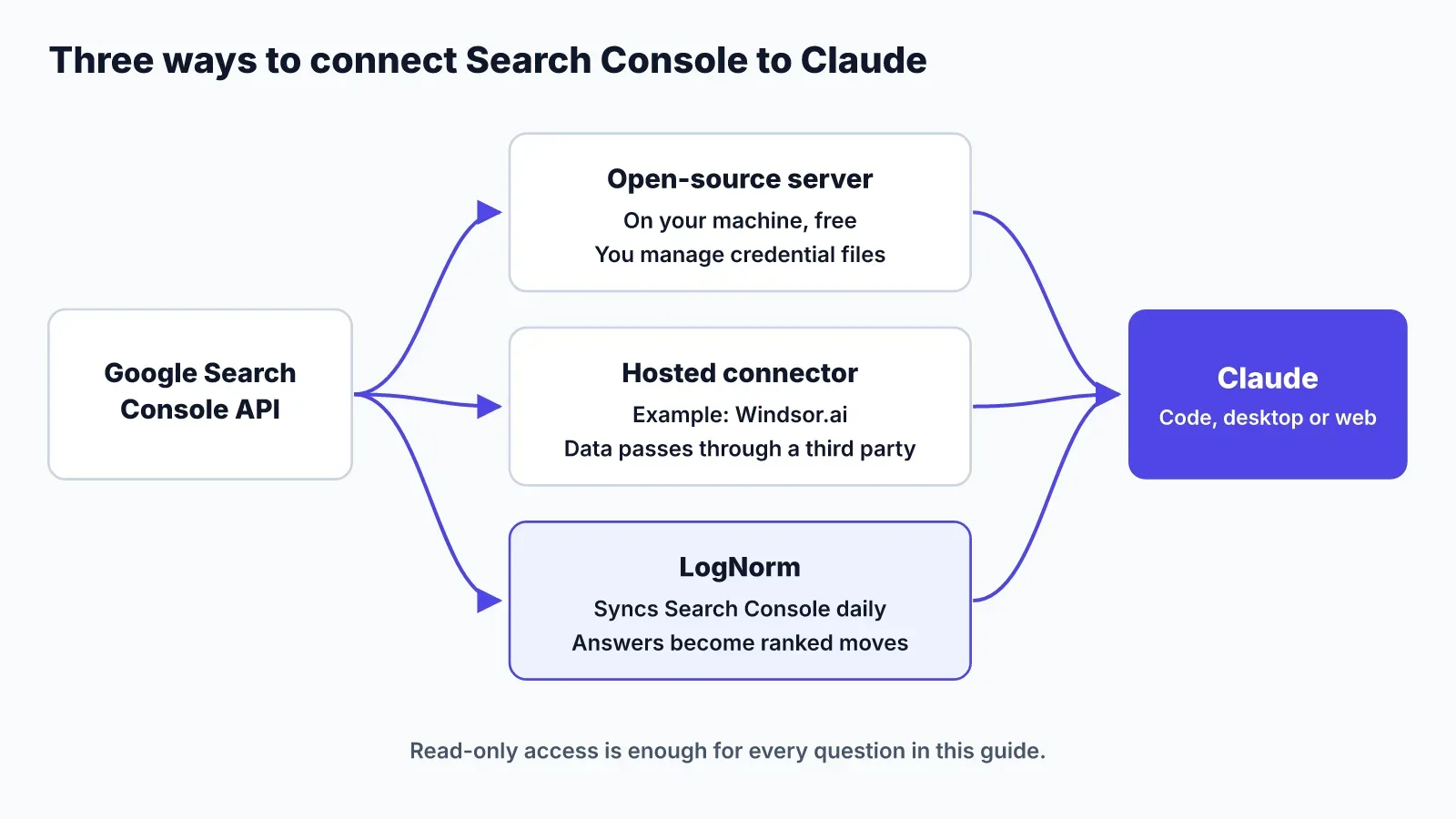
You can connect Google Search Console to Claude in three ways: run an open-source MCP server on your own machine, use a hosted connector, or let a growth tool that already syncs Search Console hand the data to Claude. The local route is free and keeps credentials with you. The hosted route takes minutes. The third route turns answers into work you can track.
This guide walks through each option, then the three Search Console questions that find the fastest wins. If you are setting up Claude for marketing work in general, our guide to Claude Code for marketing covers the basics.
What a Google Search Console MCP server does
A Google Search Console MCP server exposes the Search Console API as tools Claude can call. You ask a question in plain language, Claude calls the tool, and it answers from your real clicks, impressions, click-through rate (CTR) and average position.
Most servers cover the same core of the API:
- Search Analytics: performance rows broken down by query, page, country, device and date.
- URL Inspection: index status, crawl details, canonical URL and rich results for one URL.
- Sitemaps: list, inspect and sometimes submit or delete sitemaps.
- Sites: the properties your Google account can see.
For analysis you only need read access. Google's read-only scope is webmasters.readonly, and it can't change anything in your account.
Before you start: property, access and API limits
You need three things before any setup: the exact property name, access to that property, and a sense of the API's limits.
Check your property type first. A Domain property is written with an sc-domain: prefix, such as sc-domain:example.com. A URL-prefix property uses the full URL, such as https://www.example.com/. Suganthan's setup guide calls the wrong format the mistake that catches people out, and it is the first thing to check when a server returns nothing.
Your Google account also needs access to the property. If someone else owns it, ask them to add you as a user in Search Console settings.
The API has limits that shape what Claude can pull:
- A single Search Analytics request returns at most 25,000 rows; larger pulls need paging.
- Search Analytics exposes at most 50,000 rows per day per search type, sorted by clicks, so long-tail queries on big sites get cut.
- Search Analytics allows 1,200 queries per minute per site and per user.
- URL Inspection allows 2,000 queries per day and 600 per minute per site, so you can't inspect a whole large site in one go.
For most small sites none of these bite. They matter when you ask Claude for "every query" on a site with years of content.
Option 1: run an open-source server on your machine
An open-source server runs on your computer, talks to Google with your own credentials, and costs nothing. Pick this if you are comfortable creating a Google Cloud project and editing a config file.
Two servers whose documentation we read:
- suganthan-gsc-mcp, from suganthan.com. It ships 29 tools, from quick-win keywords and content decay to cannibalisation, image search reports and Indexing API submissions. You set it up with OAuth for personal use or a service account for automation and agencies. The author estimates about fifteen minutes.
- google-search-console-mcp by kn00m1 (listed on MCP Market). It's a Python server that signs in with Google Application Default Credentials or an OAuth desktop client. Its write tools (sitemap submit and delete) stay off unless you set
GSC_WRITE_ACCESS=true, and it sanitises API responses against prompt injection.
The steps are similar for both:
- Create a project in Google Cloud Console and enable the Search Console API.
- Create an OAuth client (desktop app) or a service account. A service account must be added as a user on your Search Console property.
- Install the server and point it at your credentials file.
- Add it to Claude Code or Claude Desktop as a local (stdio) MCP server.
- Ask Claude to list your properties, to confirm it can see the right one.
Other open-source servers exist, including the AminForou/mcp-gsc repository on GitHub. Read each README and its permissions before you install one. The trade-off with every local server is maintenance: you update it, and you keep the credential files safe.
Option 2: use a hosted connector
A hosted connector holds the Search Console connection for you, and Claude talks to the connector's MCP server. Pick this if you want to skip Google Cloud setup.
Windsor.ai is one example. You create a Windsor account, choose Google Search Console as a data source, grant access, then add Windsor MCP to Claude. Windsor's FAQ says its MCP works on the free forever plan.
Windsor also adds computed fields the raw API doesn't return, such as a branded versus non-branded flag and URL path levels for rolling up sections. It can blend Search Console with GA4 or Google Ads data.
The trade-off is trust. Your Search Console data passes through a third party, so read its data policy first. Windsor's FAQ also notes that Claude Desktop and ChatGPT only allow external connectors on paid plans.
Option 3: let LogNorm hold the Search Console connection
LogNorm connects to Search Console itself, syncs it daily and lets Claude read the results through LogNorm's own MCP server. Pick this if you want Claude's answers to turn into ranked, tracked work rather than a chat transcript.
Setup has two parts:
- In LogNorm, connect Search Console from onboarding, Search then Performance, or Settings then Integrations. LogNorm uses Google's OAuth with the read-only
webmasters.readonlyscope, and it never writes to your account. - Add LogNorm to Claude Code with one command, then run
/mcp, pick lognorm, choose Authenticate and click Allow in your browser.
claude mcp add --transport http --scope user lognorm https://lognorm.com/api/mcpSign-in is OAuth with PKCE, so there's no API key to copy and no credential file on your machine. LogNorm also works with Claude desktop and web, OpenAI Codex and Cursor. The agent docs cover each client.
Claude reads Search Console through an execute tool that runs JavaScript against a read-only LogNorm client in a sandbox. Two methods matter here:
lognorm.searchConsole.queries({ view }), with viewsstriking,low_ctr,topandall.lognorm.searchConsole.pages({ view: "declining" }), for pages losing clicks.
Filtering happens in the sandbox, so Claude gets the 20 rows that matter instead of 25,000. LogNorm syncs about 16 months of history on first connect, then the last 90 days daily. Its numbers run about two days behind, which is normal Search Console lag.
The Search Console questions worth asking Claude
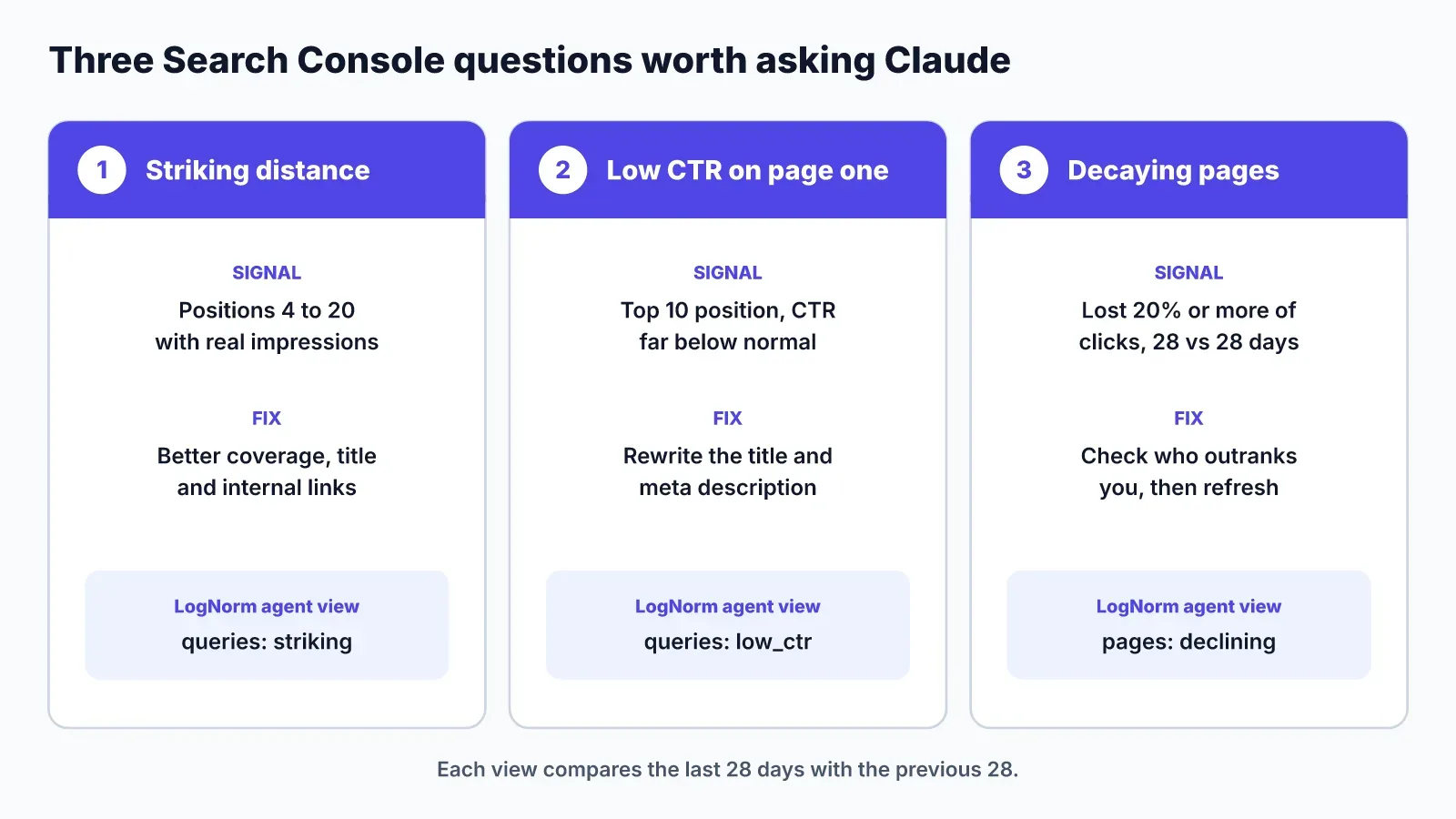
Three questions find most of the quick wins in Search Console: which queries are close to page one, which page-one results don't get clicked, and which pages are losing clicks. Each one points to a different fix: better coverage, a new title or a refresh.
Striking distance: queries in positions 4 to 20
Striking-distance queries already rank, just not high enough to get many clicks. Google sees the page as relevant, so a better title, more complete coverage and a few internal links can move it up.
Prompt to use:
Using Search Console data for the last 28 days, list queries with an
average position between 4 and 20 and at least 100 impressions.
Group them by page. For each page, say which queries the page
doesn't cover well yet.
In LogNorm, searchConsole.queries({ view: "striking" }) returns this list for positions 4 to 20 over the last 28 days, compared with the 28 before.
Low CTR on page one
A low-CTR query ranks on page one but people skip it. The fix is usually the title and meta description, not the content. A title that doesn't match the searcher's wording loses the click even at position 3.
Prompt to use:
Find queries where we rank in the top 10 with at least 300
impressions in the last 28 days, but CTR is well below other
queries at the same position. Show the page, its current title,
and a rewritten title that matches the query's intent.
In LogNorm, the low_ctr view returns page-one queries with weak click-through.
Decay: pages that lost 20% or more of their clicks
Decaying pages used to earn traffic and are slipping. Catch them early and a refresh is cheaper than a new article. Check what now ranks above you before you rewrite anything.
Prompt to use:
Compare clicks per page for the last 28 days against the previous
28 days. List pages that lost 20% or more of their clicks, with
both numbers, and the queries that lost the most clicks on each.
In LogNorm, searchConsole.pages({ view: "declining" }) returns pages that lost 20% or more of their clicks over the last 28 days against the previous 28.
From answers to ranked moves
A chat answer disappears when you close the window. A move stays in a backlog, gets ranked against everything else, has an owner and gets measured after it ships. That is the step most Search Console MCP setups skip.
After every sync, LogNorm reads the last 28 days (and the 28 before, for decay) and creates or updates moves on its own, according to its Search Console docs:
- Striking distance: a page whose queries rank 8 to 20 with at least 20 impressions per query and 100 across the page. Up to 12 pages.
- CTR fix: a top-10 page with 300 or more impressions whose CTR is under half of what its position usually earns. Up to 10.
- Decay: a page with 30 or more clicks in the previous 28 days that lost 30% or more in the last 28. Up to 10.
- Orphan query: a query with 100 or more impressions ranking past page one, served by a page that wasn't written for it.
- Cannibalisation: a query where two or more of your pages each take at least 20% of impressions.
These automatic thresholds are stricter than the agent views above. The views are for exploring; the moves are for work LogNorm is confident is worth doing. Each move carries the Search Console rows behind it as evidence and an expected impact, such as extra clicks per 28 days at a target position.
Moves land in one ranked backlog alongside audit fixes, keyword gaps and AI visibility work, and are ranked against each other. When a move ships, LogNorm records a Search Console baseline and measures again at 28 and 90 days.
Your agent can claim a move, make the change in your codebase or draft the refresh, and send it for review. Publishing stays with your team.
Keep your Search Console credentials safe
Use read-only access unless you have a specific reason not to. Analysis needs only the webmasters.readonly scope. Write scopes let a server submit sitemaps or URLs, which you rarely want an agent doing unprompted.
A few habits keep the setup safe:
- Never paste OAuth client secrets, service account keys or tokens into a chat with Claude. Keep them in files or environment variables the server reads.
- Keep credential files out of your Git repository. Add them to
.gitignorebefore your first commit. - Prefer servers that leave write tools off by default, as the kn00m1 server does.
- Give a service account access only to the properties it needs.
- Remove access in Search Console settings when you stop using a server.
With a hosted connector or LogNorm, there's no credential file on your machine. You approve access in Google's consent screen and can revoke it from your Google account at any time.
FAQ
Is there an official Google Search Console MCP server?
We haven't found one from Google. The servers covered here come from independent developers and third-party companies. Google provides the Search Console API they all build on.
Does a Search Console MCP server work in Claude on the web?
Local servers run on your machine, so they work in Claude Desktop and Claude Code, not in Claude on the web. Hosted connectors and LogNorm are remote servers, which you add as custom connectors in Claude desktop or web.
Is a Google Search Console MCP free?
The open-source servers are free, and the Search Console API costs nothing to use within Google's quotas. Windsor.ai offers a free plan. LogNorm's Search Console connection depends on your LogNorm plan.
Can Claude submit URLs for indexing through MCP?
Some servers can. suganthan-gsc-mcp includes Indexing API tools for single URLs and batches. Leave write tools off unless you need them, and check that your pages qualify for Google's Indexing API before relying on it.
Can I connect more than one site?
Yes, with most options. Local servers can read any property your Google account or service account can access. LogNorm works on one website per agent connection, so you connect again for another site.