Content Decay: How to Spot and Refresh Declining Pages
Content decay explained: what causes pages to lose clicks, how to find them in Search Console by page and query, and how to refresh or merge them.


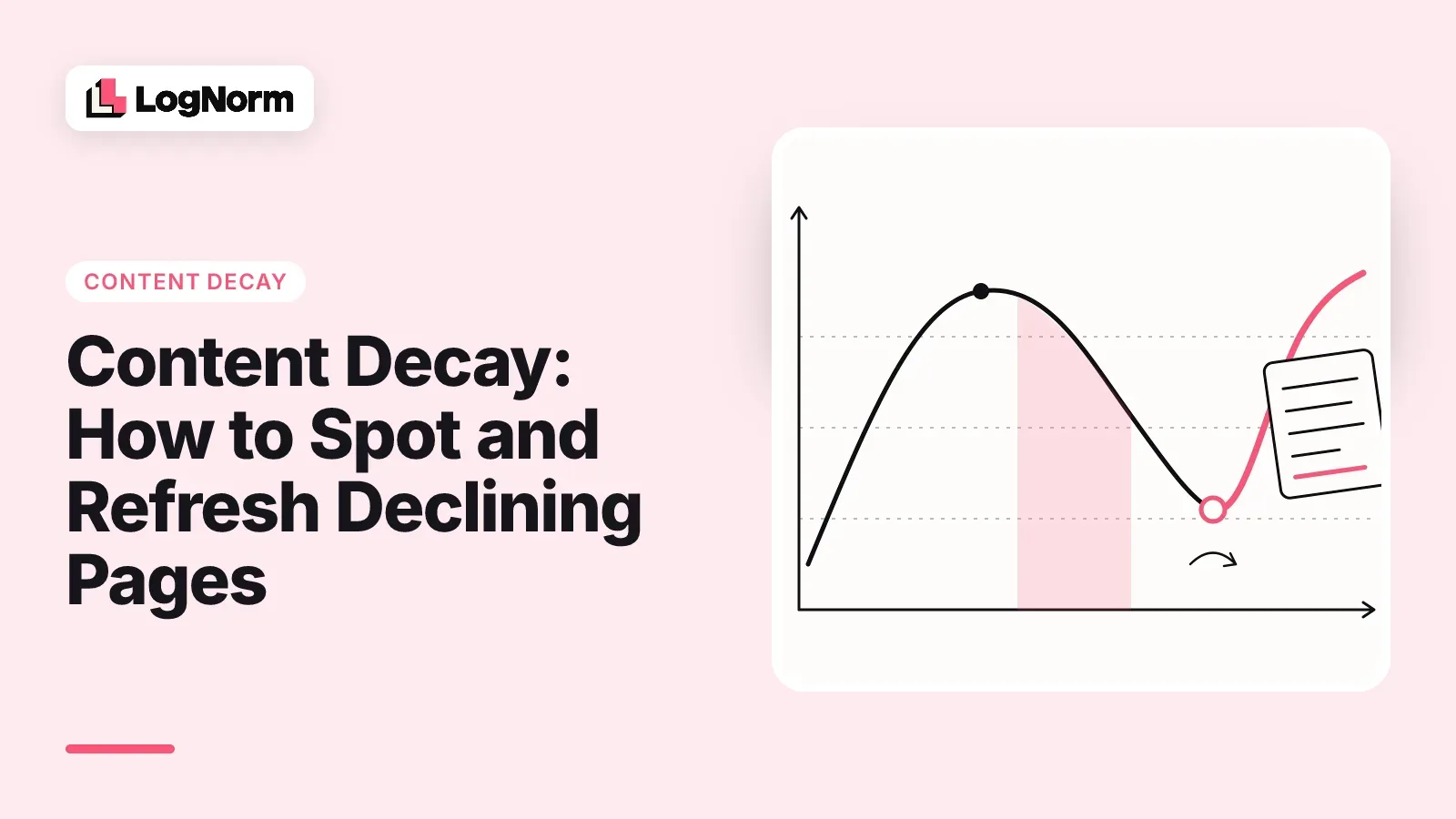
Content decay is the slow loss of organic clicks on a page that used to perform well, while the rest of your site holds steady. The page still exists, still ranks for something, and nobody changed it. That last part is usually the problem.
This guide shows how to tell which cause is behind a decaying page, how to find those pages in Google Search Console, how to decide whether each one deserves a refresh, and how to check that the refresh actually worked.
What is content decay?
Content decay is a sustained drop in clicks to a single page over weeks or months, caused by changes outside the page rather than by a site-wide problem. Rankings slip, click-through rate falls, or both, and the page earns less search traffic each month.
Two things look like decay and are not:
- A site-wide drop, where most pages fall at once. That points to tracking, a migration, an indexing problem or a Google update, and a page refresh will not fix it.
- Seasonality, where a page dips every year at the same time. Compare against the same period last year before you touch it.
For a startup blog, decay hurts more than it looks. A small site often gets most of its search clicks from a handful of older posts, so one decaying article can take a visible bite out of total traffic.
What causes content decay
Content decay has a small set of causes, and each one leaves a different pattern in your Search Console data. Reading the pattern first saves you from refreshing the wrong thing.
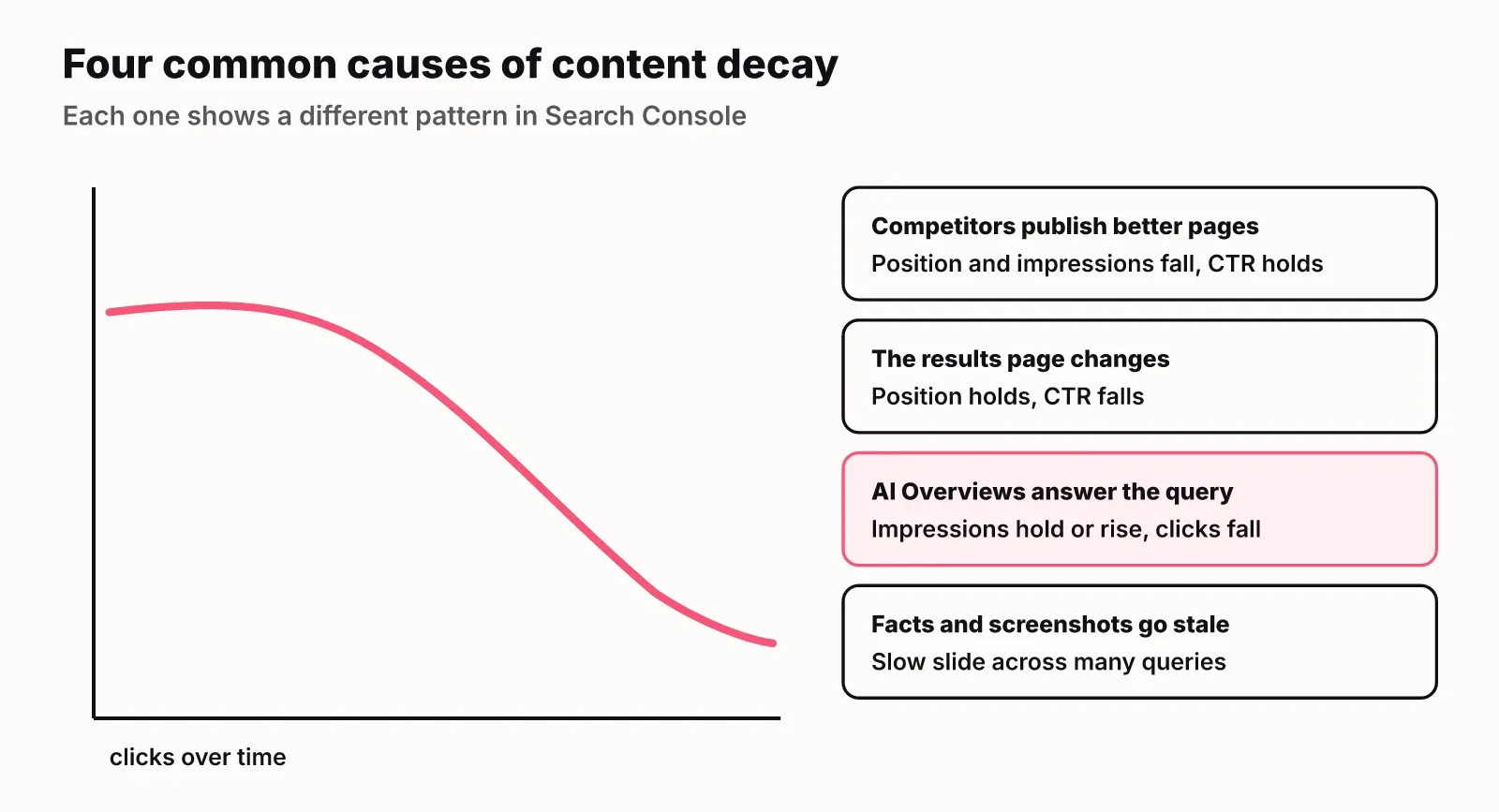
Competitors publish newer or more complete pages, and yours slides from position 3 to position 7. Google changes the results page, adding features that push organic links further down. AI Overviews now answer many informational queries directly on the results page, so fewer searchers click through even when you still rank. And the page itself ages: prices change, screenshots show an old interface, advice stops being true.
Two quieter causes are worth checking too. Search intent can shift, so people typing the same query now want a template or a comparison instead of an explainer. And your own newer posts can start competing with the old one for the same query.
| Cause | Position | Impressions | CTR | What it looks like |
|---|---|---|---|---|
| Competitors outrank you | Falls | Falls | Roughly steady | A new page sits above yours for your main query |
| Results page changes | Steady | Steady | Falls | New features above the organic results |
| AI Overviews | Steady | Steady or rising | Falls | An AI Overview answers the query before the links |
| Outdated facts | Drifts down | Falls slowly | Falls slowly | Slow slide across many long-tail queries |
| Intent shift | Falls | Falls | Falls | Top results are now a different format |
| Cannibalisation | Swaps | Split | Varies | Two of your URLs alternate for the same query |
How to spot decaying pages in Google Search Console
You find content decay in Search Console by comparing two equal periods in the Performance report, first by page and then by query. Here is the routine we use:
- Open Performance, then Search results, and click the date filter. Choose Compare and pick the last 28 days against the previous 28 days.
- Open the Pages tab and sort by the clicks difference. The pages with the largest drops rise to the top.
- Flag pages that lost about 20 percent or more of their clicks and still had meaningful traffic before the drop. That threshold is our rule of thumb, not a Google figure; tune it to your site's volume.
- For each flagged page, switch the comparison to the same 28 days last year. If last year shows the same dip, it is seasonal and you can leave it.
- Click the page to filter by it, then open the Queries tab. Look at which queries lost clicks and whether their position or their CTR moved. Match that against the table above.
- Rule out technical causes before you rewrite anything. Check the Pages indexing report and URL Inspection for the page: a noindex tag, a changed canonical, a redirect or a crawl error can look exactly like decay.
Two cautions. Small pages produce noisy numbers, so a drop from 12 clicks to 8 is not a trend. And a 28-day window can catch a single bad week; if a page is borderline, look at a 3-month comparison before acting.
Triage: refresh, merge, redirect or leave
Every decaying page gets one of four outcomes: refresh it, merge it into a stronger page, redirect it, or leave it alone. Pick by asking three questions in order.
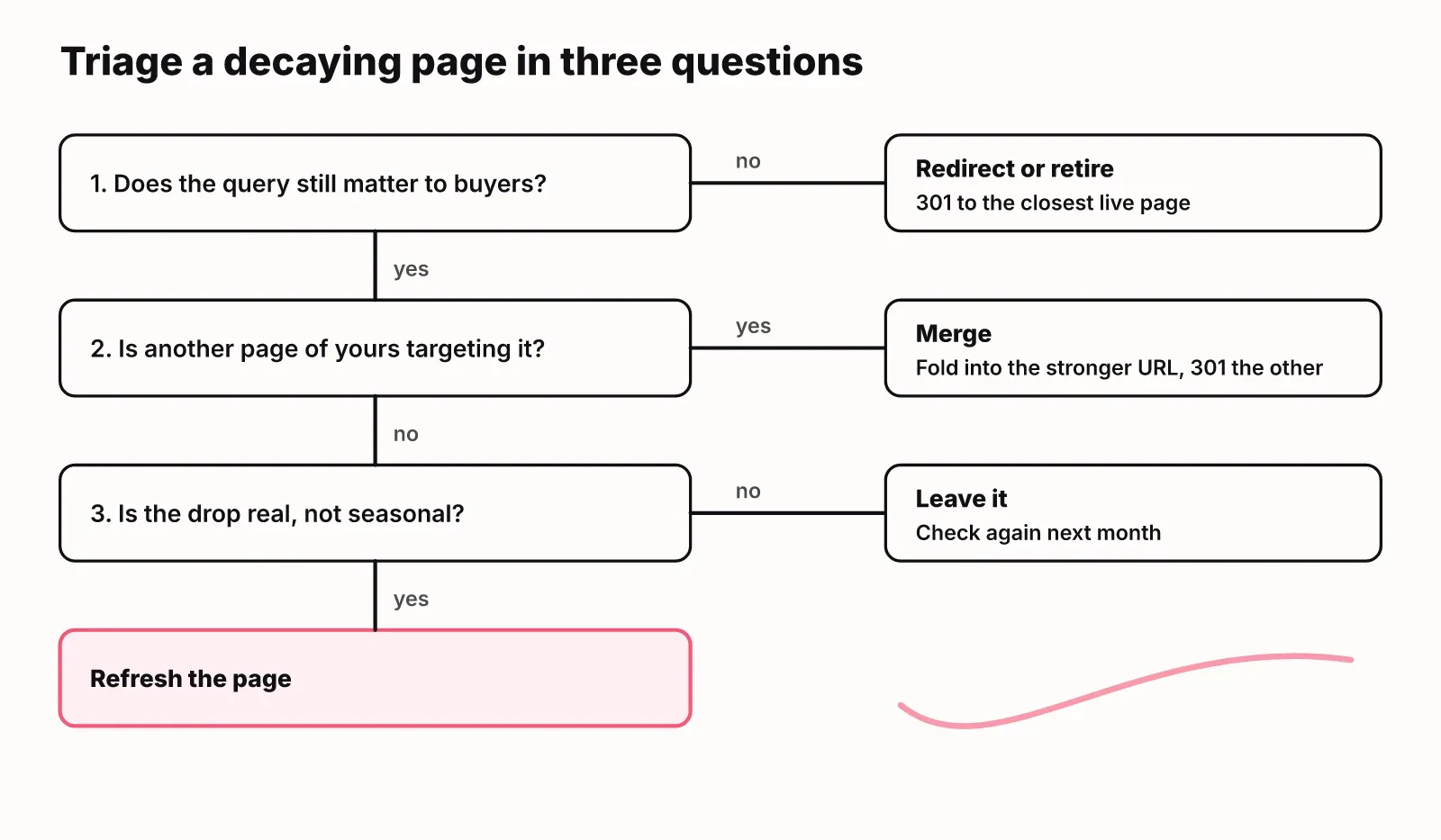
Does the query still matter to your buyers? If the topic no longer fits your product or market, retire the page and redirect it to the closest relevant page. Does another page of yours target the same query? Then merge the weaker page into the stronger one and redirect the old URL. Is the drop real once you account for seasonality and noise? If not, leave it and look again next month. If the page passes all three, refresh it.
| Outcome | Use it when | What you do |
|---|---|---|
| Refresh | The query still matters and the page is the right URL for it | Update the page in place, same URL |
| Merge | Two of your pages split the same query | Combine the best parts into the stronger URL, 301 the weaker one |
| Redirect | The topic no longer fits your business or the page is obsolete | 301 to the closest relevant page |
| Leave | The drop is seasonal, small, or explained by a change you cannot affect | Note it and recheck next month |
Default to refresh for pages on buyer topics such as comparisons, pricing explainers and how-tos for your category. They are the pages where a recovered position is worth the most.
Be careful with AI Overview decay. If impressions are steady and only CTR fell because an AI Overview now answers the query, a rewrite may not bring the clicks back. The better goal is to become one of the sources that overview cites, which means short answer-first sections and specific facts it can quote.
How to refresh a decaying page
A good refresh keeps the URL, fixes what is wrong first, and then makes the page the best current answer for the queries it already earns. Work in this order:
- Search the main query again and read the current top results and any AI Overview. Note what format wins now and what they cover that you do not.
- Fix facts. Update prices, product names, screenshots, dates and any advice that stopped being true. This is the cheapest part and often the biggest trust problem.
- Match current intent. If the top results moved from explainers to templates or comparisons, restructure the page to serve that need.
- Fill gaps from your own queries. The Queries tab for the page shows what people search before landing on it. Add sections that answer the ones you cover thinly.
- Rewrite each section opening so its first sentence answers the heading directly. That helps readers skim and gives AI engines a clean sentence to quote.
- Rewrite the title and meta description only if CTR fell while position held. If position fell, the title is rarely the problem.
- Add internal links to the refreshed page from newer, related posts, and remove links to pages you redirected.
- Change the visible updated date only when the content genuinely changed.
Keep a short changelog of what you changed and why. When you measure later, it tells you which change probably moved the numbers.
If you plan content as a ranked backlog, refreshes belong in the same queue as new posts. Our guide to SEO content strategy covers how to weigh them against each other.
Measure whether the refresh worked
You measure a refresh by recording a baseline on the day you publish it and comparing equal periods afterwards, at about 28 days and again at about 90 days. Without the baseline, you are guessing.
Record clicks, impressions, average position and CTR for the page, plus the same numbers for its top five queries. Then:
- At 28 days, compare the 28 days after the refresh with the 28 days before it. Expect early movement in position and impressions; clicks often lag.
- At 90 days, compare against the same 90-day window before the refresh, and against last year if the topic is seasonal.
- Call it a win if clicks or position recovered on the queries you targeted. If impressions rose but clicks did not, the page is ranking again but losing the click, often to an AI Overview or a weak title.
- If the page is still falling at 90 days, go back to triage. A second refresh rarely helps a page whose topic has moved on; a merge or redirect often does.
How LogNorm handles decaying pages
LogNorm turns pages that lose clicks into refresh moves, so decay shows up in your plan instead of in a report you forget to open. Once you connect Google Search Console, the decay monitor watches your pages and creates a move for each one that is losing clicks, with the evidence attached and a link back to the original page.
Each refresh move is ranked head to head against every other open move, such as new articles and technical fixes, so you can see whether refreshing a page beats writing a new one this week. You can read more about moves and how LogNorm ranks them, and how they fit into a ranked weekly plan. On plans that include it, the Monday digest email also lists the pages that decayed.
When you ship the refresh, LogNorm records a baseline at publish time and measures again at 28 and 90 days, marking the move as won if clicks, impressions or position improved. Refresh briefs and drafts are written in the content editor, the same place as new posts.
FAQ
Is freshness a ranking factor?
Freshness matters for queries where newer information is better, such as news, prices and product comparisons. For evergreen topics, a recent date alone does not lift rankings. Accurate, current content does, because it serves the searcher better than a stale page.
How often should you check for content decay?
Check once a month with a 28-day comparison in Search Console, and look at year-over-year data each quarter to catch slow declines and seasonal patterns. Weekly checks mostly surface noise unless your site has high traffic.
What is the difference between content decay and a content refresh?
Content decay is the problem: a page losing clicks over time. A content refresh is one fix for it: updating the page in place on the same URL. Some decaying pages are better merged or redirected than refreshed.
Should you change the publish date when you refresh a page?
Show an updated date when you made real changes to the content, and leave the original publish date in place. Changing only the date without changing the page misleads readers and does not help rankings.
Should you delete decaying content?
Rarely delete outright. If a page has links or still gets some traffic, redirect it to the closest relevant page or merge it into a stronger one. Remove a page without a redirect only when it has no traffic, no links and no relevant destination.
Can you prevent content decay?
You cannot prevent it, because competitors, results pages and facts keep changing. You can slow it by writing answer-first sections, keeping facts in places that are easy to update, and reviewing your top pages on a schedule.