Meta Description Length: What Google Shows in 2026
Meta description length has no fixed limit: Google cuts snippets by pixel width. See what fits on desktop and mobile, and how to get yours shown.


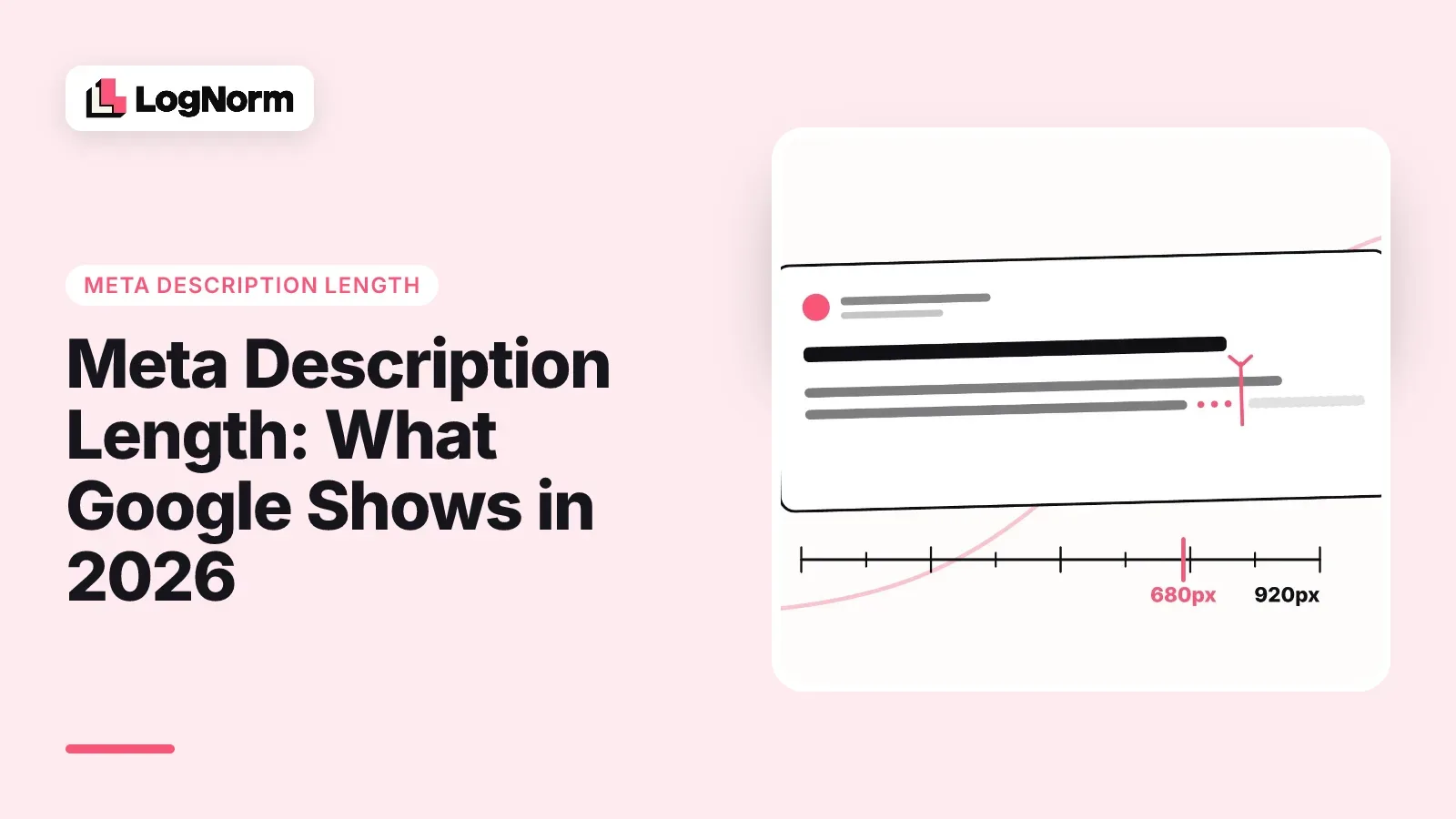
Google sets no maximum length for a meta description. Its own documentation says so directly, and adds that the snippet is cut off in search results as needed, "typically to fit the device width." So the useful question is not how many characters Google allows. It is how much of your text fits on the screen, and whether Google shows your text at all.
This guide gives you a working range, explains why tools disagree on the number, covers how Google decides between your description and your page text, and shows how to check a description before you ship it.
How long should a meta description be?
Aim for roughly 120 to 150 characters, and put the part that earns the click in the first 100 or so. That is a working range, not a rule. Google's "Control your snippets in search results" page, last updated 20 April 2026 and checked on 9 October 2026, states: "There's no limit on how long a meta description can be, but the snippet is truncated in Google Search results as needed, typically to fit the device width."
Two things follow from that sentence.
- A long description is not an error. Nothing breaks if you write 200 characters. The end simply gets replaced by an ellipsis on most screens.
- The cut happens by width, so a character count is only an estimate of where the cut lands.
LogNorm's free title and meta description checker treats 70 to 160 characters as the safe range and measures the real width instead: about 920 pixels on desktop and about 680 pixels on mobile, at the 14px Arial Google uses for result text. Below 70 characters you leave room unused that could name the audience or a concrete detail. When we measured ordinary English text in 14px Arial, it averaged about 6.3 pixels per character: roughly 145 characters fit in 920 pixels and about 105 in 680. Past that, the ending gets trimmed.
If you are fixing titles at the same time, titles have their own, much tighter width budget. Our companion guide on title tag length covers that side.
Why Google cuts descriptions by width, not characters
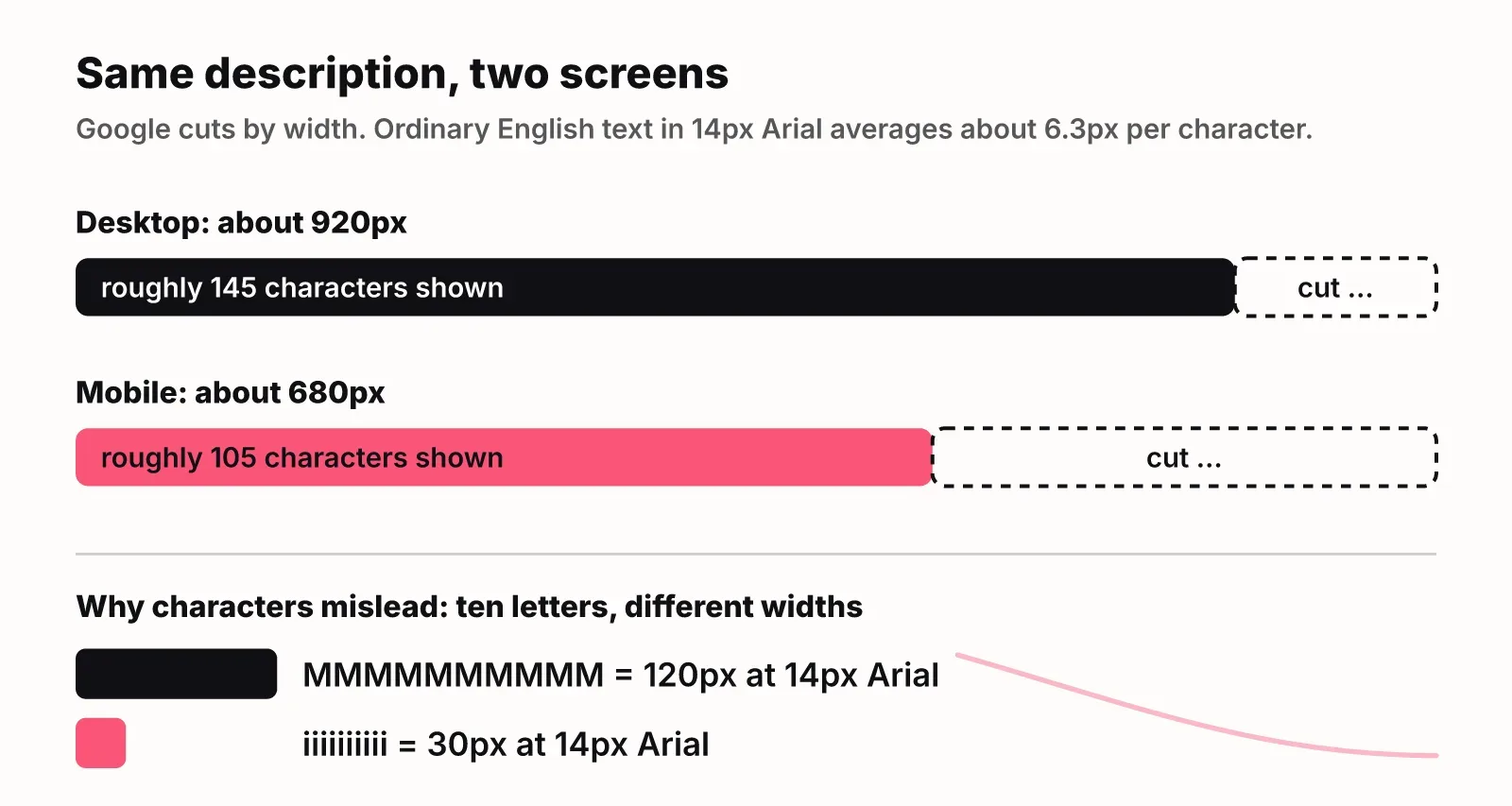
Google truncates by pixels because letters take different amounts of room. A line of capital M and W characters fills the space much faster than a line of i, l and t. Two descriptions with the same character count can end at very different points on the screen.
| Layout | Text size | Approximate width available | What it means for you |
|---|---|---|---|
| Desktop result | 14px Arial | About 920px | Roughly 145 characters of ordinary English |
| Mobile result | 14px Arial | About 680px | Roughly 105 characters, so front-load |
| Your HTML tag | No limit | Unlimited | Google never rejects a long description |
The widths come from LogNorm's checker, which adds up the real width of each character rather than counting them. Google changes its result layout from time to time, so leave a small margin rather than filling every pixel.
This is also why SEO tools give different thresholds. Screaming Frog, which ranks for this search, flags descriptions over 985 pixels. Other tools quote 155, 158 or 160 characters. Each one is estimating the same moving layout. Pick one tool, use its pixel measurement, and stop chasing the exact number.
How often Google rewrites your meta description
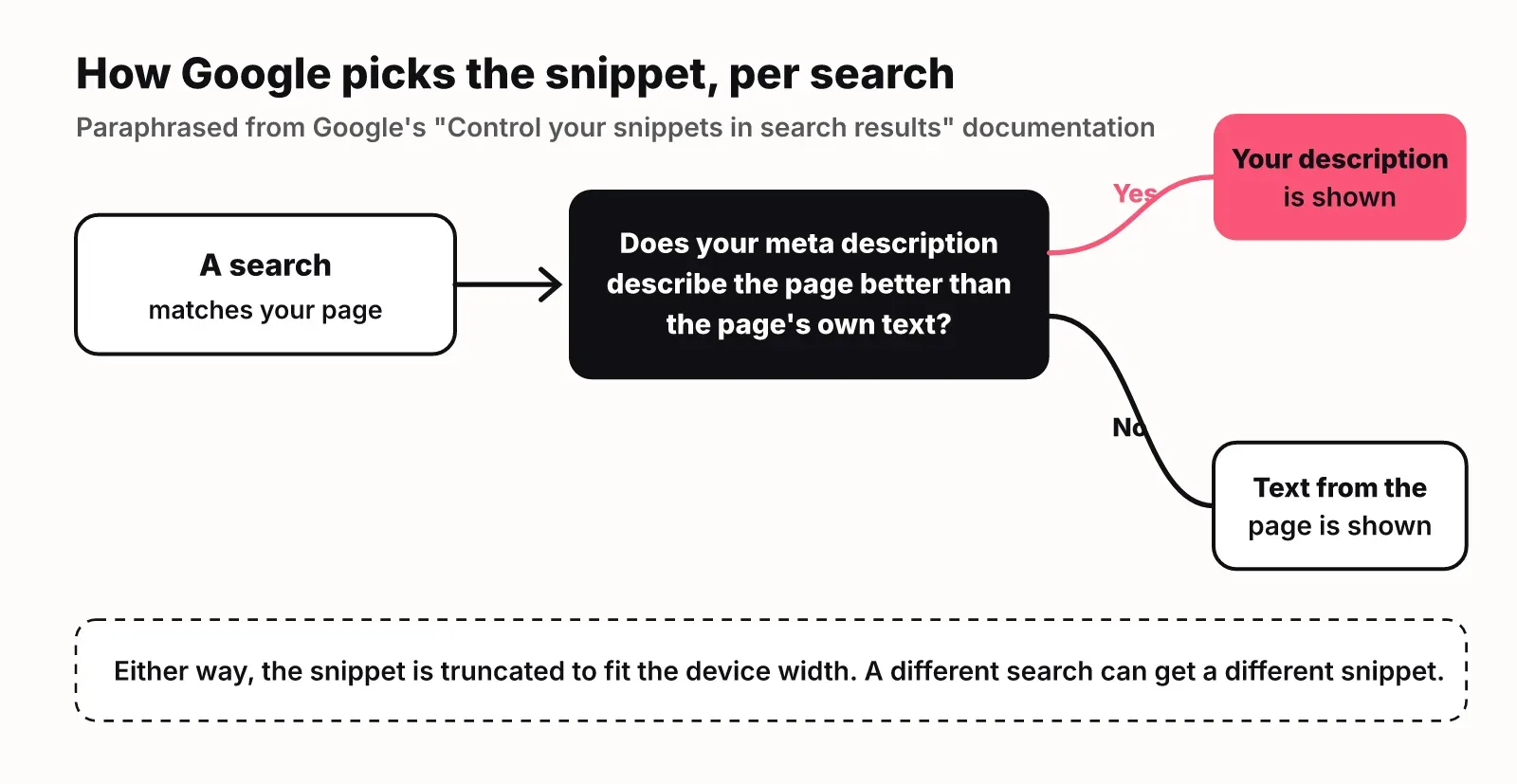
Google treats your meta description as one option, not as the default. Its documentation says that "Google primarily uses the content on the page to automatically determine the appropriate snippet," and that it uses the meta description "if it might give users a more accurate description of the page than content taken directly from the page."
The same page adds that snippets are built to match "a user's specific search," so Google Search "might show different snippets for different searches." One page can show your description for one query and a paragraph from the body for another.
Google publishes no official rate for how often it replaces descriptions, and we found no verified study we would stand behind for this article. Treat a rewrite as normal behaviour, not a penalty. Three practical consequences:
- Length alone does not decide whether your text is shown. A 150-character description that does not match the page loses to a sentence from the page.
- A rewrite on one query tells you little. Check the queries that bring real impressions.
- Your on-page copy is your second meta description. Clear opening paragraphs under each heading give Google good material when it skips the tag. The same habit helps with getting cited in AI Overviews.
How to write meta descriptions Google actually uses
Write a short, specific summary of this page that would persuade the searcher it is what they want. Google calls a good description "a pitch," and its guidance comes down to five habits.
- Make every description unique. Google says identical or similar descriptions across a site "aren't helpful." Use a site-level description only on the home page and aggregation pages. If you cannot write all of them, start with the home page and your most visited pages.
- Summarise the whole page, not its first anecdote. Google's own example of a bad description is a nostalgic story about collecting eggs on a page that teaches egg cooking methods.
- Include facts, not only sentences. Blog posts can carry the author and date. Product pages can pull price, size or maker into one line.
- Never write a keyword list. Google says descriptions made of "long strings of keywords" are "less likely to be displayed as a snippet."
- Generate descriptions with code when you have thousands of pages. Google encourages programmatic descriptions for large database-driven sites, as long as they are human-readable and varied.
Here is Google's own contrast between a weak and a strong description. Too short:
<meta name="description" content="Mechanical pencil">Specific and detailed:
<meta name="description" content="Self-sharpening mechanical pencil that autocorrects your penmanship. Includes 2B auto-replenishing lead. Available in both Vintage Pink and Schoolbus Yellow. Order 50+ pencils, get free shipping.">The better version runs past 190 characters, so desktop will trim the ending. That is fine, because the product and its main benefit come first. If the shipping offer matters most to you, move it forward.
A pattern that works for most SaaS and content pages: what the page gives the reader, then one concrete detail such as a price, a free plan, a number of templates or a time saved. Use the words the searcher typed early, because Google bolds matching words in the snippet.
Controlling snippet length with max-snippet and nosnippet
You can set your own ceiling on snippet length, or block snippets entirely, with directives Google documents on the same page. Most sites never need them. They are for pages where the snippet itself causes problems, such as text you do not want quoted out of context.
| Control | Where it goes | What it does |
|---|---|---|
| max-snippet:[number] | Robots meta tag | Sets the maximum snippet length you want shown |
| nosnippet | Robots meta tag | Stops Google showing a text snippet for the page |
| data-nosnippet | HTML attribute on an element | Keeps that part of the page out of snippets |
For example, this asks Google to keep text snippets to at most 150 characters:
<meta name="robots" content="max-snippet:150">Use these sparingly. A capped or missing snippet gives the searcher less to go on, and less reason to click.
How to check meta description length
Check width, not characters, and check what Google actually shows. A quick routine:
- Check a single page before it ships. Paste the title and description into the free title and meta description checker, or fetch the live URL. It previews desktop and mobile results, shows where the cut lands and warns when the keyword sits too late to survive truncation.
- Check the whole site for template problems. Most metadata issues come from templates: every blog post missing a description, or one description shared by every pricing variant. A site crawl finds these in one pass. LogNorm's site audit uses the same ranges as the checker and re-checks pages after your fix goes live.
- Prioritise by click-through rate. If you connect Search Console, pages with many impressions and a weak click-through rate are where a better description pays off first.
- Look at the live result. Search for your main query and see whether Google shows your description or page text. If it shows page text, compare the two and ask which one answers the search better.
If metadata fixes keep competing with everything else on your list, LogNorm turns audit findings like "descriptions too long on 9 pages" into moves in a ranked weekly plan, so the fix lands next to the work it should be weighed against.
FAQ
Does meta description length affect rankings?
Not in any way Google documents. Its snippet guide treats the meta description only as text it may show under your result. Length changes how much of that text people see, and that can change whether they click.
Is 160 characters too long for a meta description?
Not as a rule. Google sets no limit. At 160 characters, desktop results usually show most of it and mobile cuts it earlier. Put your main point in the first 100 or so characters and the trimmed ending costs you little.
Why did Google ignore my meta description?
Google builds snippets mainly from page content and uses your description only when it describes the page better for that search. Common causes are a description that does not match the page, a generic description reused across pages, or a list of keywords. Different searches can also show different snippets for the same page.
Does every page need a meta description?
Google recommends unique descriptions for each page and says to start with your most important pages, such as the home page and popular pages, if you cannot write them all. Large catalogues can generate descriptions from page data, as long as the result reads naturally.
Why are meta descriptions important for ecommerce?
Product pages scatter key details across the page, and a description can pull them into one line: product, price, maker or shipping offer. Google uses a product example with an order threshold for free shipping as its model of a good description.